Chapter 8: Fluid Navigation
Discussion Topics with Answers
1. A telephone-based menu system is being designed for a magazine subscription
service system. There are seven magazines available: National Geographic, Travel
and Leisure, Entrepreneur, Time, Golf, US News and World Report, and Fortune.
Describe three reasonable orderings of the voice menus and justify each.
2. Provide three examples of an application where menu selection and form fill-in are
more appropriate than a direct-manipulation strategy.
a) Systems that require little or no training, e.g. picking the amount to
withdraw from an Automated Teller Machine, e.g. $20, $40, $60, etc.
3. Design a touch screen music jukebox, which allows the user to select from a menu of
the five most popular songs of the week. Draw a sketch of this interface for each of
the following menu types: Binary menu, Multiple-Item menu, Check boxes, Pull–
down menus. Argue which design serves the user best.
4. You are in charge of designing a menu tree for navigating 1,250 books in a digital
library. Present an argument of whether the menu should have larger depth (number
of levels) or breadth (number of items per level).
The best way to examine menu depth vs. breadth is to first look at the
extremes. How cumbersome would it be to have 1 menu with a long list of
1,250 books on it? How awkward would it be to have 1,250 menus each of 1
5. Frequent menu users can become annoyed if they must make several menu
selections to complete a simple task. Suggest two ways you can refine the menu
approach to accommodate expert or frequent users.
6. When users are navigating through a menu structure, they may become disoriented.
The authors suggest techniques to help alleviate this disorientation such as indicating
the current position in the menu. Draw a sketch of how you can show users their
position for an on-line car showroom, assuming the user has browsed with the
following path:
Main Menu -> Mid-size Cars -> Honda -> Accord
7. What are some design considerations for fluid navigation of small-screen displays,
e.g. Smartphone or even smart watch screens?
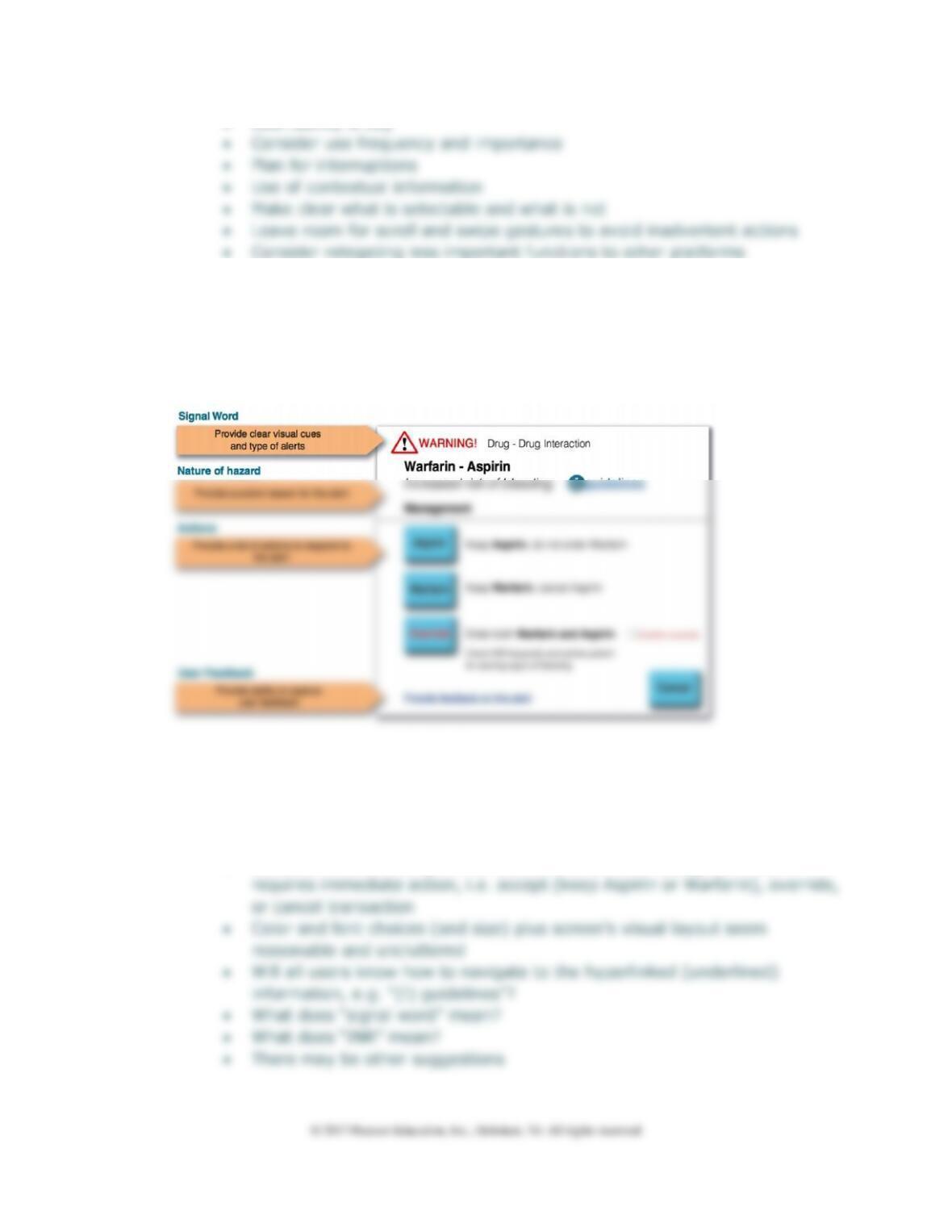
8. Critique the design of the dialog box below (DTUI6 Fig. 8.19) in the text. This dialog
box is used to alert clinicians who try to prescribe the drug Warfarin, because it
increases the risk of bleeding in patients already on Aspirin.
• Determine which of several possible actions are proposed
• Overriding the alert is possible but requires confirmation by clicking a
check box
• Note the red-highlighted letters in the “Override” button, with “confirm
override” (extra) confirmation step
• Because of the severity of the alert, this is a modal dialog box and it