Guide to Networking Essentials, Eighth Edition 5-1
Chapter 5
Network Protocols
At a Glance
Instructor’s Manual Table of Contents
• Overview
• Objectives
• Teaching Tips
• Quick Quizzes
• Class Discussion Topics
• Additional Projects
• Additional Resources
• Key Terms
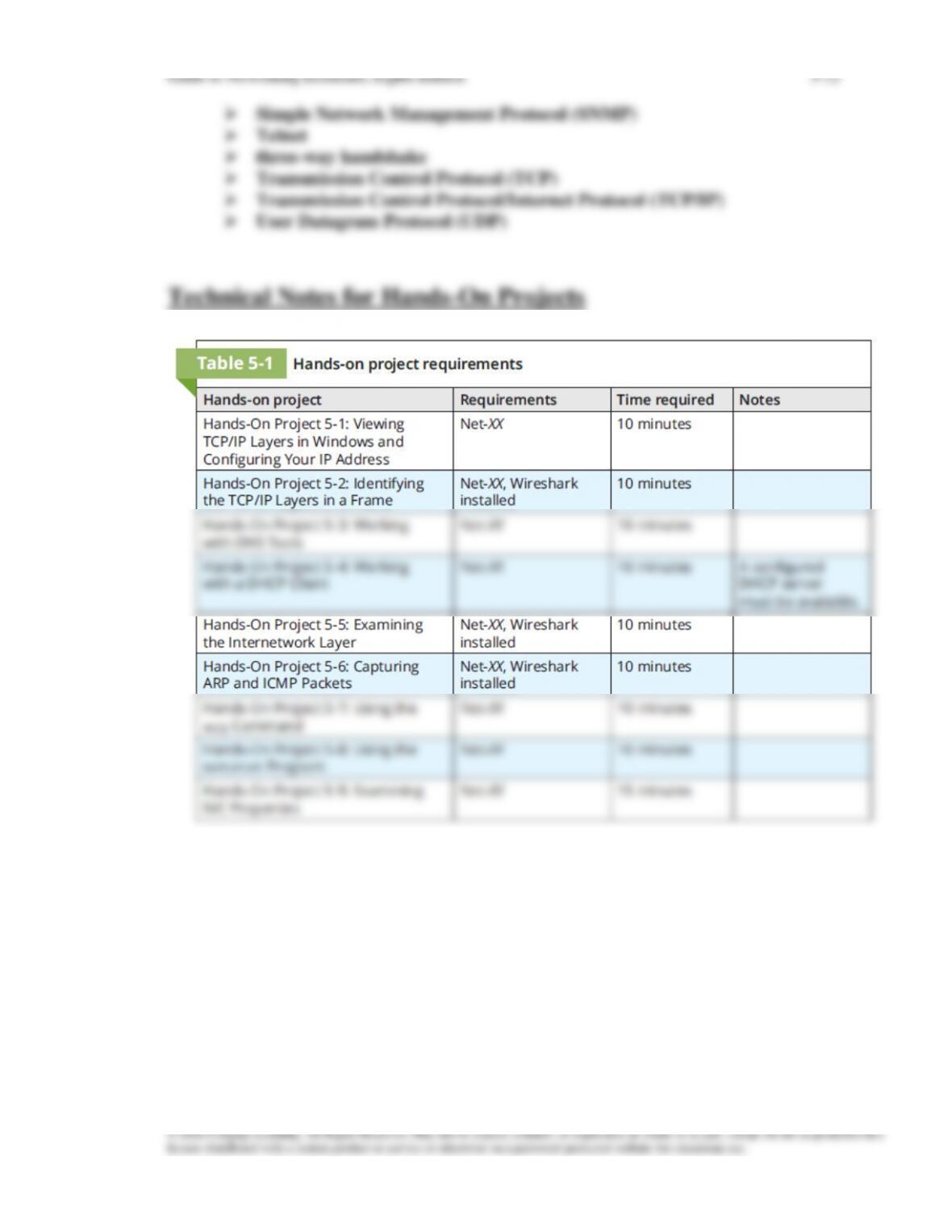
• Technical Notes for Hands-On Projects
Guide to Networking Essentials, Eighth Edition 5-2
Lecture Notes
Overview
Chapter 5 will introduce students to the purpose of network protocols. They also learn
the layers in the TCP/IP architecture and the protocols found in each layer. This chapter
discusses network protocols in general but focuses on the most common suite of
protocols used in networks: TCP/IP.
Objectives
• Describe the purpose of a network protocol and the layers in the TCP/IP architecture
• Describe TCP/IP Application-layer protocols
• Describe TCP/IP Transport-layer protocols
Teaching Tips
TCP/IP’s Layered Architecture
2. Use the most common protocol suite, TCP/IP, as an example
4. Use Figures 5-2 through 5-5 to illustrate what happens to a request for a Web browser
page as it progresses through the TCP protocol stack. Point out that as the request
Application-Layer Protocols
1. Describe the purpose of the application layer and its role in providing network services
2. Mention that application-layer protocols also provide authentication and data-formatting
3. Be sure students are aware of the fact that most application layer protocols have a client
and a server set up.
4. List the functions that the Application layer may handle:
• Access by applications to network services
HTTP: Protocol of the World Wide Web
1. Explain that HTTP is the protocol used by web browsers to access web pages.
Originally used for transferring HTML pages, it can now be used for file transfer,
E-mail Protocols: POP3, IMAP, and SMTP
2. Describe how SMTP sends mail across the Internet.
FTP and TFTP
1. Explain that File Transfer Protocol (FTP) is a client/server protocol used to transfer and
2. Discuss the Trivial File Transfer Protocol (TFTP) as a simple protocol for transferring
Server Message Block
1. Describe Server Message Block (SMB) is the protocol Windows file and printer
Remote Desktop Protocol (RDP)
1. Explain that Remote Desktop Protocol (RDP) is used to access a Windows computer
Telnet and SSH
1. Discuss the protocols Telnet and Secure Shell (SSH), which are used to connect to a
Simple Networking Management Protocol
1. Explain that SNMP is used to monitor and manage network devices and gather statistics
Dynamic Host Configuration Protocol
2. Discuss the following elements of a DHCP server:
• IP address scope
3. Describe the steps in leasing or renewing a lease on an IP address with DHCP
a. Explain what can occur if DHCP servers aren’t available and a host is
4. Point out that a major benefit of using DHCP is how easily computers can be moved to
a new network segment.
5. Discuss the four broadcast packets used during the IP address leasing process:
• DHCPDiscover
Domain Name System (DNS)
1. Explain DNS as a means to resolve easy-to-remember domain names into IP addresses.
4. Describe the process by which an administrator sets up a DNS server, and the creation
of host records or zones.
5. Explain that in order to speed up communication, DNS clients can maintain a DNS
7. Briefly discuss the history of DNS, beginning with the Linux environment through
Windows today.
8. Discuss the following DNS server elements:
• DNS zones
9. Use Figure 5-14 to illustrate a DNS query making its way through the DNS hierarchy.
Teaching
Tip
If students have had previous computer courses, they may benefit from a
comparison of DNS to a database, or even as a hierarchical filesystem. Top level
domains would be considered root folders, with individual domain names being
represented as folders deeper into the structure. This can help to explain how
DNS is structured.
Quick Quiz 1
1. When a set of protocols work together cooperatively it is known as a
____________________.
2. When using UDP, what name is given to the unit of information the Transport Layer
works with?
a. datagram
b. segment
c. frame
Guide to Networking Essentials, Eighth Edition 5-6
d. packet
3. Which of the following protocols is used by Windows file and printer services to share
resources between Windows computers?
a. File Transfer Protocol
b. IMAP4
c. Remote Desktop Protocol
d. Server Message Block
4. Which Transport-layer protocol does DHCP use?
5. What UDP port is associated with the DNS Server service?
a. 54
b. 63
c. 80
d. 53
Transport-Layer Protocols
1. Point out that transport-layer protocols are used with most Application-layer protocols
Role of the Transport Layer
2. Discuss the two main protocols to discuss at this layer are TCP and UDP
3. Explain to students that TCP works with units of data called segments and UDP works
4. Describe how port numbers identify application destinations for TCP and UDP
5. Point out that the Internet Assigned Numbers Authority (IANA) assigns a dedicated
6. Explain to students how UDP and TCP both protect data integrity by adding a
checksum to communications.
TCP: The Reliable Transport Layer
1. Explain to students that applications can use TCP for reliable packet delivery. This
works by:
3. Explain how TCP breaks up large amounts of data into segments in order to meet the
4. Discuss TCP’s use of flow control to prevent a destination from becoming
Internetwork-Layer Protocols
1. Introduce students to the four main tasks that the Internetwork layer is responsible for:
• Defines and verifies IP addresses
Defines and Verifies IP Addresses
1. Students should know that the internetwork layer is where IP addresses are found, and
Routes Packets Through an Internetwork
1. Describe to students the process by which the internetwork layer is responsible for
Guide to Networking Essentials, Eighth Edition 5-8
Resolves MAC Addresses from IP Addresses
1. Explain to students that the Internetwork layer is where MAC addresses are resolved
Delivers Packets Efficiently
1. Discuss the responsibility of the internetwork layer protocols in efficient delivery of
packets.
Protocols at the Internetwork Layer
1. List the protocols used at the internetwork layer:
• IPv4
2. Explain that Internet Protocol Version 4 (IPv4) is a connectionless protocol, and is the
3. Briefly explain some of the parts of an IP packet header and their purpose. Discuss the
following fields:
• Version
4. Describe Internet Protocol Version 6 (IPv6) as the successor to the IPv4 protocol.
5. Review the following improvements and changes in IPv6:
• Larger address space
• Hierarchical address space
Guide to Networking Essentials, Eighth Edition 5-10
2. When using a _______________ protocol, no lasting connection is made from source to
destination.
3. Which of the following is used by TCP and UDP to specify the source and destination
Application-layer protocols?
a. Segment numbers
b. Window size headers
c. Port numbers
d. IP addresses
4. What protocol is used to resolve a logical (IP) address to a physical (MAC) address?
5. At what layer of the TCP/IP protocol suite are packets received and encapsulated to
create frames?
Class Discussion Topics
1. Discuss the need for a Transport protocol in network communication. Would network
communication work without a Transport layer? What types of applications could work
without a Transport layer? What are some of the problems modern networks would face
if there was no Transport layer?
Additional Projects
1. Students can research what options administrators currently have to slow the depletion
Additional Resources
1. Understanding Application-Layer Protocols
3. Understanding the Internet Protocol
5. The TCP/IP Guide
Key Terms
For explanations of key terms, see the Glossary for this text.
➢ Address Resolution Protocol (ARP)
➢ File Transfer Protocol (FTP)
➢ flow control
➢ fully qualified domain name (FQDN)
➢ Internet Control Message Protocol (ICMP)
➢ Internet Message Access Protocol version 4 (IMAP4)
➢ reservation
➢ resolver cache
➢ resource records
➢ Secure Shell (SSH)
➢ Segment