
Guide to Networking Essentials, Eighth Edition 1-1
Chapter 1
Introduction to Computer Networks
At a Glance
Instructor’s Manual Table of Contents
• Overview
• Objectives
• Teaching Tips
• Quick Quizzes
• Class Discussion Topics
• Additional Projects
• Additional Resources
• Key Terms
• Technical Notes for Hands-On Projects
Guide to Networking Essentials, Eighth Edition 1-2
Lecture Notes
Overview
Chapter 1 offers an introduction to basic computer components and operation. Students
learn about the fundamental reasons for networking, as well as how to identify essential
network components. They also learn to compare different types of networks. Students
will examine the components of a network and the fundamentals of communication
between computers. Many new terms are introduced and defined, and the varied types
of networks students might encounter are described.
Objectives
• Describe basic computer components and operation
• Explain the fundamentals of network communication
Teaching Tips
An Overview of Computer Concepts
1. Provide a brief introduction to networking and why it is so important to have a basic
understanding of computer concepts and terminology.
Basic Functions of a Computer
1. Introduce students to the three basic tasks that all computers perform.
2. Give students an idea of where each of the three basic tasks is utilized. For example, a
Guide to Networking Essentials, Eighth Edition 1-3
Teaching
Tip
Students can view a basic breakdown of a computer’s parts and functions at
http://www.howstuffworks.com/pc.htm.
Storage Components
2. Describe how data is stored in bits. Point out that a byte is represented by a collection of
8 bits.
Personal Computer Hardware
1. Introduce students to the four major PC components
a. Motherboard
2. Use Figure 1-1 and Table 1-3 to discuss the key components of a motherboard.
4. Use Figure 1-2 to discuss the components of a hard disk drive.
5. Point out that solid state drives (SSDs) are used in place of hard drives in many systems
6. Explain that RAM is a short-term storage component on a computer. Point out that
7. Describe firmware as a set of instructions located in a chip on the motherboard. Explain
8. Discuss the importance of the basic input/output system (BIOS) or Unified Extensible
9. Explain to students that the firmware program offers the user an opportunity to run the
Computer Boot Procedure
1. Describe the six steps in the typical computer boot procedure:
a. Power is applied to the motherboard
2. Explain the critical services provided by a computer’s OS. Point out that the services an
The Fundamentals of Network Communication
1. Describe the most basic network as two or more computers connected by some kind of
Network Components
1. Discuss the three components needed in order to “network” a stand-alone computer:
• Network interface card
Teaching
Tip
Read an article that takes a look at different network media types by clicking the
following link: https://www.techwalla.com/articles/types-of-media-used-in–
computer-networking
2. Explain to students that network software can divided into the following categories:
• Network clients and servers
Steps of Network Communication
2. Point out that the steps taken on the server side are essentially the reverse of those on
the client side. Review those steps with your students.
Layers of the Network Communication Process
1. Explain how the steps of network communication are referred to layers, and the two
2. Use Table 1-4 to take a look at an example of how layers can help describe the network
communication process.
Teaching
Tip
Microsoft has an article on the OSI model that will help explain the workings of
a layered network: http://support.microsoft.com/kb/103884
How Two Computers Communicate on a LAN: Some Details
1. Introduce students to idea of a computer’s logical and physical address.
3. Use Figure 1-8 to describe the steps of the communication process between two
computers.
4. Review Table 1-5, which describes the steps of saving a file with the network
Quick Quiz 1
1. Name the three basic tasks all computer perform:
2. True or False: Random access memory (RAM) is considered long-term storage.

3. Which of the following components provides a number of critical services, including a
user interface, memory management, a file system, multitasking, and the interface to
hardware devices?
a. RAM
b. Operating system (OS)
c. BIOS
d. Hard drive
4. What is the name given to software that provides the interface between the OS and
computer hardware?
5. What is the physical address assigned to NICs called?
a. Media Address Control
b. Physical Address Control
c. Media Access Control
d. Media Control Access
Network Terms Explained
1. Explain the importance of learning the “language” of computer networking.
LANs, Internetworks, WANs, and MANs
1. Use Figure 1-14 to show the components of a basic LAN consisting of computers
interconnected by a hub.
3. Review the reasons listed in the text that discuss why internetworks are usually created.
Internet, Intranet, and Extranet
2. Explain that an extranet sits somewhere between the Internet and an intranet. Mention
that it allows limited and controlled access to internal network resources by outside
Guide to Networking Essentials, Eighth Edition 1-7
Teaching
Tip
For more information on types of networks and their scopes, see
http://compnetworking.about.com/od/basicnetworkingconcepts/a/network_types.
htm
Packets and Frames
1. Explain that when computers transfer information across a network, they do so in short
bursts (chunks) of data and that each chunk of data has the same basic structure.
3. Briefly discuss how data is segmented into packets, and then encapsulated into frames
4. Define encapsulation as the process of adding IP addresses and MAC addresses to
5. Use Figures 1-20 through 1-22 to demonstrate how data is divided into several packets
Clients and Servers
1. Explain the different uses of the term client in relation to OS / computer / software.
2. The term “Server” can also be ambiguous. Discuss different definitions in relation to
Network Models
Peer-to-Peer/Workgroup Model
1. Describe the peer-to-peer networking model as it relates to client PC’s
a. Cover the benefits (simplicity and cost) of a peer-to-peer network model versus
Guide to Networking Essentials, Eighth Edition 1-8
Server/Domain-Based Model
1. Explain what it means to be a part of a domain based network architecture, and how it
affects user accounts and resource access
2. Use Table 1-6 to summarize the differences of the two networking models, as it relates
to resource access, security, performance, and cost. Be sure to point out that because
5. On a Windows-based peer to peer network, all computers are members of a:
a. Domain
b. Workgroup
c. Server network
d. WAN
Class Discussion Topics
1. Have any of the students installed/configured a LAN before? If so, ask them to briefly
2. Do students have previous experience with PC repair and maintenance? If so, ask them
Additional Projects
1. Students should research a list of operating systems (client or server) and detail their
2. Give students the chance to look at network comparisons of small, home peer-to-peer
Additional Resources
1. Computer Networking Basics:
3. Networking Glossary:
4. Introduction to Client-Server Networks:
5. How Home Networking Works:
Guide to Networking Essentials, Eighth Edition 1-10
Key Terms
For explanations of key terms, see the Glossary for this text.
➢ semiconductor (CMOS)
➢ memory
➢ core
➢ credentials
➢ directory service
➢ intranet
➢ local area network (LAN)
➢ metropolitan area network
➢ (MAN)
➢ multicore CPU
➢ server-based network
➢ stand-alone computer
➢ trailer
Guide to Networking Essentials, Eighth Edition 1-11
➢ Unified Extensible
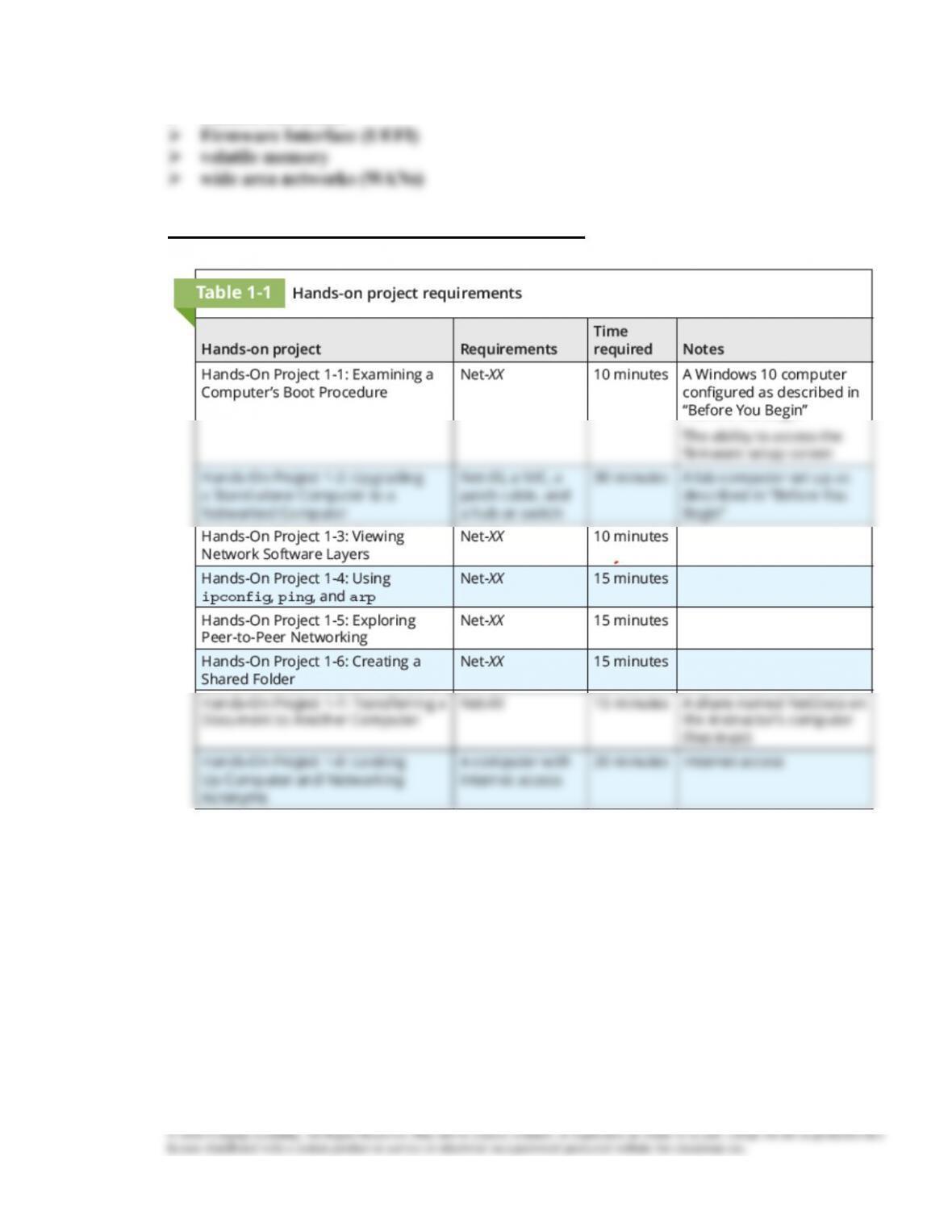
Technical Notes for Hands-On Projects