Worksheet: JPEG Compression Artifact
ApplicationProgramRequired
AdobePhotoshop5.5orlater
Objectives
1. TotakeacloserlookattheJPEGartifact.
2. TolearnwhereJPEGartifactismostvisible.
Introduction
JPEGisacommonfileformatforWebimages.ManydigitalcamerasalsosavedigitalphotographsdirectlyinJPEG
format,which,forsomecameras,maybetheonlychoiceofthefileformat.
HaveyounoticedanyuglyartifactinsomeJPEGimages?IfyouarepostingyourportfolioofartworkasJPEGimages
ontheWeb,youshouldunderstandhowtheJPEGcompressionaffectsyourimagequalityandhowtominimizethe
artifact.
Theexampleimageyouwilluseinthisexercisehasmanysolidcolorareasandedgeswheresharpcolorchanges
occur.ItisnotthetypeofimagesthatJPEGcompressionisbestforbecausetheJPEGcompressionartifactismore
pronounce.However,thiswillmakeiteasyforyoutoseetheartifactinthisexercise.
Instructions
LookunderJPEGCompressionArtifact.ThisexampleimageisaTIFfilewithnoimagecompression.Theimageismade
upoflargeareasofsolidcolorsandgradients.
I.CompressionQualityandFileSize
1. OpentheimagewithAdobePhotoshop,andconvertthisimageintoJPEGfileswithdifferentcompressionlevel.
2. IfyouhaveaccesstoPhotoshop5.5uptoCS2,chooseFile>SaveforWeb…
IfyouhavePhotoshopCS3orlater,chooseFile>SaveforWeb&Devices…
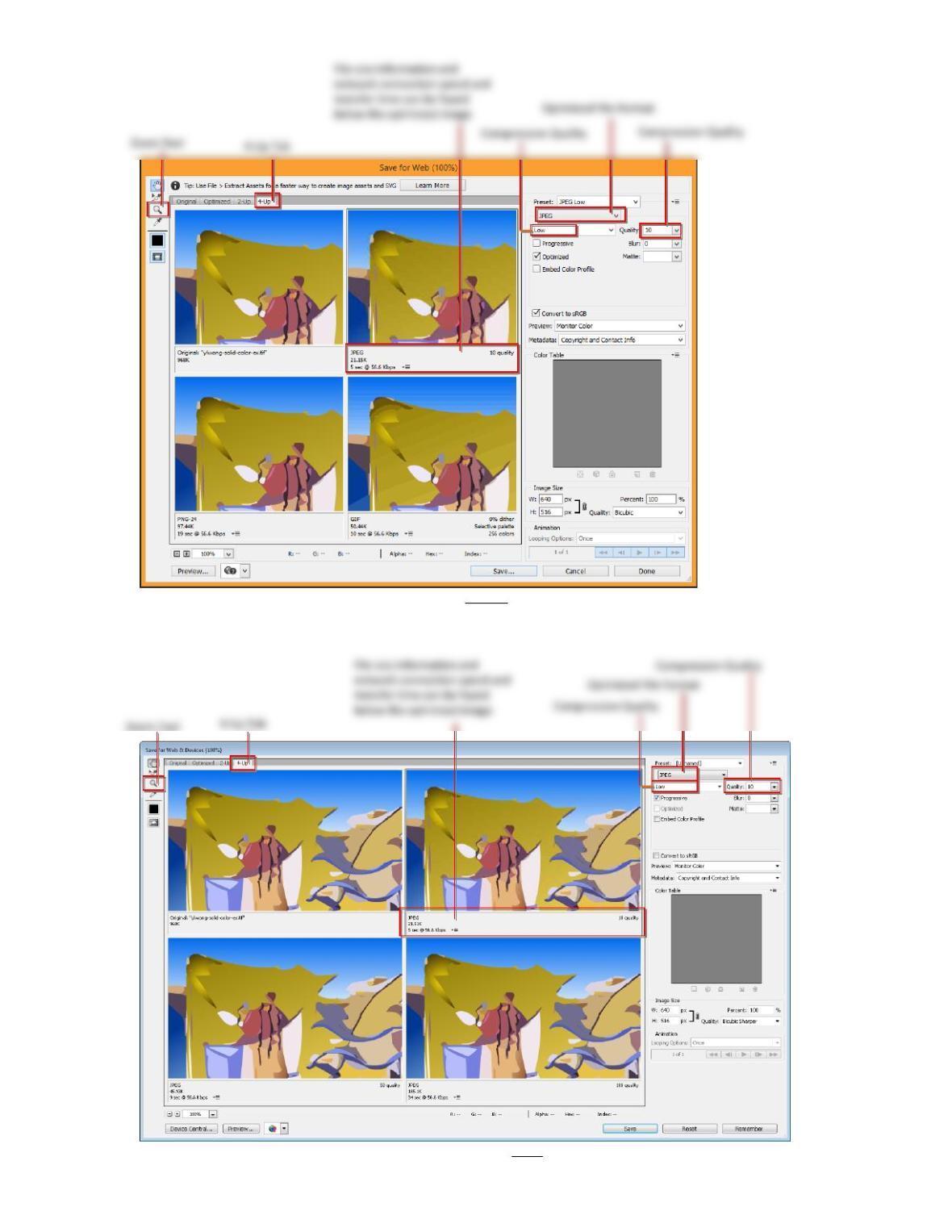
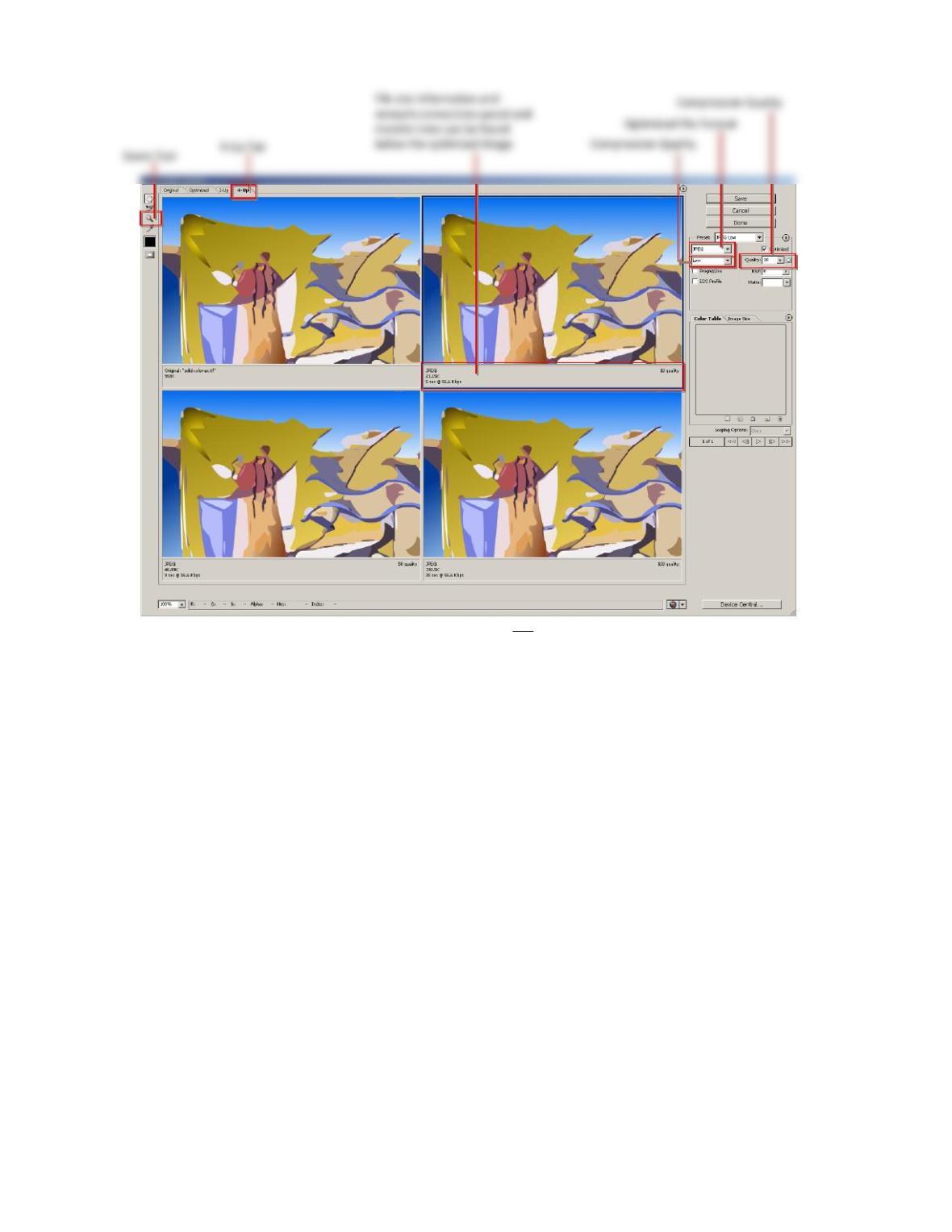
3. Clickthe4‐Uptab(Figure4andFigure5,onthelastpageofthisworksheet),soyoucanseetheoriginalTIF
imageandthreeoptimizedimagesofdifferentJPEGcompressionsettingssimultaneously.
4. Clickoneachofthesethreedifferentoptimizedimages,andselectJPEGfromtheOptimizedFileFormat
dropdownmenu.ThenselectfromtheCompressionQualitydropdownLow,Medium,andMaximum.
1.Notedowninthetablethefilesizesandthetimetotransferthefileoveraspecificnetwork
connectionspeed:
Compression
Quality
FileSize
(KB)
TransferTime(sec.)atwhat
NetworkConnectionSpeed
2.Whichcompressionqualityamongthethreeinthetableabovegivesthebestimage
quality?
3.Whichcompressionqualityamongthethreeinthetableabovegivestheworstimage
quality?
Page2of6
5. ZoomintheimagestolookcloselyandcomparetheoriginalTIFimagewiththethreeoptimizedimages.Doyou
seethedifference?
A.Attheintersectionofverydifferentcolors
B.Withinasolidcolorawayfromtheedgeofthecolor
6. SelecttheoptimizedimagethathastheCompressionQualitysettoMaximum;youcanalsodirectlysetthe
II.TakeaCloserLookattheJPEGImage
Openthismax.jpgfileinPhotoshop.ItmaylookthesameastheoriginalTIFimagetothenakedeyes.However,
somecolorsarealtered,especiallythepixelsaroundtheedgeswheresharpchangesofcolorsoccur.Trythese:
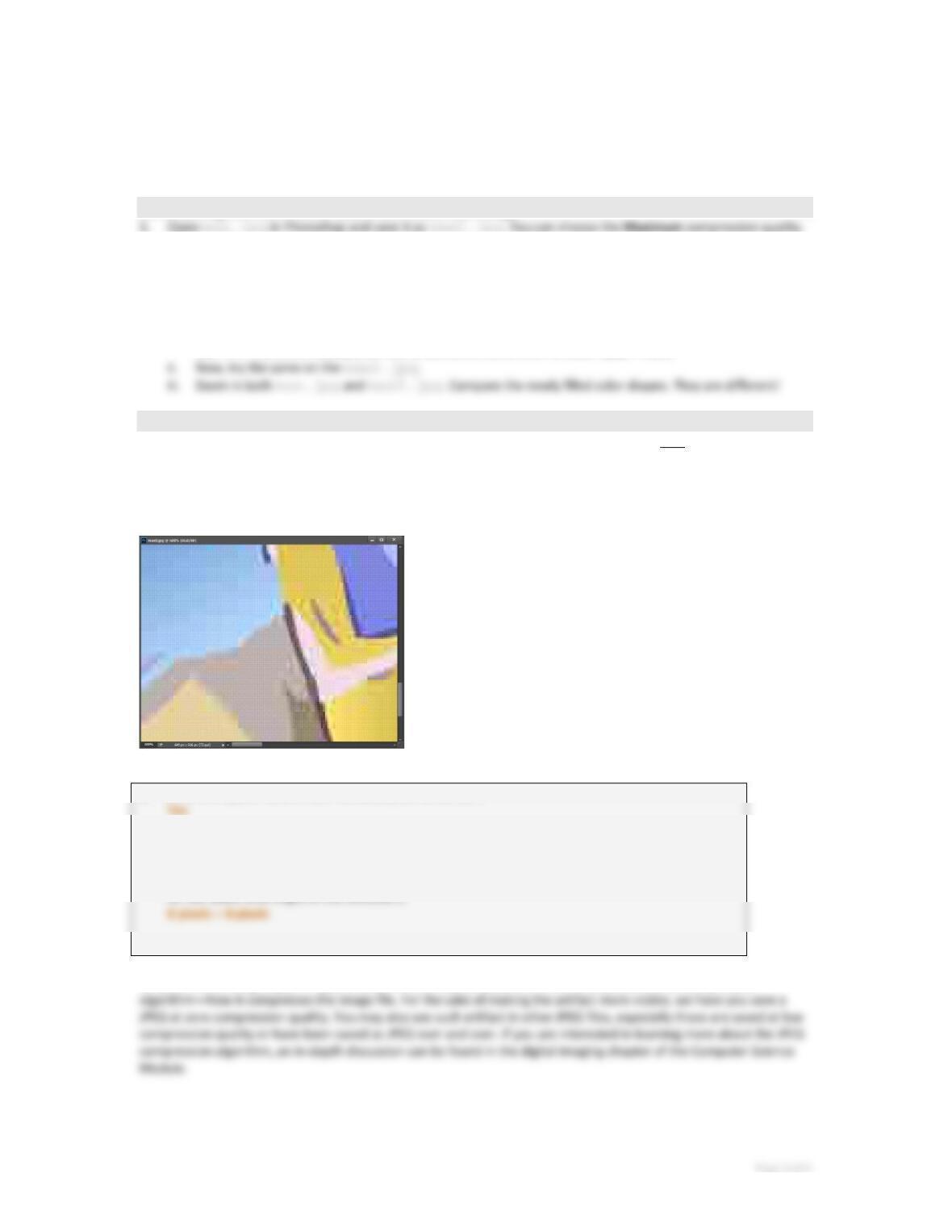
1. UsetheMagicWandselectiontool,withitsTolerancesettozero,clicktoselectasolidcolorareaintheoriginal
2. Now,trythesameonthemax.jpg.Howistheshapeoftheselection?Mostofthemiddleareaisintheselection
buttheedgearoundthesolidcolorisnot.And,theselectionoutlineisalittlejagged(Figure1b).
(a)(b)
Figure1
5.Whycanyoutellfromtheobservationintheabovestepsthatthemax.jpgisnotexactly
thesameastheoriginalTIF?(First,whatdoessettingtheToleranceofMagicWandtozero
means?)
Lowercompressionqualitysettingscanimposeveryvisiblealternationsontheimage,buttheMaximumsetting
causesonlyindiscerniblealterations.TheMaximumsettinggiveslargerfilesizebutitisstillmuchsmallerthanthe
originalTIF.
Buthowwouldthisaffectthewayyoucreateyourdigitalimages?Thisaffectshowyouusetheimage.Forexample,
anyimagesthatareintendedforfurthereditingshouldnotbekeptinJPEGformatbecauseeverytimeyousavea
JPEGfile,itgetsalteredevenifyouhavenotchangedanything.(Seethefollowingsections)
III.ResavingaJPEGEvenat100%WillAltertheImage
2. Closethefileandopenthemax2.jpginPhotoshop.
SincethecompressionqualityissettoMaximum,thealternationcausedbytheJPEGartifactisindiscernible.Toseeif
max2.jpgisreallyalteredfrommax.jpg,trythefollowing:
i. UsetheMagicWandselectiontool,againwithitsTolerancesettozero,clicktoselectasolidcolorareain
themax.jpg.Filltheselectionwithadistinctivecolor,suchasblack.(Edit>Fill…)
IV.ResavingaJPEGWillLowertheQuality
OpentheoriginalTIFfileinPhotoshopandsaveitasJPEGatthecompressionqualitysettozero.Namethenewfile
asmax0.jpg.
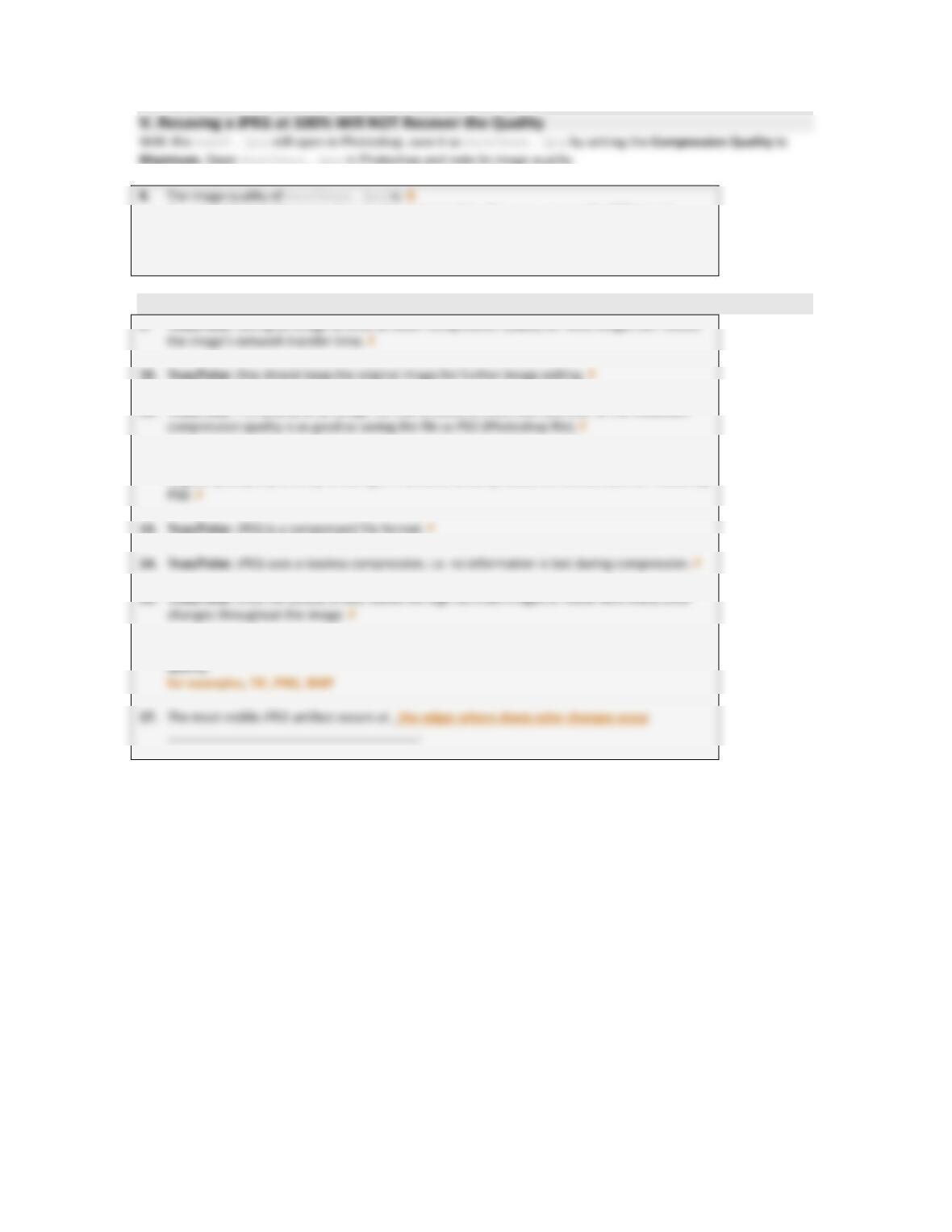
Openthismax0.jpginPhotoshop.Zoomintheimageto600%.Youwillseethatthecolorsseemtobegroupedin
squareblocks(Figure2).
Figure2
6.Doallthesquareblockshavethesamepixeldimension?
7.Whatisthepixeldimensionofthesquareblocks?
(Therearemanywaystofindoutthepixeldimensionofthesquareblocks.Onewayistousea
RectangularMarqueeTooltomakeaselectionaroundasquareblock.Then,lookattheInfopalette
forthewidthandheightoftheselection.)
Whyarethecolorsgroupedinsquareblocksofsuchapixeldimension?ItisrelatedtotheJPEGcompression
Page4of6
A.recovered,andisasgoodas,oralmostasgoodas,themax.jpg–theJPEGsaved
directlyfromtheoriginalTIFatthemaximumcompressionquality.
B.worsethanmax0.jpg,oratleastthereisnotanyobservableimprovementover
max0.jpg.
VI.SummaryandConclusions
9.True/False:SavinganimageasJPEGatlowercompressionqualityforWebimagescanreduce
11.True/False:ThequalityofanimagefilethatissavedasJPEGoverandoveratthemaximum
12.True/False:AnimagethatissavedasJPEGatanycompressionqualitycanberecoveredtothe
originalqualityanytimebyre‐savingitinanotheruncompressedfileformatsuchasPhotoshop
16.Nameonefileformat,inadditiontoPSD(Photoshop),thatwillnotcausedegradationinimage
Page5of6
Figure3.SaveforWeb…dialogboxinAdobePhotoshopCC2014.
Figure4.SaveforWeb&DevicesdialogboxinAdobePhotoshopCS5.1.
Page6of6
Figure5.SaveforWeb&DevicesdialogboxinAdobePhotoshopCS3.