Lab Exercise – SSL/TLS
Objective
To observe SSL/TLS (Secure Sockets Layer / Transport Layer Security) in action. SSL/TLS is used to secure
TCP connections, and it is widely used as part of the secure web: HTTPS is SSL over HTTP. SSL/TLS is cov-
ered in §8.9.3 of your text. Review that section before doing this lab.
Requirements
Wireshark: This lab uses Wireshark to capture or examine a packet trace. A packet trace is a record of
traffic at some location on the network, as if a snapshot was taken of all the bits that passed across a
particular wire. The packet trace records a timestamp for each packet, along with the bits that make up
the packet, from the low–layer headers to the higher–layer contents. Wireshark runs on most operating
wget / curl: This lab uses wget (Linux and Windows) and curl (Mac) to fetch web resources. wget
and curl are command–line programs that let you fetch a URL. Unlike a web browser, which fetches
Step 1: Capture a Trace
Proceed as follows to capture a trace of SSL traffic; alternatively, you may use a supplied trace. The easi-
2. Launch Wireshark and start a capture with a filter of “tcp port 443“. We use this filter be-
cause there is no shorthand for SSL, but SSL is normally carried on port 443 in the case of secure
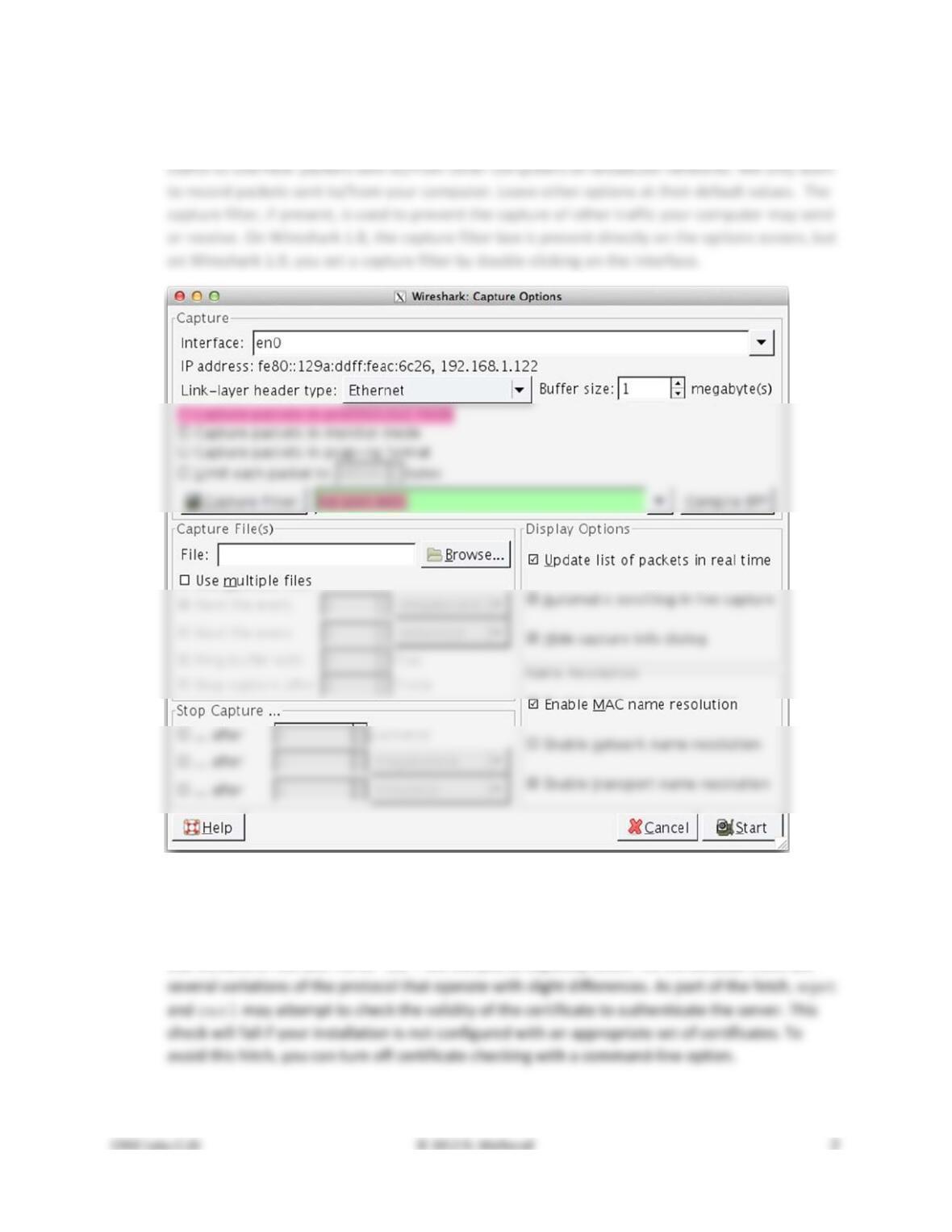
used by your computer to connect to the Internet. If unsure, guess and revisit this step later if
your capture is not successful. Uncheck “capture packets in promiscuous mode”. This mode is
Figure 1: Setting up the capture options
3. Use wget / curl to fetch a single HTTPS resource of your choice using the TLSv1 protocol. This
download will generate SSL traffic. Strictly speaking, it is TLS traffic, but we will refer to the vari-
ous versions of SSL and TLS as “SSL”. We ask you to explicitly select TLS 1.0 because there are
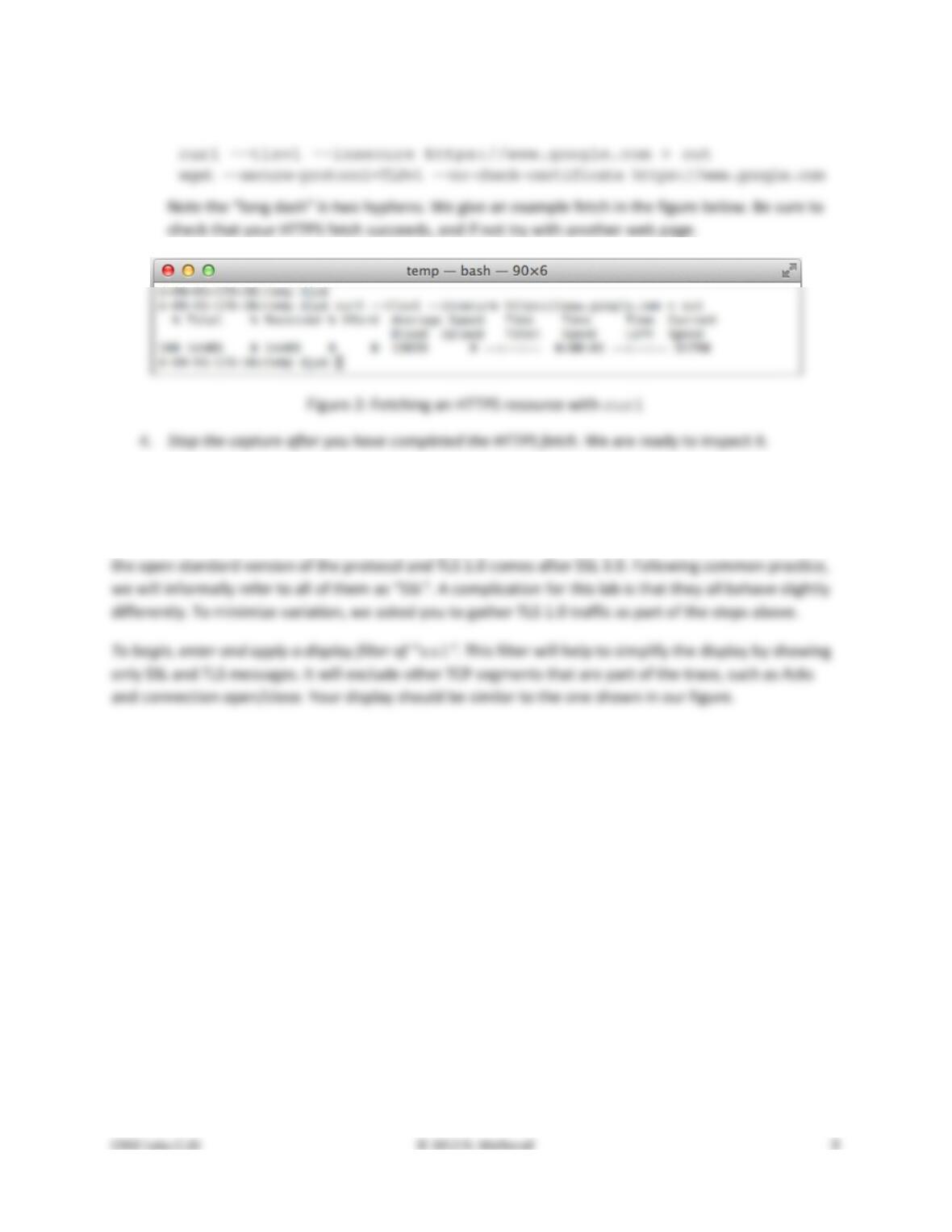
Examples of the full command are:
Step 2: Inspect the Trace
Now we are ready to look at the details of some “SSL” messages. There are several different versions of
SSL and TLS that are in widespread use, including SSL version 2, SSL version 3, and TLS version 1; TLS is
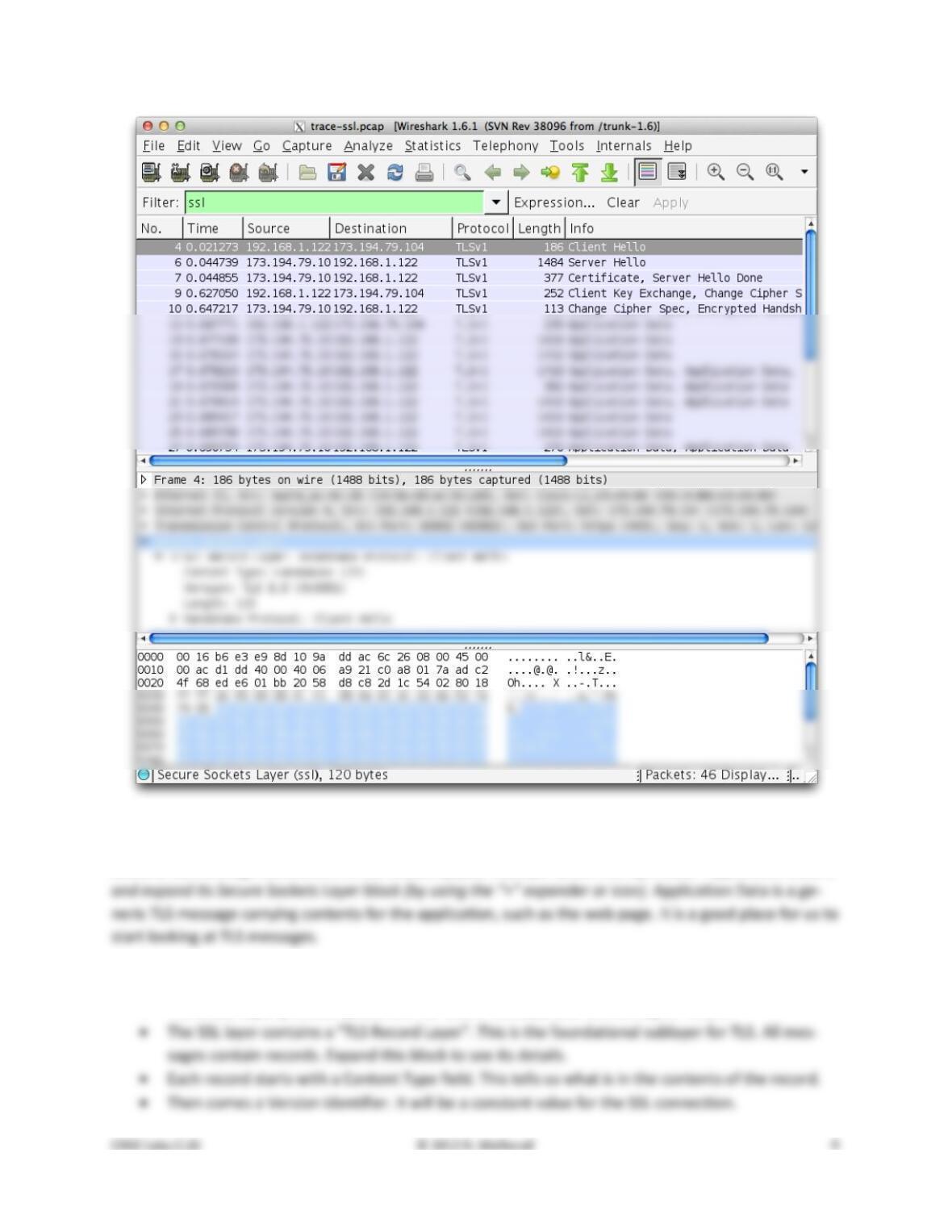
Figure 3: Trace of “SSL” traffic showing the details of the SSL header
Select a TLS message somewhere in the middle of your trace for which the Info reads “Application Data”,
Look for the following protocol blocks and fields in the message:
• The lower layer protocol blocks are TCP and IP because SSL runs on top of TCP/IP.
• It is followed by a Length field giving the length of the record.
• Last comes the contents of the record. Application Data records are sent after SSL has secured
Answer the following questions to show your understanding of SSL records:
1. What is the Content–Type for a record containing “Application Data”?
2. What version constant is used in your trace, and which version of TLS does it represent?
3. Does the Length cover the Record Layer header as well as payload, or only the payload?
Step 3: The SSL Handshake
An important part of SSL is the initial handshake that establishes a secure connection. The handshake
proceeds in several phases. There are slight differences for different versions of TLS and depending on
the encryption scheme that is in use. The usual outline for a brand new connection is:
a. Client (the browser) and Server (the web server) both send their Hellos
b. Server sends its certificate to Client to authenticate (and optionally asks for Client Certificate)
c. Client sends keying information and signals a switch to encrypted data.
Overall Handshake
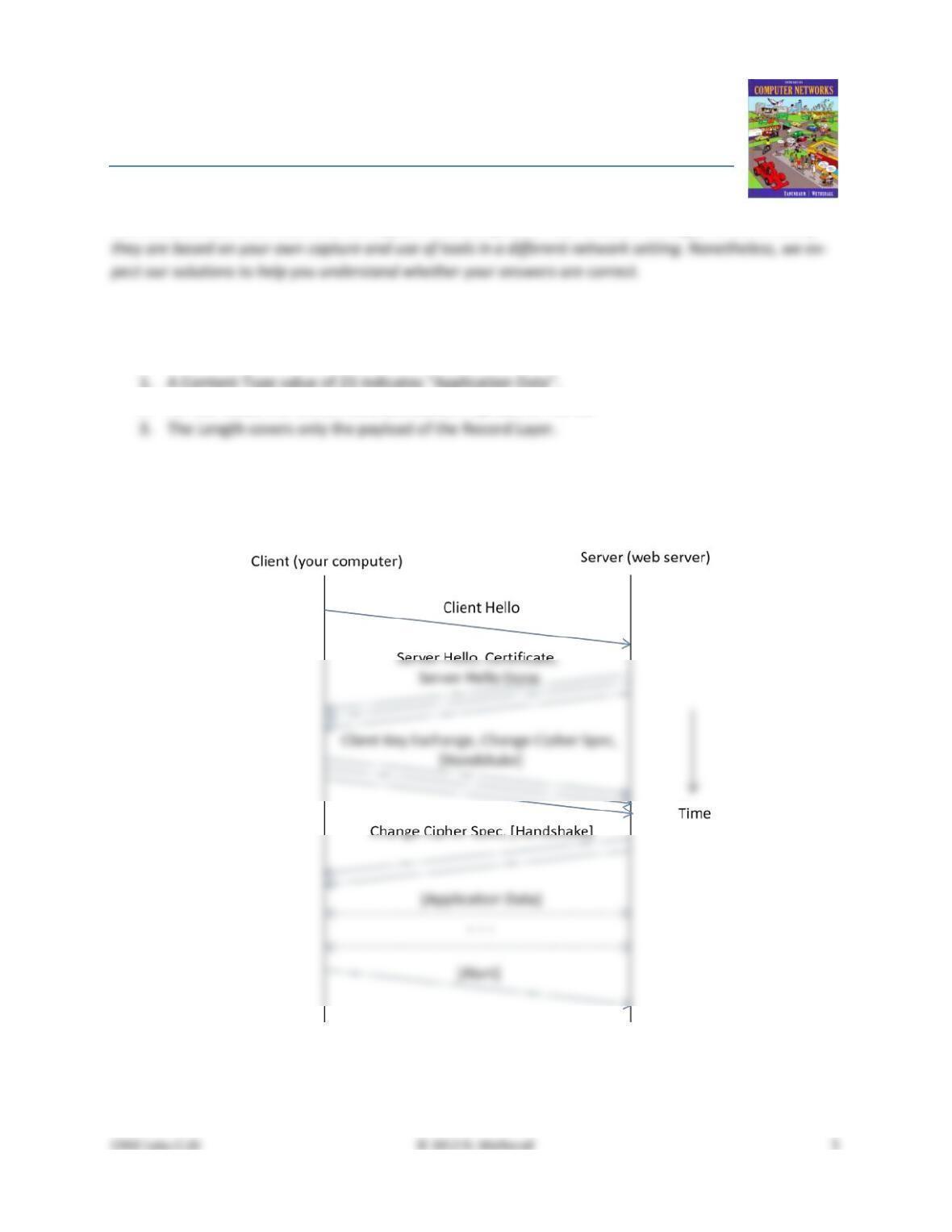
To get a sense of the overall SSL connection behavior, draw a timeline showing and naming the SSL mes-
sages sent between the client and the server. As usual, draw vertical lines to represent the client and the
Hello Messages
Find and inspect the details of the Client Hello and Server Hello messages, including expanding the Hand-
Answer the following questions:
1. How long in bytes is the random data in the Hellos? Both the Client and Server include this ran-
2. How long in bytes is the session identifier sent by the server? This identifier allows later resump-
3. What Cipher method is chosen by the Server? Give its name and value. The Client will list the dif-
Certificate Messages
Next, find and inspect the details of the Certificate message, including expanding the Handshake proto-
col block within the TLS Record. As with the Hellos, the contents of the Certificate message are visible
because an encryption scheme is not yet established. It should come after the Hello messages.
Answer the following questions:
4. Who sends the Certificate, the client, the server, or both? A certificate is sent by one party to let
the other party authenticate that it is who it claims to be. Based on this usage, you should be
Client Key Exchange and Change Cipher Messages
Find and inspect the details of the Client Key Exchange and Change Cipher messages, expanding their
various details. The key exchange message is sent to pass keying information so that both sides will have
the same secret session key. The change cipher message signal a switch to a new encryption scheme to
the other party. This means that it is the last unencrypted message sent by the party.
Answer the following questions:
5. At the Record Layer, what Content–Type values are used to indicate each of these messages? Say
Alert Message
Finally, find and inspect the details of an Alert message at the end of the trace. The Alert message is sent
to signal a condition, such as notification that one party is closing the connection. You should find an
Alert after the Application Data messages that make up the secure web fetch.
Answer the following questions:
8. At the Record Layer, what Content–Type value is used to signal an alert?
9. Tell us whether the contents of the alert are encrypted or sent in the clear? To check this, see
Explore on your own
We encourage you to explore SSL/TLS on your own once you have completed this lab. Some ideas:
• Remove the display filter for “ssl” to see the other TCP segments that are part of the connec-
tion. In this way you will see when TCP connection setup/teardown happens relative to the SSL
handshake and close_notify alert.
Solutions – SSL/TLS
The solutions below are based on our capture and use of tools. Your answers will differ in the details if
Step 2: Inspect the Trace
Answers to the questions:
2. For our trace, the version constant 0x0301 represents TLS 1.0
Step 3: The SSL Handshake
Overall Handshake
Figure 1: Timeline of the SSL messages in the connection
Notes:
• Your figure may vary due to slight differences in SSL/TLS versions, as well as differences in server
behavior, but the overall construction should be similar.
Answers to the questions:
Hello Message
Certificate Message
4. The server sends a certificate to the client, since it is the browser that wants to verify the identi-
Client Key Exchange and Change Cipher Messages
5. The Client Key Exchange has a Content–Type of 22, indicating the Handshake protocol. This is the
7. The contents of the Change Cipher Spec message are simply the value 1 as a single byte. Actual-
Alert Message
8. The Content–Type value is 21 for Alert. This is a new protocol, different from the Handshake,
[END]