
chapter
5
Accounting Systems
______________________________________________
OPENING COMMENTS
Chapter 5 introduces new concepts and new forms. The new concepts relate to accounting system design,
computerized accounting, e-commerce, and subsidiary ledgers. The new forms introduced are the special
journals for a service business: revenue journal, cash receipts journal, purchases journal, and cash
payments journal.
The transactions that will be recorded in special journals are the same as those that were covered in
Chapters 1–4; only the journal format has changed. But beware—students frequently get lost in the
barrage of new forms.
In this chapter, it is especially obvious that there is no substitute for practice. Students need the
opportunity to try recording and posting transactions in a setting where they can ask questions. Group
learning activities are very effective.
The chapter ends with a description of segment analysis and a discussion of how horizontal and vertical
analysis can be used to evaluate the operating performance of a company.
After studying the chapter, your students should be able to:
2. Journalize and post transactions in a manual accounting system that uses subsidiary ledgers and
special journals.
4. Describe the basic features of e-commerce.
5. Use segment analysis in evaluating the operating performance of a company.

74 Chapter 5 Accounting Systems
STUDENT FAQS
• Why do we need to know how to design a manual accounting system if most accounting systems are
computerized?
• How can you be assured that a current balance in subsidiary ledger accounts is correct in a manual
system when the control account entries are not posted until the end of the month?
• What is the advantage of using special journals in a computerized accounting system?
• In e-commerce, what are the advantages of making accounting entries on someone else’s server
instead of your own server?
• Why do we need both subsidiary ledgers and the general ledger? Doesn’t the use of subsidiary ledgers
result in more work and recording transactions twice?
• Why can’t all purchases (cash and on account) be recorded in the purchases journal?
• Why can’t all revenue (cash and on account) be recorded in the revenue journal?
• Remind me again of the difference between a ledger and a journal?
• Why can’t you wait until the end of the month to post to the control accounts as well as the subsidiary
ledgers?
• The text says that businesses may be segmented by region, by product or service, or by type of
customer. Are there other ways of segmenting? What would they be and how do they help managers
evaluate the company’s performance?
OBJECTIVE 1
Define and describe an accounting system.
KEY TERMS
Accounting System
Internal Controls
SUGGESTED APPROACH
An accounting system consists of the methods and procedures for collecting, classifying, summarizing,
and reporting a business’s financial and operating information. This objective presents the basic principles
that should be considered when designing an accounting system. The following brainstorming exercise
will help stimulate interest in the topic.

Chapter 5 Accounting Systems 75
BRAINSTORMING EXERCISE—Accounting Systems
Pose the following scenario to your class, shown in Transparency Master (TM) 5-1: You have decided to
open a bookstore that sells textbooks and competes with the campus bookstore. You have chosen a
location and have received a list of textbooks used by the college. What other decisions will you have to
make regarding the operations of your business?
As your students call out operational concerns, list them on the board. While they will come up with
many decisions to be made (e.g., operating hours, personnel requirements, advertising strategy), they may
not mention the design of an accounting system.
This will give you the opportunity to remind them that an owner must consider how information needed
to prepare financial statements and tax returns will be collected and processed. An entrepreneur cannot
simply operate a business by throwing every receipt in a box and hoping that at the end of the year, his or
her accountant can figure out what happened.
Likewise, whenever information must be changed within a company, management must review how the
new information will be recorded and reported. For example, when the accounting pronouncement
requiring companies to prepare a statement of cash flows was issued, one of the first concerns that many
companies addressed was how to collect the information needed to prepare this financial statement.
Management must design an accounting system that does the following:
2. Produces effective (useful) reports
4. Has adequate internal controls
Ask students to identify information that would be useful in running the day–to-day operations of the
bookstore described above. List these on the board. Much of this information (such as which merchandise
is selling best, which merchandise customers are returning, and which merchandise is still on hand) can
be obtained from a well-planned accounting system.
Although students may be tempted to discuss inventory procedures as part of this exercise, merchandising
businesses will be discussed in detail in Chapter 6. Limit the discussion to accounting operations and
making the right decisions for collecting, classifying, summarizing, and reporting a business’s financial
and operating information.
76 Chapter 5 Accounting Systems
OBJECTIVE 2
Journalize and post transactions in a manual accounting system that uses subsidiary ledgers
and special journals.
KEY TERMS
Accounts Payable Subsidiary Ledger
General Ledger
Accounts Receivable Subsidiary Ledger
Invoice
Cash Payments Journal
Purchases Journal
Cash Receipts Journal
Revenue Journal
Controlling Account
General Journal
SUGGESTED APPROACH
Under this learning objective, you need to introduce students to subsidiary ledgers and special journals.
Although these topics are traditionally presented as one package, your students’ comprehension may be
increased by explaining subsidiary ledgers in a two-column journal environment before moving on to the
special multicolumn journals. It may be beneficial to explain that subsidiary ledgers are the details behind
GROUP LEARNING ACTIVITY—Subsidiary Ledgers
As an attention-getter, pose the following scenario to your class:
Let’s say that you called _____________ (name of a local service business) and
purchased $200 of their services on account. You knew that the business kept track of the
fact that someone owed $200 as an account receivable, but it didn’t record who owed the
$200. Therefore, the business couldn’t send out bills at the end of the month; it simply
relied on its customers to remember how much they owed and send in their payment on
time. Do you think most people would pay the amount of money they owed on time?

Chapter 5 Accounting Systems 77
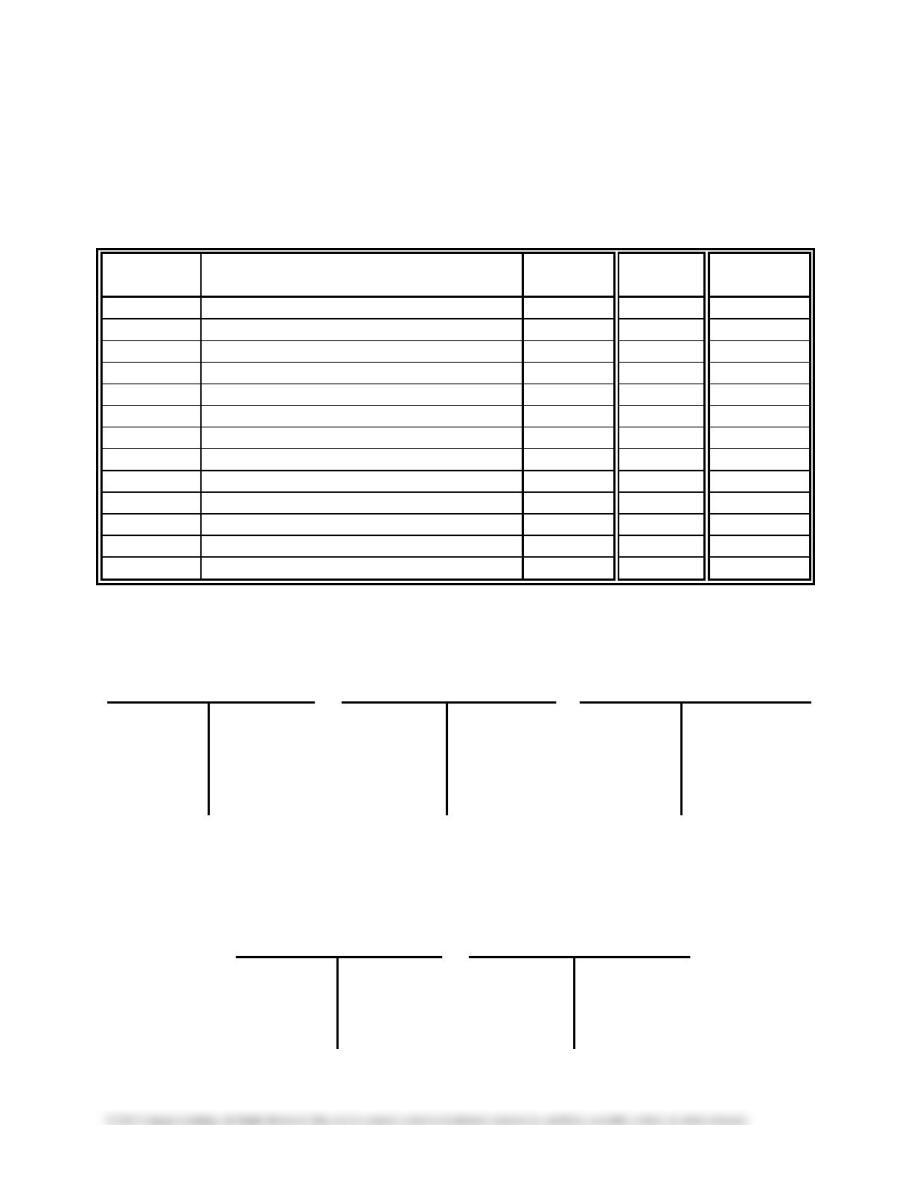
Transactions to illustrate the accounts receivable subsidiary ledger are presented in TM 5-2. Handout 5-1
is a journal page to be distributed to your students for use in recording these transactions. There are also a
few general ledger and accounts receivable subsidiary ledger accounts in T account format.
Divide the class into small groups and ask your students to record the transactions from TM 5-2 in the
journal provided. After each transaction is recorded, instruct them to post the entry both to the general
ledger accounts and the appropriate subsidiary ledger account. Each entry to Accounts Receivable will be
posted to two different accounts: Accounts Receivable in the general ledger and the appropriate customer
account in the subsidiary ledger. As a result, the Posting Reference column in the journal will have two
markings for each entry to Accounts Receivable—an account number to show that the entry was posted to
the general ledger and a check mark to show that the entry was posted to the subsidiary ledger.
You may want to record and post the first entry as an example before asking students to work on their
own. After students have finished recording and posting these transactions, ask them to add the balances
of the customer accounts in the accounts receivable subsidiary ledger. Stress that the total of the customer
accounts in the subsidiary ledger must equal the total of Accounts Receivable in the general ledger. Also
point out that the individual accounts in the accounts receivable ledger provide a complete credit history
for each customer. The solution to this exercise is shown on TM 5-3.
Remind students that it is also necessary to maintain an accounts payable subsidiary ledger. This allows a
company to keep track of those who are owed money. Note to students that many businesses use
subsidiary ledgers for other accounts such as an equipment subsidiary ledger to keep track of each item of
equipment purchased, its cost, location, and other data.
WRITING EXERCISE—Subsidiary Ledgers
Ask your students to write answers to the following questions (TM 5-4):
1. What is the purpose of an accounts receivable subsidiary ledger?
2. What information would be included in a subsidiary ledger for a company’s fixed asset account? Do
you think it would be helpful to keep a fixed asset subsidiary ledger? Explain your answer.
GROUP LEARNING ACTIVITY—Special Journals
Begin coverage of special journals by discussing their purpose and the transactions recorded in each of
the four types of special journals.
1. Revenue journal—fees earned on account
3. Purchases journal—all items purchased on account
4. Cash payments journal—any transaction where cash is paid (including cash purchases of assets such
as supplies, insurance, and prepaid rent or the payment of expenses such as advertising expense,
wages expense, utilities expense, or any other items)
It is also useful to point out that any transaction that does not “fit” in a special journal is recorded in the
general journal. These transactions include adjusting entries and closing entries.
However, it will probably suffice to explain that entries to the purchases journal and the cash payments
journal are recorded and posted using the same process as the cash receipts journal.
After introducing the special journals, it is helpful to instruct your class to work through a special journal
problem as a group learning activity. Although the concepts associated with special journals are relatively
easy, these problems require several pages of forms, which can overwhelm students. It is a good idea to
Purchases journal Problems 5-3A or 5-3B
When it is time to work through the chosen problem, divide the class into small groups. Remind them that
entries are posted to the subsidiary ledgers daily; however, postings to the general ledger are made only at
the end of the month. You may want to demonstrate a few transactions for the class before they begin
working on their own.
As an alternative approach, the publisher provides various practice set options, such as the Lightning
Fitness Equipment practice set, which has students record transactions in specialized journals and that
uses subsidiary ledgers for accounts receivable and accounts payable. This practice set is for a
WRITING EXERCISE—Special Journals and Subsidiary Ledgers
Ask your students to write answers to the following questions (TM 5-5):
1. Why is the revenue journal posted to the accounts receivable subsidiary ledger periodically
throughout the month, while it is posted to the general ledger only at the end of the month?
2. Will the balance of the accounts receivable controlling account agree with the balance of the accounts
receivable ledger at all times during a month? Why or why not?
Possible responses: 1) The revenue needs to post to the subsidiary ledgers on a regular basis to keep the
customer balances up to date. If a customer calls and request a payoff on their account, the subsidiary

80 Chapter 5 Accounting Systems
OBJECTIVE 3
Describe and illustrate the use of a computerized accounting system.
SUGGESTED APPROACH
Ask your students to give examples of errors they have made while completing homework assignments
from the first four chapters of this course, and list these errors on the board. To get this list started, you
may have to prompt your students by asking if they have posted any entries to the wrong account or
incorrectly added an account balance. After you have a few errors listed, ask students to identify which
errors would have been avoided if a computer had processed the accounting data in the homework
problems. This will allow you to emphasize one of the main advantages of a computerized accounting
system: elimination of many of the math, posting, and journal recording errors made in a manual system.
The Objective 3 text illustrates the revenue and collection cycle in a computerized environment using the
popular QuickBooks® accounting software. Use the lecture aids below to simulate how the computer
processes revenue and collection information.
LECTURE AID—Revenue and Collection Cycle in a Computerized
Environment
Ask your student to turn to Exhibit 7 in their textbooks. Refer them to the illustration of the electronic
invoice at the top of the page. Ask them to write in their notes the journal entry (two-column journal
format) needed when Accessories By Claire, a customer, is billed for $2,200 for services completed on
account. The answer is:
Accounts Receivable—Accessories By Claire……… 2,200
Fees Earned……………………………… 2,200
Explain that the computer software generates this entry and posts it to the accounts in the general ledger.
The software also tracks the balances owed by each customer. The Accessories By Claire account balance
is automatically updated by the invoice.
Next, refer your students to the “receive payment” form in the middle of the page. Ask them to write in
their notes the journal entry needed when payment is received from the customer previously billed on
account. The answer is:
Cash………………………………………. 2,200
Accounts Receivable— Accessories By Claire 2,200
Once again, the computer software generates this entry and posts it to the accounts in the general ledger.
The Accessories By Claire accounts receivable balance is also updated.
Ask your students how the software determined the amounts to be reported on the “Customer Balance
Summary.” Answer: by adding the invoices sent to each customer and subtracting the payments received.

Chapter 5 Accounting Systems 81
Also ask how the software determined the amounts to be reported on the “Income by Customer
Summary.” Answer: by summing the invoices sent to each customer.
Point out that the total shown on the “Customer Balance Summary” is the total for Accounts Receivable
in the general ledger. The total shown on the “Income by Customer Summary” is the balance of Fees
Earned in the general ledger.
OBJECTIVE 4
Describe the basic features of e-commerce.
KEY TERMS
E-commerce
SUGGESTED APPROACH
The text defines e-commerce as “using the Internet to perform business transactions.” Many of your
students will have already engaged in business-to-consumer (B2C) e-commerce. You may want to ask
your students for examples of merchandise they purchased using the Internet.
As the text mentions, fraud is a definite concern for both businesses and consumers engaging in e–
commerce. Use the Internet Activity below to introduce students to WebTrust.
INTERNET ACTIVITY—WebTrust
WebTrust is a service developed by the American Institute of Certified Public Accountants that is
provided by CPAs with special training. When a company’s Web site receives the WebTrust seal, it
means the site has:
• Been certified by a specially trained and licensed public accounting firm
• Disclosed its business practices
• Been audited to prove the site actually follows those practices
• Met international WebTrust Standards for e-commerce

82 Chapter 5 Accounting Systems
OBJECTIVE 5
Use segment analysis in evaluating the operating performance of a company.
SUGGESTED APPROACH
Remind students that invoices to customers are used not only to inform customers of amounts due, they
can also provide the information used to analyze if sales are meeting different goals and objectives of the
company or to analyze sales data such as popular models by region. This valuable information becomes a
management tool to direct future decisions. As an example, for a big clothing manufacturer, ask students
to list the information on invoices that could be used for analysis and what segment the stated information
would be used in.
Some answers might be: the state in which the sale occurred, to determine which regions of the country
experience the most and/or least sales volume; or which items are purchased, to determine which products
are most and/or least popular. Both of these answers can be further broken down by date (i.e., annual or
seasonal) for comparison purposes to spot trends.
Handout 5-1 ACCOUNTS RECEIVABLE TRANSACTIONS
Ryan’s Computer Consulting Group
JOURNAL
DATE
DESCRIPTION
POST.
REF.
DEBIT
CREDIT
GENERAL LEDGER
Acct. No. 101
Acct. No. 105
Acct. No. 401
Cash
Accts. Receivable
Fees Earned
ACCOUNTS RECEIVABLE
SUBSIDIARY LEDGER
Milford Tool Co.
Rahn Hills
Medical Group
DIFFICULTY BUSPROG AICPA AICPA ACBSP BLOOM’S TIME
DQ5-1 5-2 Easy Analytic Measurement Special Journals Knowledge 5 min.
Learning
Spread-
DQ5-2 5-2 Easy Analytic Measurement Special Journals Knowledge 5 min.
DQ5-3 5-2 Easy Analytic Measurement Special Journals Knowledge 5 min.
DQ5-4 5-2 Easy Analytic Measurement Special Journals Knowledge 5 min.
DQ5-5 5-2 Easy Analytic Measurement Special Journals Knowledge 5 min.
DQ5-6 5-2 Easy Analytic Measurement Special Journals Knowledge 5 min.
DQ5-7 5-3 Easy Technology Leveraging Technology Recording Transactions Knowledge 5 min.
DQ5-8 5-3 Easy Technology Leveraging Technology Recording Transactions Knowledge 5 min.
DQ5-9 5-3 Easy Technology Leveraging Technology Special Journals Knowledge 5 min.
DQ5-10 5-4 Easy Technology Measurement Recording Transactions Knowledge 5 min.
PE5-1A 5-2 Revenue journal Easy Analytic Measurement Special Journals Application 5 min.
PE5-1B 5-2 Revenue journal Easy Analytic Measurement Special Journals Application 5 min.
PE5-2A 5-2
ledger
Easy Analytic Measurement Special Journals Application 5 min.
Accounts receivable subsidiary
PE5-2B 5-2
ledger
Easy Analytic Measurement Special Journals Application 5 min.
PE5-3A 5-2 Purchases journal Easy Analytic Measurement Special Journals Application 5 min.
PE5-3B 5-2 Purchases journal Easy Analytic Measurement Special Journals Application 5 min.
PE5-4A 5-2 Accounts payable subsidiary ledger Easy Analytic Measurement Special Journals Application 5 min.
PE5-4B 5-2 Accounts payable subsidiary ledger Easy Analytic Measurement Special Journals Application 5 min.
PE5-5A 5-5 Segment analysis Moderate Analytic Measurement Financial Statement Analysis Application 5 min.
PE5-5B 5-5 Segment analysis Moderate Analytic Measurement Financial Statement Analysis Application 5 min.
Ex5-1 5-2
Identify postings from revenue
journal
Easy Analytic Measurement Special Journals Application 5 min.
Ex5-2 5-2 Accounts receivable ledger Easy Analytic Measurement Special Journals Application 5 min.
Ex5-3 5-2 Identify journals Easy Analytic Measurement Special Journals Knowledge 5 min.
Ex5-4 5-2 Identify journals Easy Analytic Measurement Special Journals Knowledge 5 min.
Ex5-5 5-2
receivable ledger
Easy Analytic Measurement Special Journals Knowledge 5 min.
Prepare journal entries in a revenue
Ex5-6 5-2
journal
Moderate Analytic Measurement Special Journals Application 5 min.
Ex5-7 5-2, 5-3 Posting a revenue journal Moderate Analytic Measurement Special Journals Application 5 min.
Ex5-8 5-2
Accounts receivable subsidiary
ledger
Moderate Analytic Measurement Special Journals Application 5 min.
Ex5-10 5-2 Revenue and cash receipts journals Moderate Analytic Measurement Special Journals Application 5 min.
Ex5-11 5-2
journal
Easy Analytic Measurement Special Journals Application 5 min.
Ex5-12 5-2
payments journal
Easy Analytic Measurement Special Journals Application 5 min.
Ex5-13 5-2
payable ledger account
Easy Analytic Measurement Special Journals Application 5 min.
Ex5-14 5-2
purchases journal
Easy Analytic Measurement Special Journals Application 5 min.
HOMEWORK CHART WITH LEARNING OUTCOMES TAGGING
DIFFICULTY BUSPROG AICPA AICPA ACBSP BLOOM’S TIME
Problem
Learning
Objective
Description Primary Broad Business Functional Primary
Spread–
sheet
GL
Ex5-15 5-2, 5-3 Posting a purchases journal Moderate Analytic Measurement Special Journals Application 5 min.
Ex5-16 5-2 Accounts payable subsidiary ledger Moderate Analytic Measurement Special Journals Application 5 min.
Purchases and cash payments
Ex5-17 5-2
journals
Moderate Analytic Measurement Special Journals Application 5 min.
Ex5-18 5-2
Purchases and cash payments
journal
Moderate Analytic Measurement Special Journals Application 5 min.
Ex5-19 5-2
and accounts payable subsidiary
ledger
Identify postings from special
Error in accounts payable ledger
Ex5-20 5-2
journals
Moderate Analytic Measurement Special Journals Application 5 min.
Ex5-21 5-2 Cash receipts journal Easy Analytic Measurement Special Journals Application 5 min.
Ex5-22 5-3 Computerized accounting systems Easy Technology Leveraging Technology Special Journals Knowledge 5 min.
Computerized accounting systems
Ex5-24 5-4 E-commerce Easy Technology Leveraging Technology Special Journals Knowledge 5 min.
Ex5-25 5-5
Segment revenue horizontal
analysis Moderate Analytic Measurement Financial Statement Analysis Application 5 min.
Ex5-26 5-5 Segment revenue vertical analysis Moderate Analytic Measurement Financial Statement Analysis Application 5 min.
Ex5-27 5-5
Segment revenue horizontal and
vertical analyses
Moderate Analytic Measurement Financial Statement Analysis Application 5 min.
Revenue journal; accounts
Pr5-1A 5-2, 5-3
receivable and general ledgers
Moderate Analytic Measurement Special Journals Application 5 min. X
ledgers
account, and accounts payable
Revenue and cash receipts journals;
accounts receivable and general
Pr5-3A 5-2, 5-4
ledger
Moderate Analytic Measurement Special Journals Application 5 min. X
Pr5-4A 5-2
Purchases and cash payments
journals; accounts payable
subsidiary and general ledgers
Moderate Analytic Measurement Special Journals Application 5 min. X
All journals and general ledger; trial
balance
Revenue journal; accounts
Pr5-1B 5-2, 5-3
receivable and general ledgers
Moderate Analytic Measurement Special Journals Application 5 min. X
Pr5-2B 5-2, 5-3
ledgers
Moderate Analytic Measurement Special Journals Application 5 min. X
Purchases, accounts payable
account, and accounts payable
Revenue and cash receipts journals;
accounts receivable and general
Pr5-3B 5-2, 5-4
ledger
Moderate Analytic Measurement Special Journals Application 5 min. X
Pr5-4B 5-2
Purchases and cash payments
journals; accounts payable and
general ledgers
Moderate Analytic Measurement Special Journals Application 5 min. X
Pr5-5B 5-2
All journals and general ledger; trial
balance
Ethics and professional conduct in
CP5-1 5-1
business
Moderate Ethics Industry Purpose Knowledge 5 min.
CP5-2 5-3
Manual vs. computerized
accounting systems
Easy Technology Leveraging Technology Purpose Comprehension 5 min.
DIFFICULTY BUSPROG AICPA AICPA ACBSP BLOOM’S TIME
Problem
Learning
Objective
Description Primary Broad Business Functional Primary
Spread–
sheet
GL
CP5-4 5-1, 5-2 Design of accounting systems Moderate
Thinking
Critical Thinking Special Journals Comprehension 5 min.
CP5-5 5-4 Internet-based accounting systems Moderate
Thinking
Critical Thinking Purpose Comprehension 5 min.
CP5-6 5-4 SCM and CRM Moderate Analytic Measurement Purpose Knowledge 5 min.