CHAPTER 1
INTRODUCTION TO BELLWETHER GARDEN SUPPLY
In Chapter 1, students are introduced to Sage 50 2019. Chapter 1 and all
subsequent chapters begin with Learning Objectives.
LEARNING OBJECTIVES
1. Start Sage 50 2019.
Comment
If Sage 50 2019 is not installed, refer to textbook pages vii-xvi. The sample
company, Bellwether Garden Supply, must be installed to complete Chapter
1. The serial number for Student Version installation is 7Ø2FB-58Ø2-9793–
2211. After installation, activation is required (textbook pages xiii-xiv). The
Help menu includes Sage 50 Activation.
2. Explore the sample company, Bellwether Garden Supply.
3. Make sure global options are set .1
4. Back up Bellwether Garden Supply data .
5. Restore data with Sage 50’s restore Wizard .
6. Operate Sage 50’s menus, drop-down lists, toolbar, and navigation bar.
7. Use File Explorer to see files sizes.
8. Export Sage 50 reports to Excel, and save reports as Adobe PDF files.
9. Make three backups, save three Excel files, and three PDF files.2
SAGE 50 TIPS, CHAPTER 1
➢ Email sageeducation@sage.com, or phone the Educational Partner
Program at 800-256-8807, for the full non-time limited Educational
Version. Sage Education emails a serial number that can be used when
installing the software.
1This icon, , means there is a video. Go online to www.mhhe.com/yacht2019 > link
to Student Edition > select Chapter 1 > Videos.
2Refer to the chart on textbook pages 2-4 for the size of files backed up and saved.
Students should check with their instructor for his or her preference for receiving Excel
(.xlsx) or Adobe (.pdf) files.

6 – IMK Chapter 1
➢ If you have more than one section of students using the sample
company, you should restore the starting data for Bellwether Garden
Supply before beginning the next class. Instructions for making the first
backup are on textbook pages 23-26. This backup is for Bellwether
Garden Supply’s starting data. At this point in Chapter 1, students have
not added any information to the sample company. The backup name is
bgs.ptb.
➢ The textbook shows detailed steps for backing up to a USB flash drive.
For all backups in Chapters 1-18 and the projects, a 4GB USB flash
drive is recommended.
➢ Sage 50’s backups default to the hard drive. Students can back up to
the default location, or specify a location for backing up, such as a
network location or external media.
➢ See textbook pages 27 through 31 for Using Sage 50’s Restore Wizard.
Sage 50’s Restore Wizard allows you to Overwrite existing company
data or Create a new company using the restored data. Overwrite
existing company data is the default. For more information about
restoring a new company (one that is not listed in Sage 50), refer to the
Read Me box on textbook page 28.
Read Me: Do your students need to restore?
If students are completing Sage 50 work in the computer lab or
classroom, they should restore backup files from their USB drive (or other
location). In order for the student to start where they left off the last time data was
backed up, use the restore feature.
If students are working on their own computer or laptop, they probably can skip
restore. For example, in Chapter 1 on textbook pages 38–39, students added
themselves as an employee. Students should display the employee list. If their name
is shown, they can skip restore.
If students are taking this course online, they probably do not have to restore each
time it is shown in the textbook. Their PCs or laptops will accumulate Sage 50 data as
they work through the book. The author suggests that students restore periodically.
What should the instructor do? You may want to include in your syllabus whether or
not you want students to restore backup files each time it is shown in the textbook. It
may depend on whether students are working in the classroom or on their own
computers.
Introduction to Bellwether Garden Supply 7 – IMK
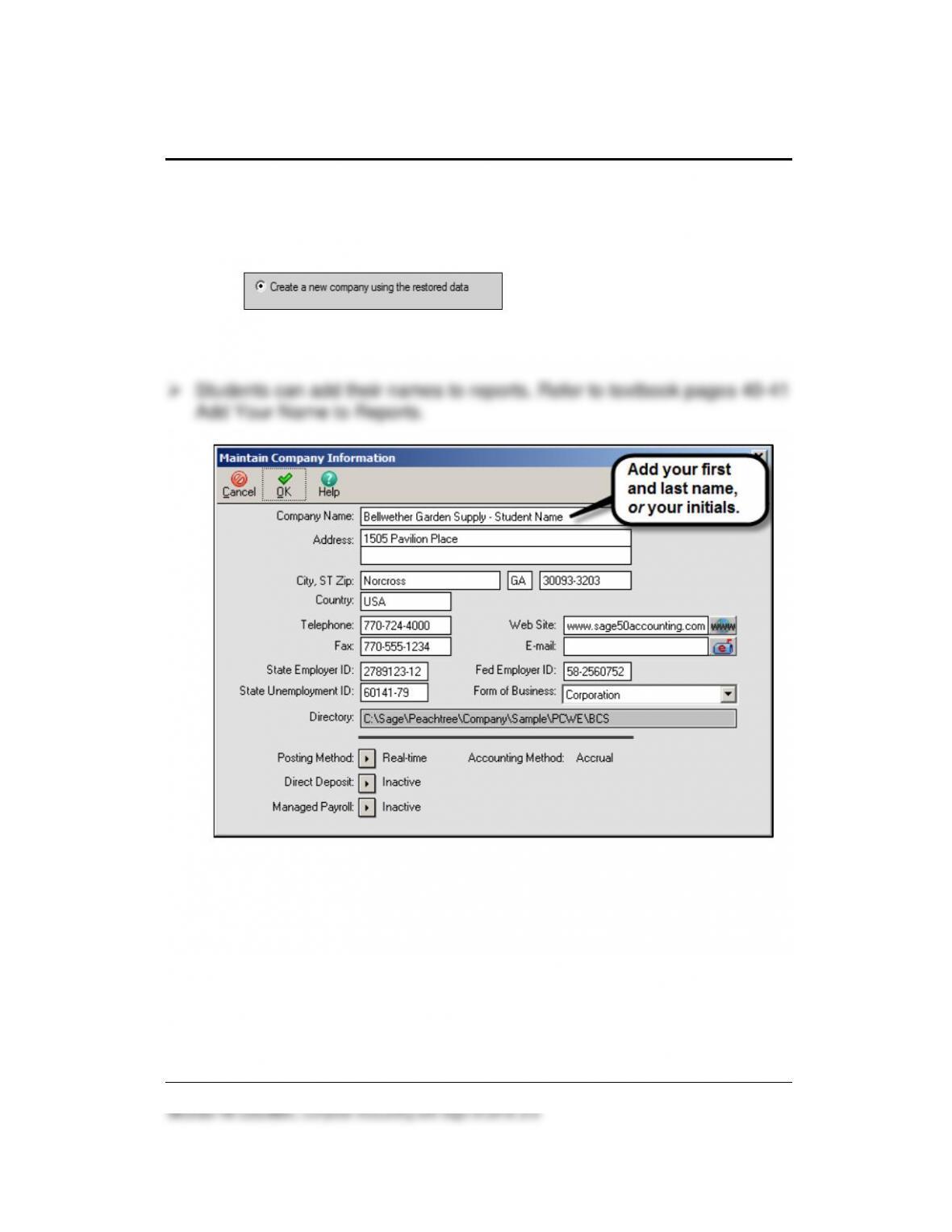
➢ Students can restore from a backup file even if no Sage 50 company
exists. From Sage 50’s start up window, select File > Restore. Select
the location of the backup file. On the Restore Wizard’s Select
Company window, select Create a new company using the restored
data . The selection for “Create a new
company using the restored data” allows you to restore backup data
and set up the company at the same time.
➢ In Windows, the computer owner is identified when files are backed up
or saved. Go to the location of the backup file; right-click on the
filename, left-click Properties. The Details tab shows the Owner and
Computer name. The time and date is also shown. The same steps can
be used to check .ptb files (extension used for Sage 50 backups); Excel
files (.xlsx or .xls extensions); Adobe files (PDF extension); and Word
files (.docx and .doc extensions).
8 – IMK Chapter 1
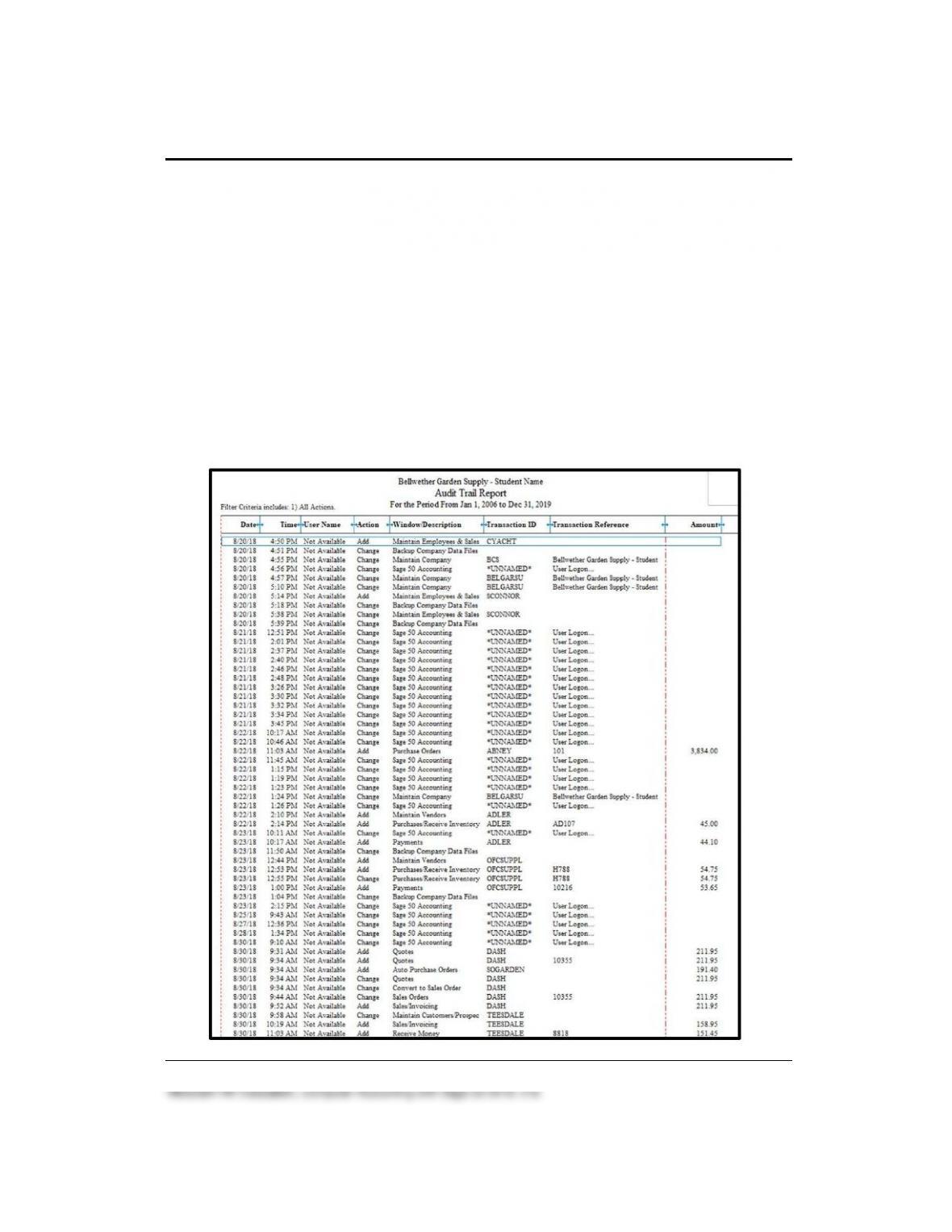
➢ In Chapter 5 on textbook page 185, an Audit Trail Report is shown.
Observe that the Transaction ID column shows CYACHT and
SCONNER in the Add, Maintain Employees rows; the Date and Time
this entry was recorded is also shown. This information shows the
employee added in Chapter 1, textbook pages 38–39 Adding Yourself
as an Employee and textbook page 49 (Exercise 1-2). Students are
instructed to use their first initial and last name. CYACHT is shown on
the Audit Trail Report because the author’s name is used. The dates
and times in the report below indicate when the author made changes.
Your students Date and Time fields will differ. If your students are
completing work after December 31, 2019, the date range should be
For the Period From Jan 1, 2006 to the student’s current date (instead
of Dec 31, 2019).

Introduction to Bellwether Garden Supply 9 – IMK
The Audit Trail Report is a way for instructors to check the integrity of
individual student records. Use the Audit Trail Report to make sure that
the student turning in the work is the one whose name appears on the
Maintain Employees row. If two or more Audit Trail Reports have the
same name, date and time, you probably have a paper trail to students
sharing backup files. You may want students to turn in their Chapter
5.ptb file so that you can restore that file and check the Audit Trail
Report. Another way to do this is to have the student restore the
Chapter 5.ptb file in the computer lab, then display the Jan 1, 2006
through Dec 31, 2019 (if after 12/31/19, use that date) Audit Trail report
to check the name, date, and time next to Maintain Employees.
It is the goal of the textbook to make learning interactive. Throughout the
textbook, numerous window illustrations are used to show the students
how to complete the instructions successfully.
Sage 50 is similar to other programs that use the Windows operating
systems. Your students will see similarities in the Navigation Bar
selections, menus, entering and saving data, and selecting icons. If your
students are not familiar with Microsoft Windows, using Sage will help them
become familiar with the Windows operating system.
In Chapter 1, students use the sample company, Bellwether Garden
Supply. Bellwether Garden Supply is one of the sample companies
included when Sage 50 is installed. Your students will get a sampling of
features that will be developed in greater detail as they complete the
textbook. The purpose of the sample company, Bellwether Garden Supply,
is to provide software familiarity rather than to test accounting knowledge.
Comment:
The work in Chapters 1-7 is cumulative. Students need to complete the
activities within the chapter and the exercises at the end of the chapter.
Completing all the work in Chapters 1–7 will ensure that your students’ work
agrees with what is shown in the textbook.

10 – IMK Chapter 1
EXPORTING SAGE 50 REPORTS TO MICROSOFT EXCEL AND WORD
If Sage 50 report printouts are required for grading purposes, they can be
exported to Excel then emailed to the instructor as an .xls (Excel 97-2008)
or .xlsx (Excel 2007-2016) attachment. Refer to textbook pages 41-44,
Exporting Sage 50 Reports to Microsoft Excel. Sage 50 reports include an
Excel icon.
Sage 50 reports can also be copied to Microsoft Word. Chapter 18 includes
how to copy reports to Microsoft Word.
To compare two spreadsheets, refer to pages 710-711, Appendix A,
Troubleshooting. You may want to compare your student’s spreadsheet to
the Excel Reports on the OLC at www.mhhe.com/yacht2019 > Instructor
Edition > Excel Reports.
SAVING REPORTS AS ADOBE PDF FILES
Sage 50 reports can also be saved as PDF files. This may be the
instructor’s preference for collecting student work. Textbook pages 44-45
show the steps for saving PDF files. In Chapter 1, the following reports are
saved as PDF files: the Employee List and the Chart of Accounts.
Comment: The Comment on page 50 reminds students to check with their instructor for
his or her preference for receiving files. If instructors prefer Sage 50 reports attached for
grading purposes, refer to textbook pages 41–44, Exporting Reports to Excel; or Saving
Employee List as a PDF File, pages 44-45. To export two Sage 50 reports to one Excel
file, see pages 84-86. For grading purposes, instructors may prefer receiving Adobe
files (.pdf) or Excel files (.xlsx).
How to Fix? PDF button is not active. What should I do?
1. Display the report. Select the Print icon instead of the PDF icon.
2. The Print window appears. In the Name field, click on the down-arrow.
3. Select Adobe PDF. Click <OK>. Save the file to your USB drive.
OR, use Excel to save as an Adobe PDF file. The author used Excel 2013.
a. Open the Chapter 1_Employee List.xlsx file.
b. Select File > Save as Adobe PDF > Convert to PDF > type the File name
Introduction to Bellwether Garden Supply 11 – IMK
Before making changes to Bellwether Garden Supply, you should back up
the sample company data. When using Sage, information is automatically
saved to the hard drive of the computer. In a classroom, a number of
students may be using the same computer. This means that when you
return to the computer lab or classroom, your data will be gone. Backing
up means saving a copy of the data to a hard drive, network drive, or
external media. Backing up ensures that you can start where you left off
the last time Sage 50 was used.
When backing up, you have choices − accept the hard-drive default
location or back up to a USB drive (or other external media). In the steps
that follow, backups are made to a USB drive also called flash drives,
thumb drives, or pen/stick drives. In this book, the term USB flash drive is
used to identify USB storage media. USB is an abbreviation of Universal
Serial Bus.
Comment: Backing up data to the hard-drive default location
The author suggests backing up the sample company before any changes are made. In the
textbook, backups are made to external media or a USB drive. Backups can also be made
to the desktop or other locations.
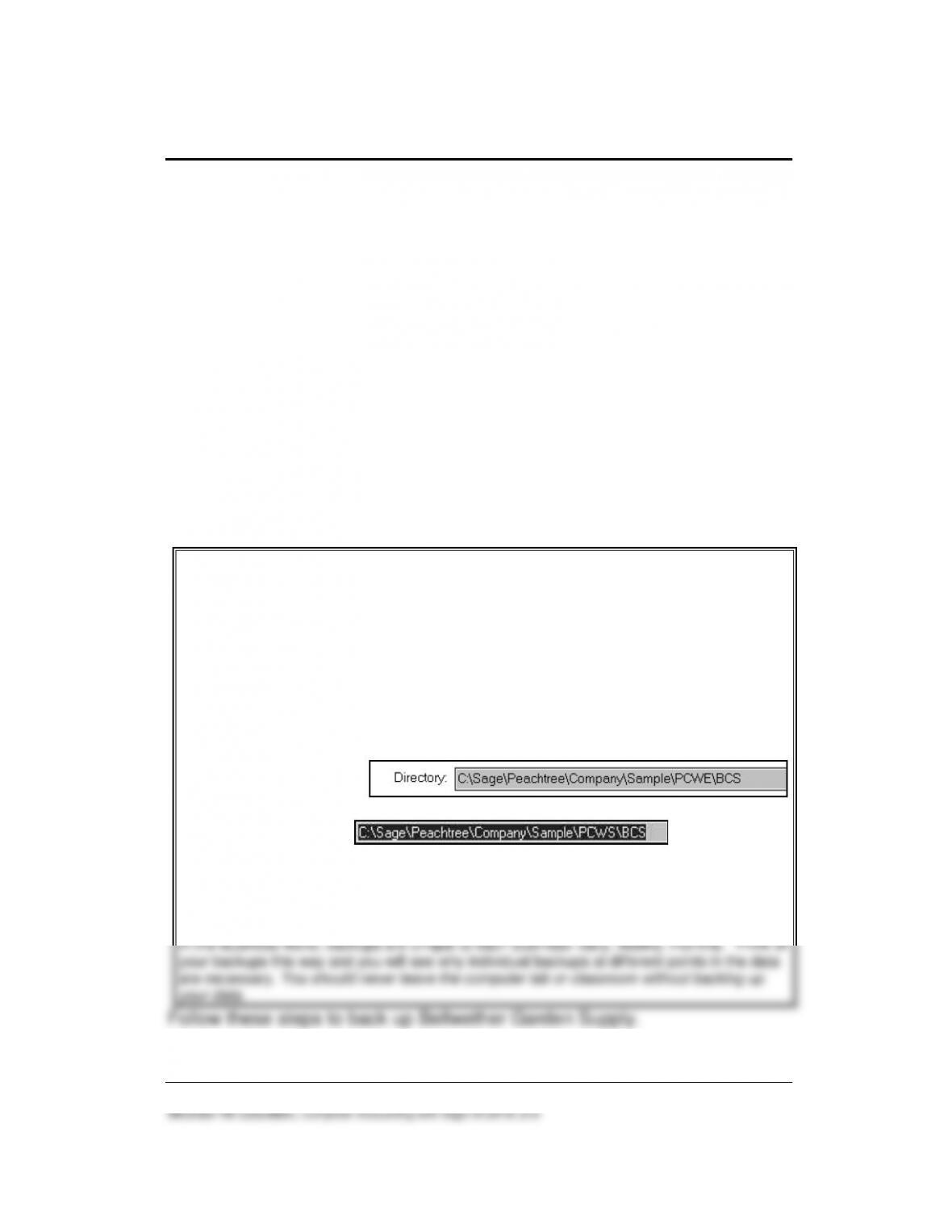
You may also backup to the default location at
C:\Sage\Peachtree\Company\Sample\PCWS\BCS. Hint: To see the default directory where
Bellwether is located, from the menu bar select Maintain, Company Information. The
Directory field shows the location of the BCS folder. BCS is the folder where Bellwether
Garden Supply data is stored.
Education Version directory:
Student Version directory:
When a backup is made, data is saved to the current point. To distinguish between backups,
a different backup name (file name) should be used. Use Sage 50’s restore feature to
retrieve information that was backed up.
In the business world, backups are unique to each business: daily, weekly, monthly. Think of
your backups this way and you will see why individual backups at different points in the data
are necessary. You should never leave the computer lab or classroom without backing up
your data.
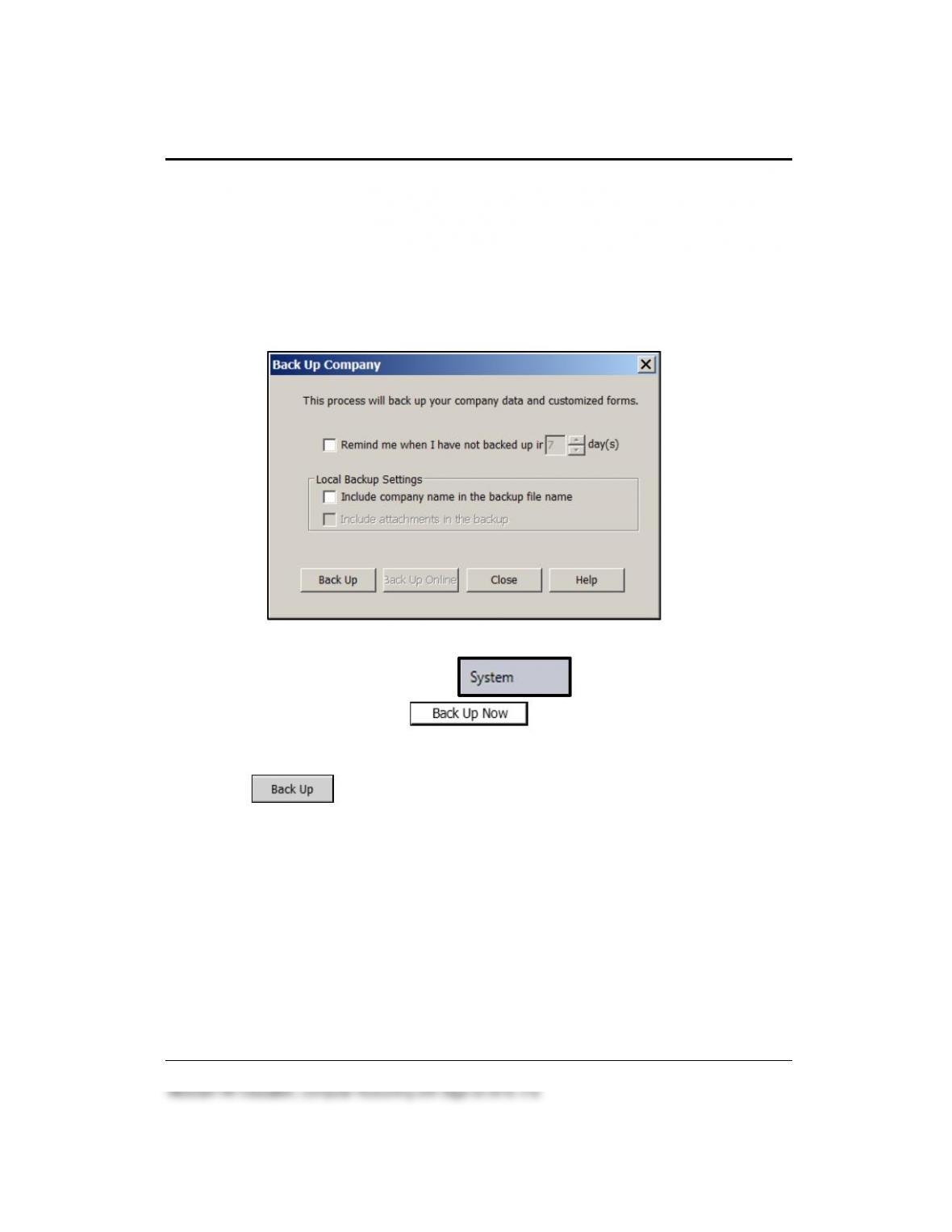
Follow these steps to back up Bellwether Garden Supply.
12 – IMK Chapter 1
The text directions assume that you are backing up to a USB drive. You
can also backup to the desktop, hard drive, or network location. One USB
flash, thumb or pen drive can be used for all backups in the textbook
(Chapters 1-18 and the projects). The chart on pages 2-4 (Part 1
introduction) shows the size of each backup made in Chapters 1–8.
1. Insert a USB flash drive into the USB drive.
2. From the Navigation Bar, click . In the Back Up and
Restore Data area, click . The Back Up Company
window appears. If necessary, uncheck the box next to Include
company name in the backup file name.
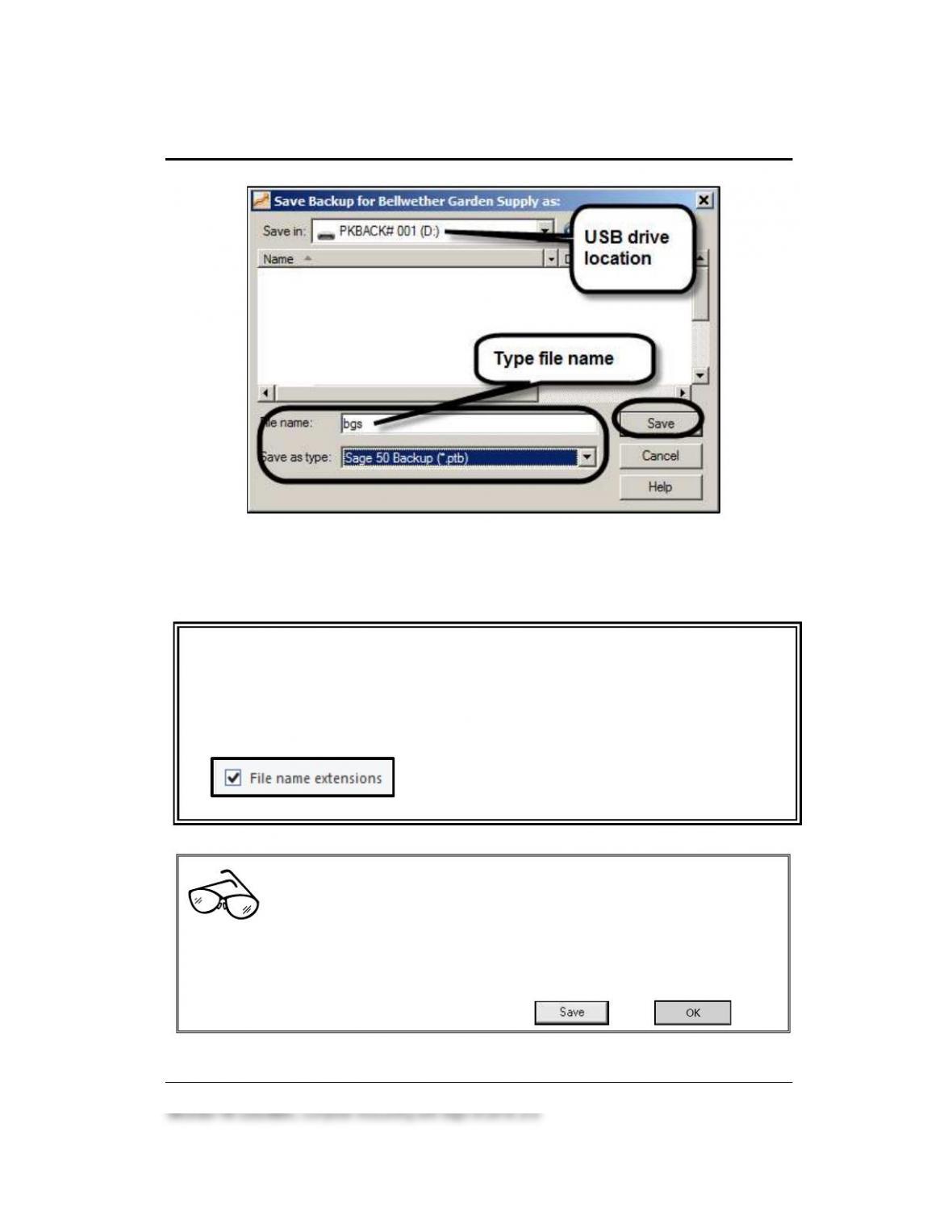
3. Click . The Save Backup for Bellwether Garden Supply as
window appears.
4. In the Save in field, select your USB drive. The illustration below
shows drive D, which is the location of the author’s USB drive. Your
USB drive letter may differ. Type bgs in the File name field.
Introduction to Bellwether Garden Supply 13 – IMK
Observe that the Save as type field shows that you are making a
Sage 50 Backup (*.ptb), which is abbreviated ptb. This is the
extension for Sage 50 backups.
Comment
If your Save as type field does not show Sage 50 Backup (*.ptb), follow these steps:
1. Open File Explorer.
2. From the menu bar, select View.
3. Make sure the box next to File name extensions is checked
..
4. Close File Explorer.
Read Me: “Student Version” or “Educational Version”
If you are backing up to the default hard-drive location, the Student
Version hard-drive location for backups is C:\Sage\Company\Sample\PCWS\BCS. If
your folder shows …\Sample\PCWE, you are using the Educational Version’s sample
company data. Your hard-drive location may differ.
Accept the hard-drive default for backing up. Click , then .
14 – IMK Chapter 1
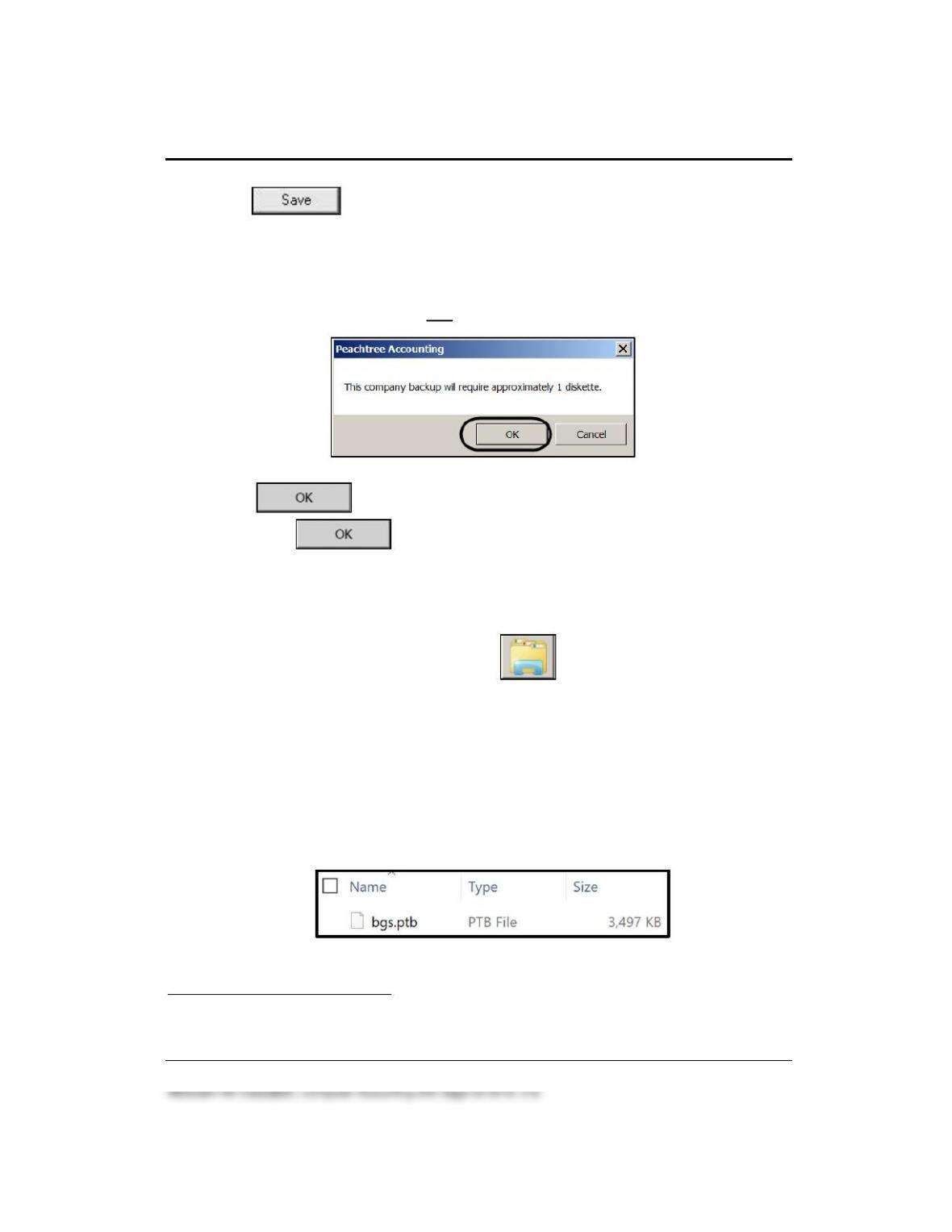
5. Click .
6. A window appears that says This company backup will require
approximately 1 diskette. (If students are backing up to USB flash
drive, this window appears. If backing up to the default hard-drive
location, this window does not appear.)
7. Click . When the window prompts Please insert the first
disk, click . When Back Up Company scale is 100%
complete, you have successfully backed up the sample company.
Follow these steps to see the size of the backup file.
1. Open File Explorer. The folder icon also opens File Explorer.
2. Select your USB drive (or the location where you backed up
Bellwether Garden Supply).
The Name of the file is bgs.ptb; the size of the file is 3,305 KB;3 and
File Type is PTB File. Compare this information to the bcs folder on
your hard drive, network drive, USB drive, or DVD. Your backup size
may differ.
3The size of your backup file may differ.

Introduction to Bellwether Garden Supply 15 – IMK
Refer to the chart on pages 2-4 for back up sizes. Sage 50 backs up to
the current point in the data. The author suggests backing up to a USB
flash drive, CD-R, DVD-R, or hard drive location.
Follow these steps to exit Sage 50:
1. Close File Explorer.
2. From Sage 50’s menu bar, click File > Exit. You are returned to the
desktop.
USING SAGE 50’S RESTORE WIZARD 4
In order to start where you left off the last time you backed up, use Sage
50’s Restore Wizard. The instructor may prefer that students use File
Explorer to copy/paste instead of Sage 50’s Restore feature. Students are
reminded to check with their instructor on the preferred method. This
textbook shows Sage 50’s Restore Wizard.
1. Start Sage 50. (Hint: If another company opens, from the menu bar
select File > Close Company to go to the startup window.) Open the
sample company, Bellwether Garden Supply.
4The arrow indicates a video at www.mhhe.com/yacht2019 > Student Edition >
Chapter 1 > Videos > Restore.
16 – IMK Chapter 1
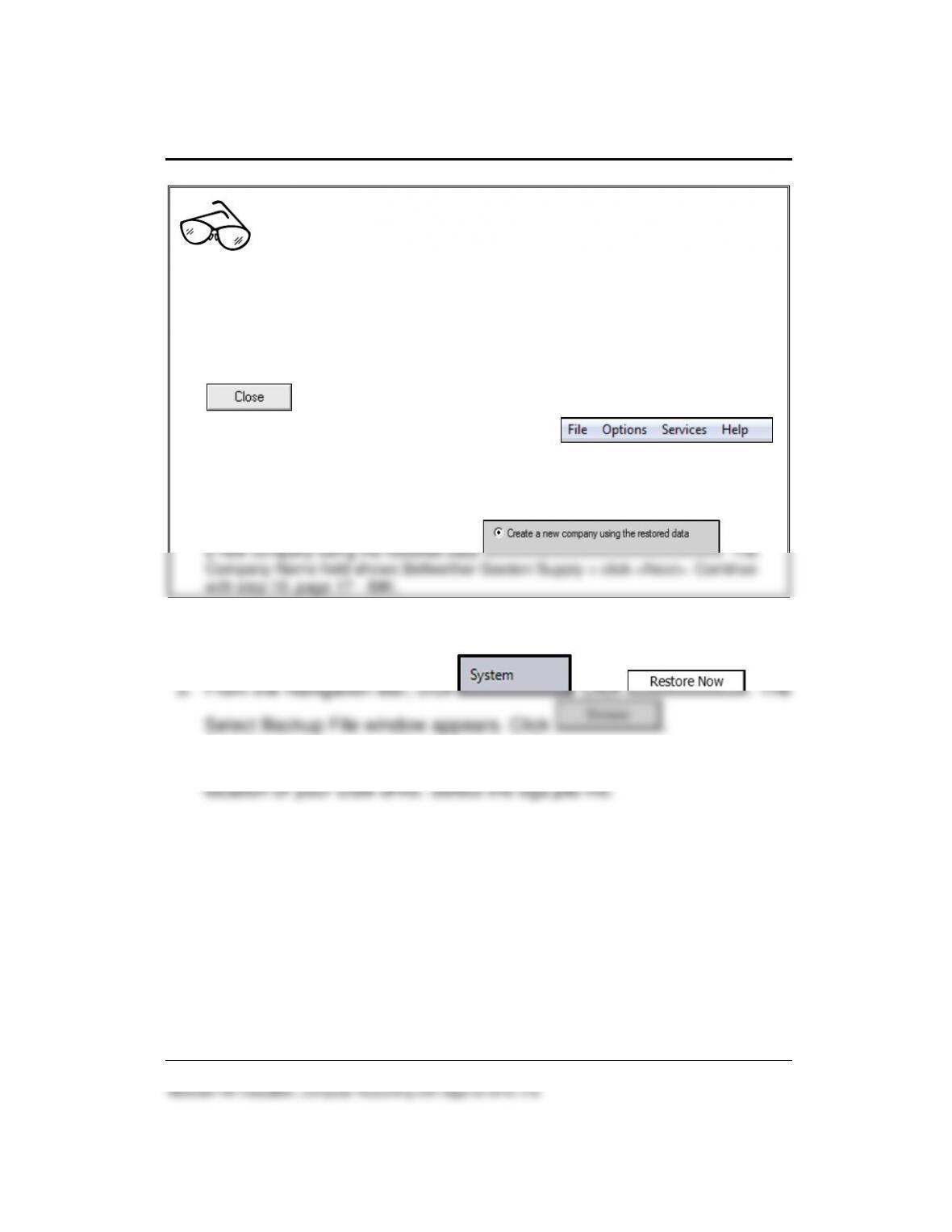
Read Me: What if Bellwether Garden Supply is not shown as an
existing company or when you select Explore a sample company?
Some schools delete company folders from the hard drive. For example, you have a
backup file but the company, Bellwether Garden Supply, is not listed as a Sage 50
company. Follow these steps to restore a company from a backup file.
1. If necessary, click File > Close Company to go to the Startup window. To double
check that Bellwether is not listed, select Open an existing company. Make sure
Bellwether Garden Supply is not listed in the Company Name list. Click
.
2. The startup window shows four menu bar options—.
Select File > Restore.
3. Browse to the location of your backup file. Click on the backup file to highlight it.
Click <Open>.
4. On the Select Company, Choose how to restore your backup window, select Create
a new company using the restored data . The
Company Name field shows Bellwether Garden Supply > click <Next>. Continue
with step 10, page 17 – IMK.
2. Insert your USB flash drive. The steps that follow assume you are
restoring from a USB drive.
4. The Open Backup File window appears. In the Look in field, select the
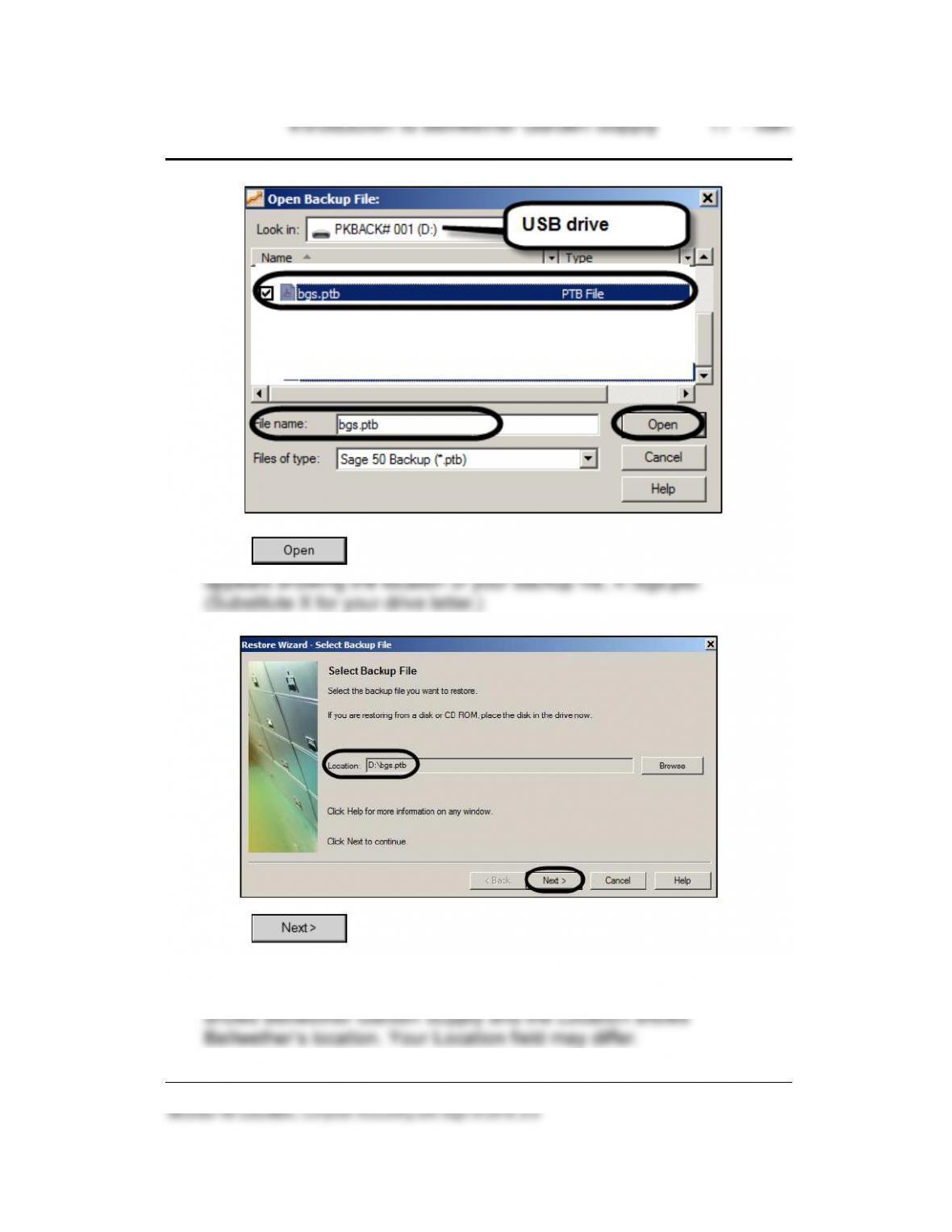
5. Click . The Restore Wizard – Select Backup File window
6. Click .
7. The Select Company window appears. Observe that Overwrite
existing company data is the default. The Company Name field
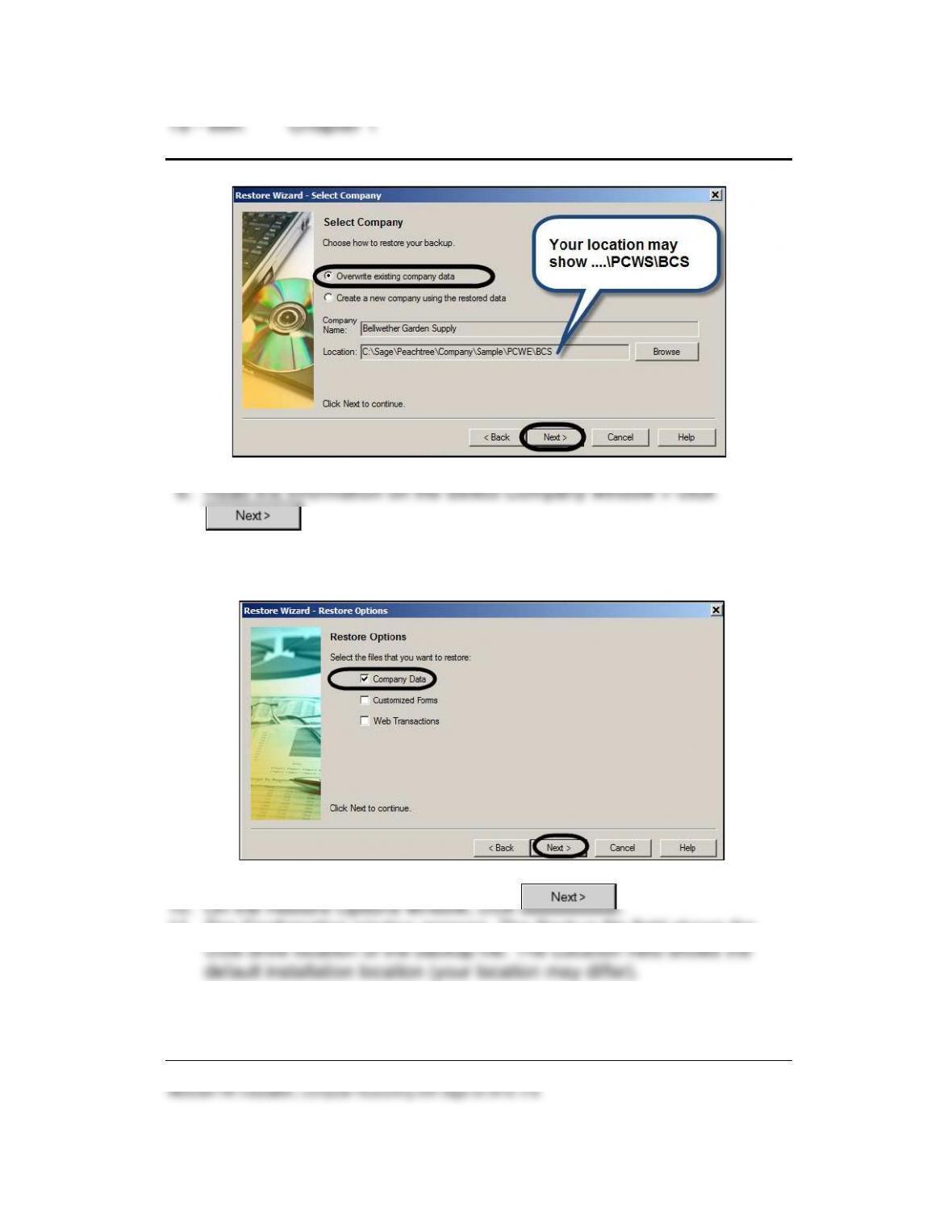
.
9. The Restore Options window appears. Make sure that the check mark
is next to Company Data.
11. The Confirmation window appears. The Backup file field shows the
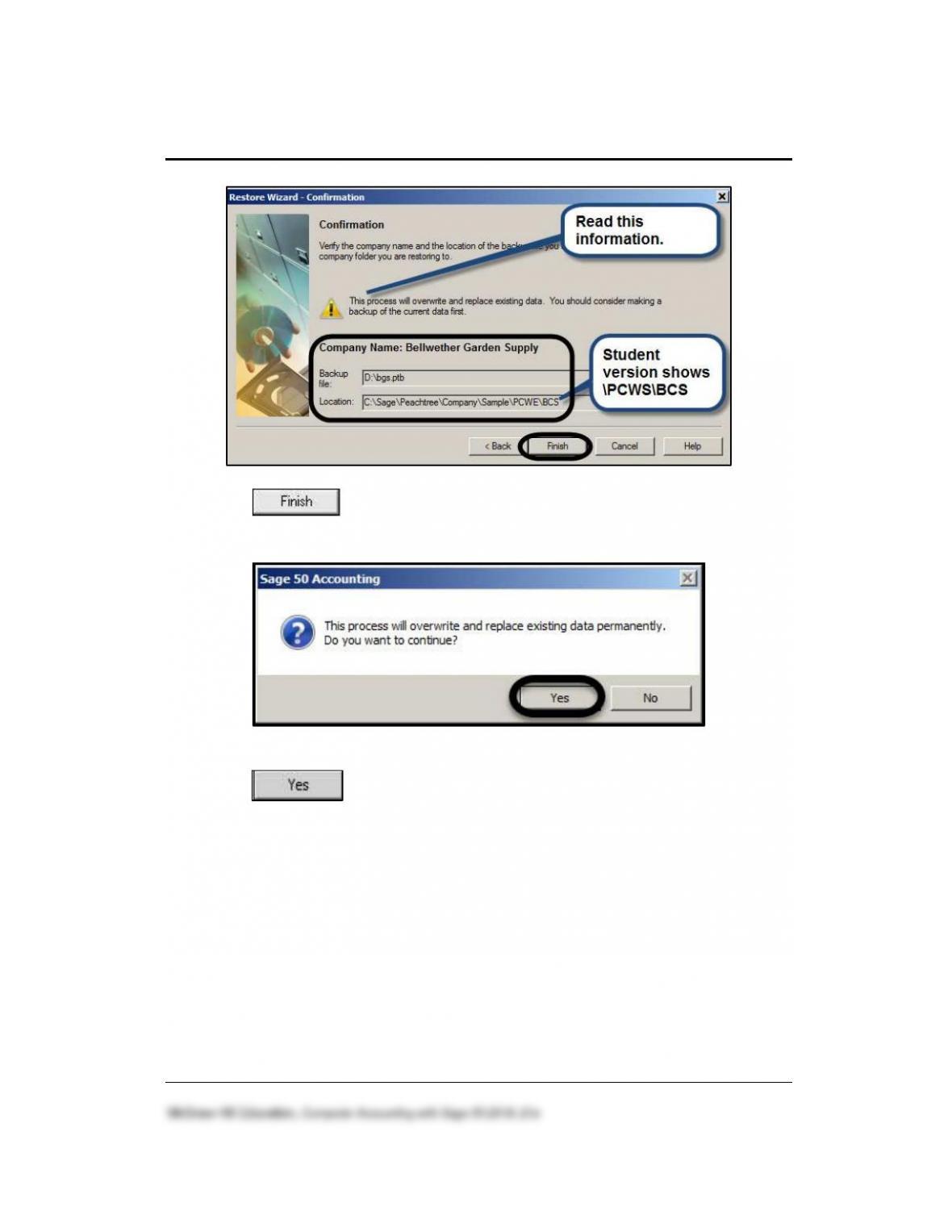
Introduction to Bellwether Garden Supply 19 – IMK
12. Click . The window prompts “This process will overwrite and
replace existing data permanently. Do you want to continue?”
13. Click . When the scale is 100% complete, the Bellwether
Garden Supply data is restored. The Bellwether Garden Supply – Sage
50 Accounting window appears. (Hint: If a screen prompts that you can
use Sage 50 Accounting for 14 months, click <OK>.)
Once Bellwether’s files are restored, you are ready to continue using the
sample company. Before your students exit, they should make a backup of
their work.
You may find a lecture outline helpful in organizing your presentation of
Chapter 1. The Instructor’s Manual and Key includes a lecture outline for
each chapter in the textbook, end-of-chapter report printouts, answers to