
2-34
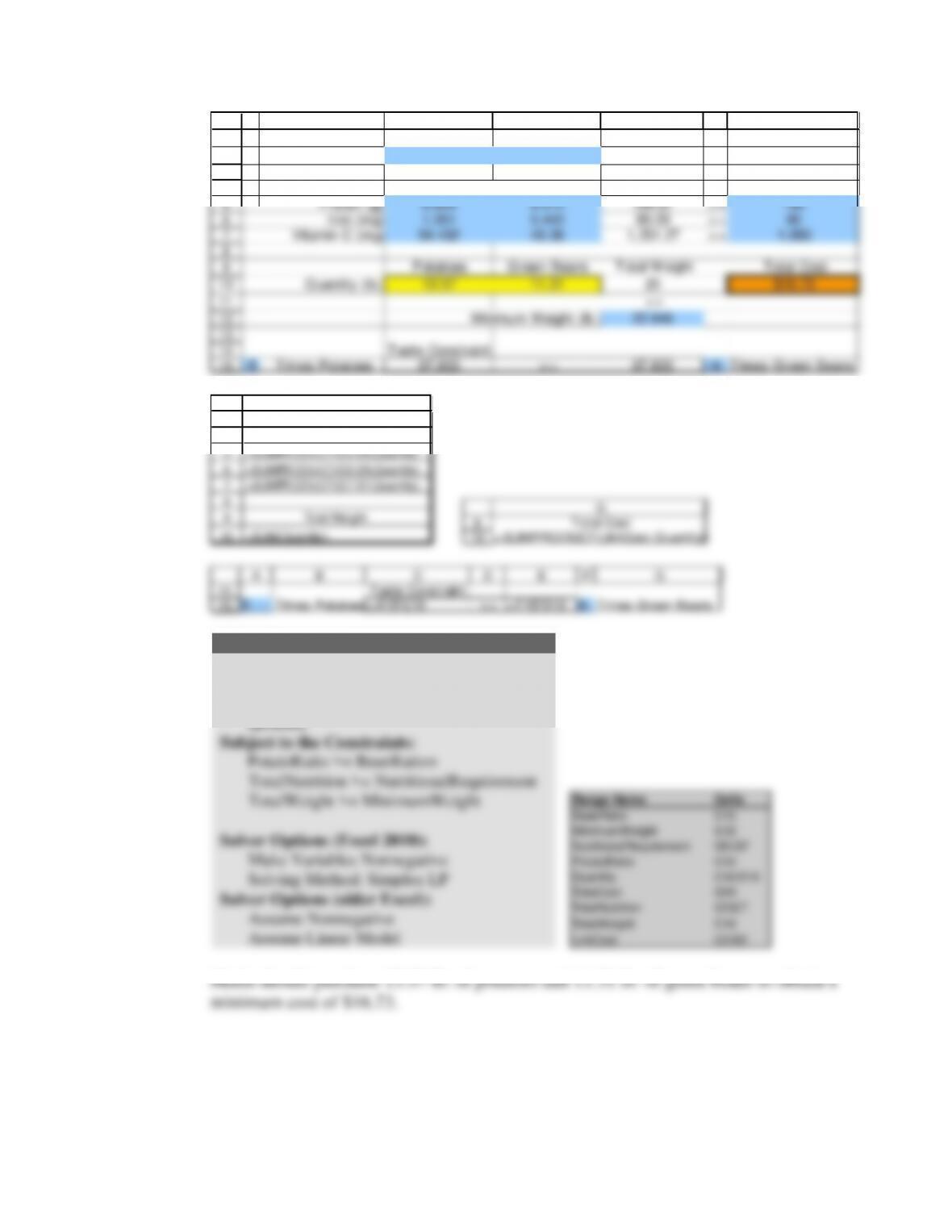
Taste Constraint
Edson requires that the casserole contain at least a six to five ratio in the weight of
potatoes to green beans. We have:
poun ds of potatoes
Weight Constraint
Finally, Maria requires a minimum of 10 kilograms of potatoes and green beans
together. Because we measure potatoes and green beans in pounds, we must perform
the following conversion:
10 kg o f potatoes an d green b eans
1000 g
1 lb
=22.046 lb of potatoes and green beans
Chapter 02 – Linear Programming: Basic Concepts
2-35
1
2
3
4
5
6
7
8
9
10
11
12
13
14
A B C D E F G
Potatoes Green Beans
Unit Cost (per lb.) $0.40 $1.00
Total Nutritional
Nutrition Requirement
Protein (g) 6.804 9.072 194.87 >= 180
Iron (mg) 1.361 5.443 80.00 >= 80
Vitamin C (mg) 54.432 45.36 1,251.27 >= 1,050
Potatoes Green Beans Total Weight Total Cost
Quantity (lb.) 13.57 11.31 25 $16.73
>=
Minimum Weight (lb.) 22.046
Taste Constraint:
Nutritional Data (per pound)
3
4
5
6
7
8
9
10
E
Total
Nutritio n
=SUMPR ODUCT(C5 :D5,Quantity)
=SUMPR ODUCT(C6 :D6,Quantity)
=SUMPR ODUCT(C7 :D7,Quantity)
Total Weight
=SUM(Quantity )
9
10
G
Total Cost
=SUMPRODUCT(UnitCost,Quantity)
14
15
A B C D E F G
Taste Constraint:
5 Times Potatoes= A15*C10 >= =F15*D10 6 Times Green Beans
Solver Parameters
Set Objective (Target Cell): TotalCost
To: Min
By Changing (Variable) Cells:
Quantity
Subject to the Constraints:
PotatoRatio >= BeanRation
TotalNutrition >= NutritionalRequirement
TotalWeight >= MinimumWeight
Solver Options (Excel 2010):
Make Variables Nonnegative
Solving Method: Simplex LP
Solver Options (older Excel):
Assume Nonnegative
Assume Linear Model
Range Name Cells
BeanRatio E15
MinimumWeight E12
NutritionalRequirement G5:G7
PotatoRatio C15
Quantity C10:D10
TotalCost G10
TotalNutrition E5:E7
TotalWeight E10
UnitCost C2:D2
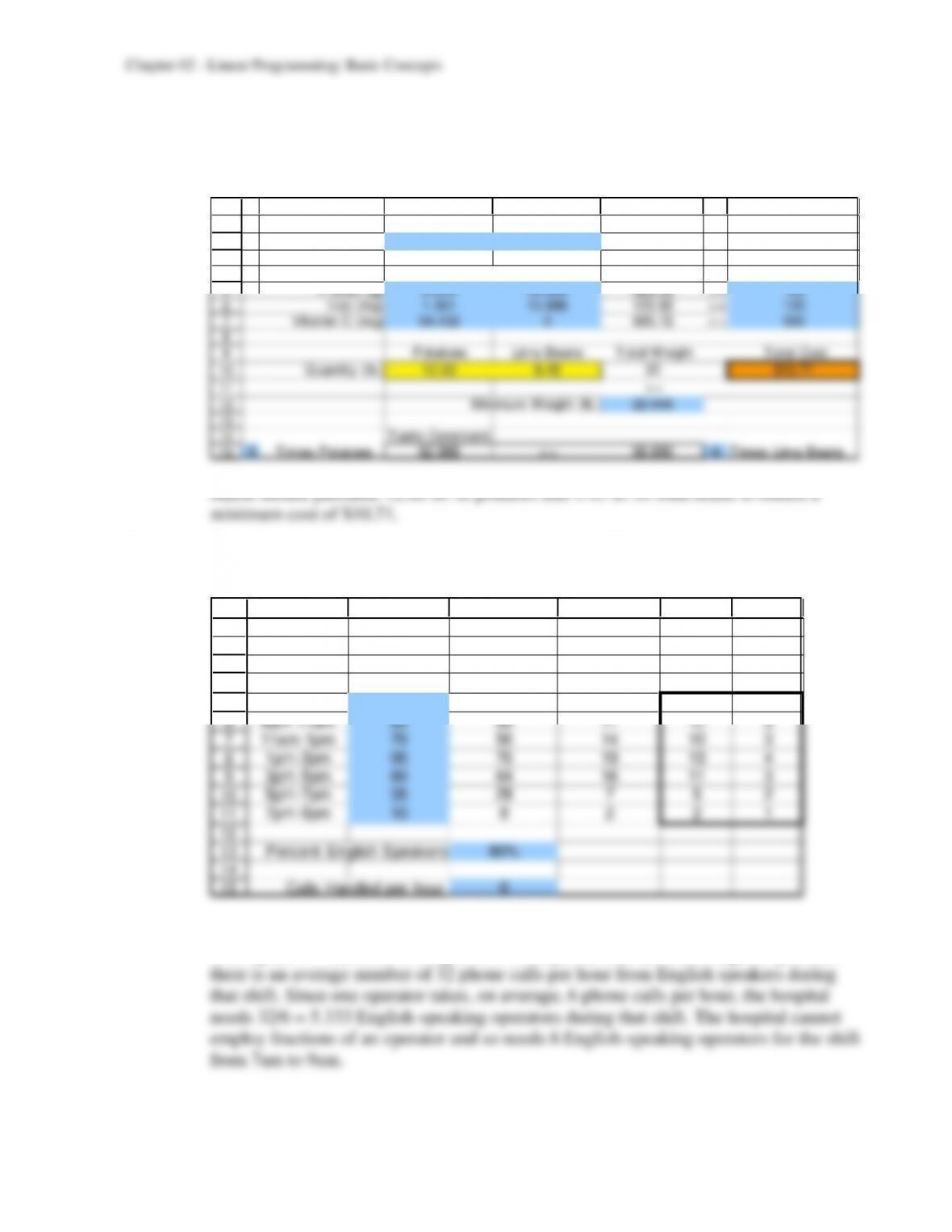
Maria should purchase 13.57 lb. of potatoes and 11.31 lb. of green beans to obtain a
15
2-36
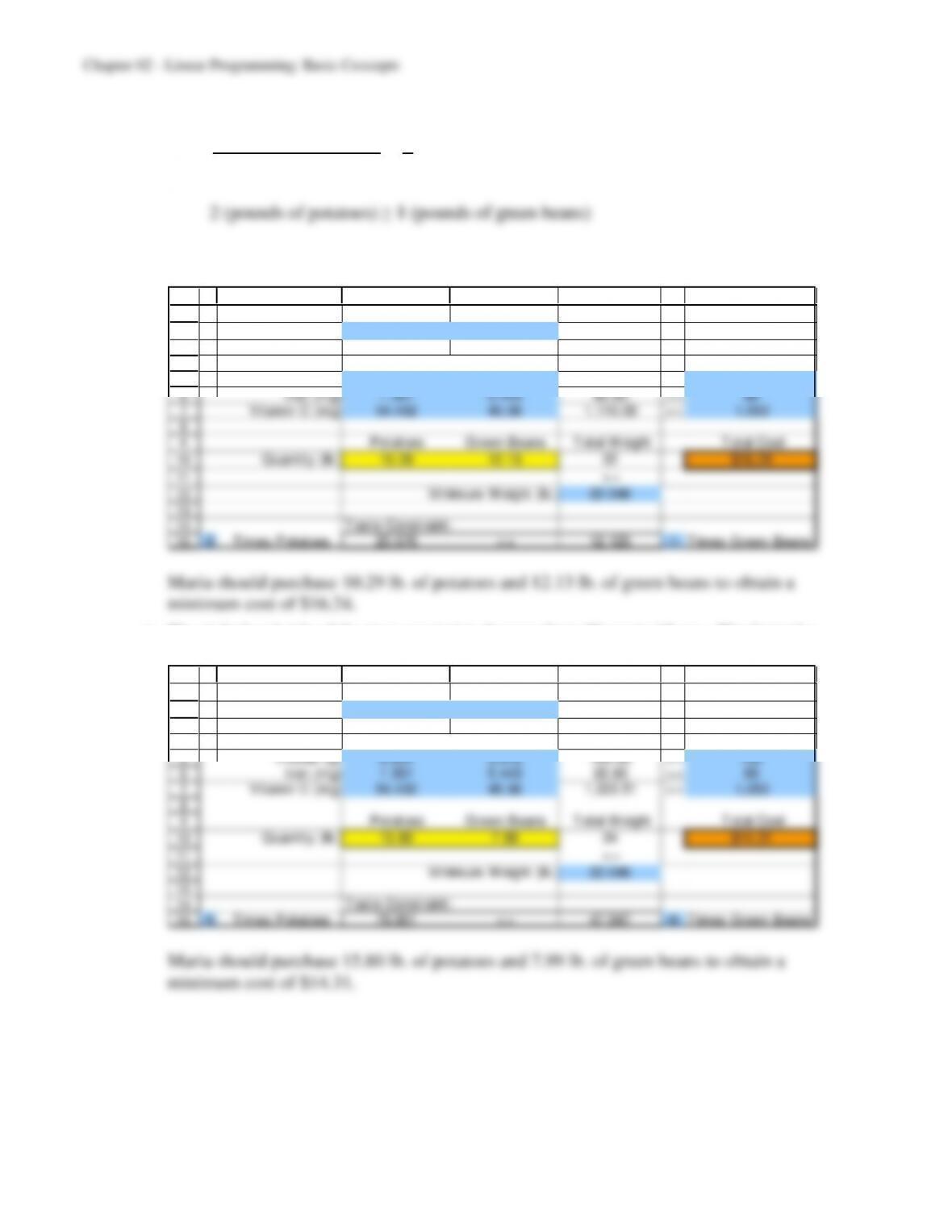
b) The taste constraint changes. The new constraint is now.
poun ds of potatoes
poun ds of green beans
1
2
The formulas and Solver settings used to solve the problem remain the same as part (a).
1
2
3
4
5
6
7
8
9
10
11
12
13
14
15
A B C D E F G
Potatoes Green Beans
Unit Cost (per lb.) $0.40 $1.00
Total Nutritional
Nutrition Requirement
Protein (g) 6.804 9.072 180.00 >= 180
Iron (mg) 1.361 5.443 80.00 >= 80
Vitamin C (mg) 54.432 45.36 1,110.00 >= 1,050
Potatoes Green Beans Total Weight Total Cost
Quantity (lb.) 10.29 12.13 22 $16.24
>=
Minimum Weight (lb.) 22.046
Taste Constraint:
Nutritional Data (per pound)
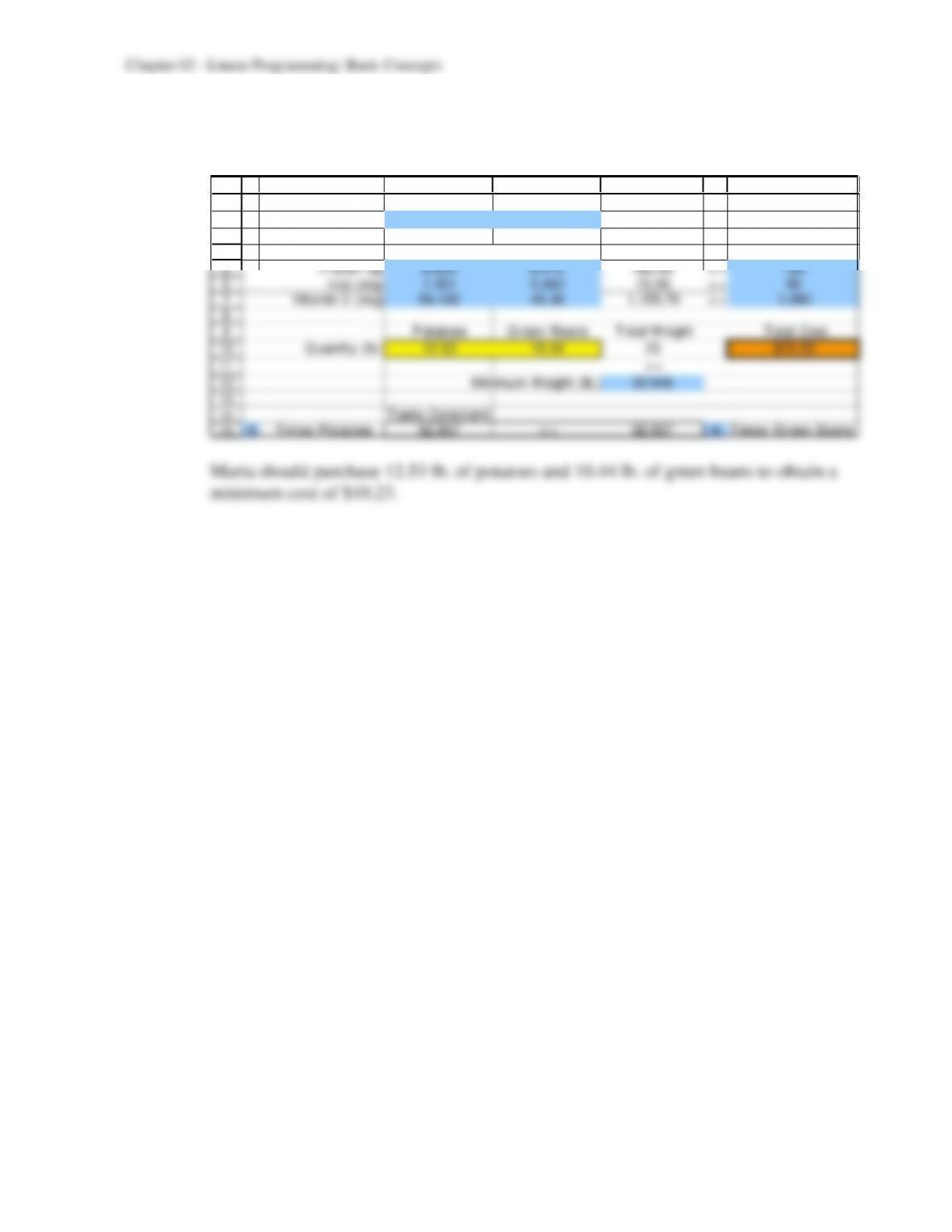
c) The right-hand side of the iron constraint changes from 80 mg to 65 mg. The formulas
and Solver settings used in the problem remain the same as in part (a).
1
2
3
4
5
6
7
8
9
10
11
12
13
14
15
A B C D E F G
Potatoes Green Beans
Unit Cost (per lb.) $0.40 $1.00
Total Nutritional
Nutrition Requirement
Protein (g) 6.804 9.072 180.00 >= 180
Iron (mg) 1.361 5.443 65.00 >= 65
Vitamin C (mg) 54.432 45.36 1,222.51 >= 1,050
Potatoes Green Beans Total Weight Total Cost
Quantity (lb.) 15.80 7.99 24 $14.31
>=
Minimum Weight (lb.) 22.046
Taste Constraint:
Nutritional Data (per pound)
2-37
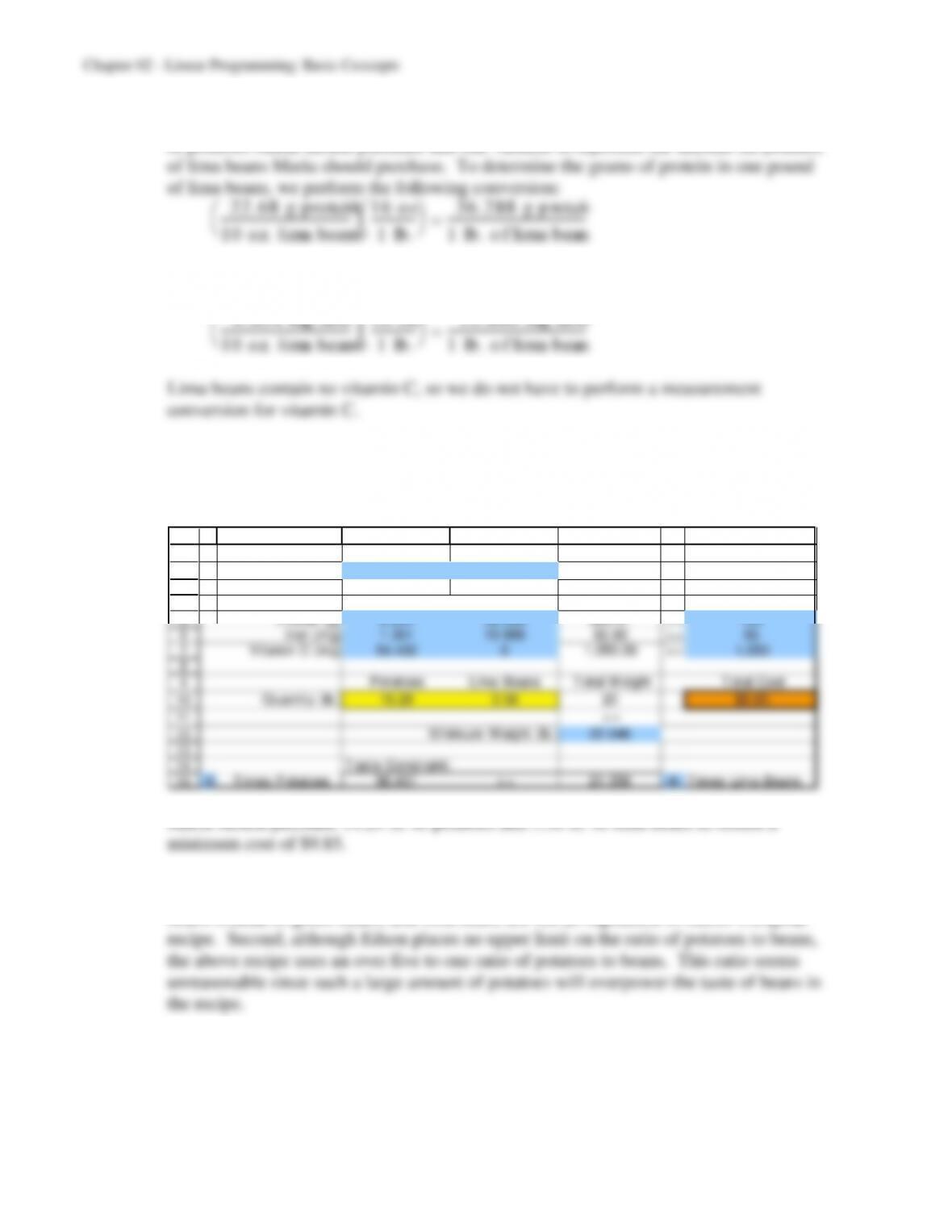
d) The iron requirement remains 65 mg. We need to change the price per pound of green
beans from $1.00 per pound to $0.50 per pound. The formulas and Solver settings used
in the problem remain the same as in part (a).
1
2
3
4
5
6
7
8
9
10
11
12
13
14
15
A B C D E F G
Potatoes Green Beans
Unit Cost (per lb.) $0.40 $0.50
Total Nutritional
Nutrition Requirement
Protein (g) 6.804 9.072 180.00 >= 180
Iron (mg) 1.361 5.443 73.90 >= 65
Vitamin C (mg) 54.432 45.36 1,155.79 >= 1,050
Potatoes Green Beans Total Weight Total Cost
Quantity (lb.) 12.53 10.44 23 $10.23
>=
Minimum Weight (lb.) 22.046
Taste Constraint:
Nutritional Data (per pound)
e) We still have two decision variables: one variable to represent the amount (in pounds)
of potatoes Maria should purchase and one variable to represent the amount (in pounds)
2-39
g) We only need to change the values on the right-hand side of the iron and vitamin C
constraints. The formulas and Solver settings used in the problem remain the same as
in part (a). The values used in the new problem formulation and solution follow.
1
2
3
4
5
6
7
8
9
10
11
12
13
14
15
A B C D E F G
Potatoes Lima Beans
Unit Cost (per lb.) $0.40 $0.60
Total Nutritional
Nutrition Requirement
Protein (g) 6.804 36.288 428.58 >= 180
Iron (mg) 1.361 10.886 120.00 >= 120
Vitamin C (mg) 54.432 0 685.72 >= 500
Potatoes Lima Beans Total Weight Total Cost
Quantity (lb.) 12.60 9.45 22 $10.71
>=
Minimum Weight (lb.) 22.046
Taste Constraint:
Nutritional Data (per pound)
2.3 a) The number of operators that the hospital needs to staff the call center during each two-
hour shift can be found in the following table:
1
2
3
4
5
6
7
8
9
10
11
12
13
14
15
A B C D E F
Average Average English Spanish
Average Calls/hour Calls/hour Speaking Speaking
Number from English from Spanish Agents Agents
Work Shift of Calls Speakers Speakers Needed Needed
7am-9am 40 32 8 6 2
9am-11am 85 68 17 12 3
11am–1pm 70 56 14 10 3
1pm-3pm 95 76 19 13 4
3pm-5pm 80 64 16 11 3
5pm-7pm 35 28 7 5 2
7pm-9pm 10 8 2 2 1
Percent English Speakers 80%
Calls Handled per hour 6
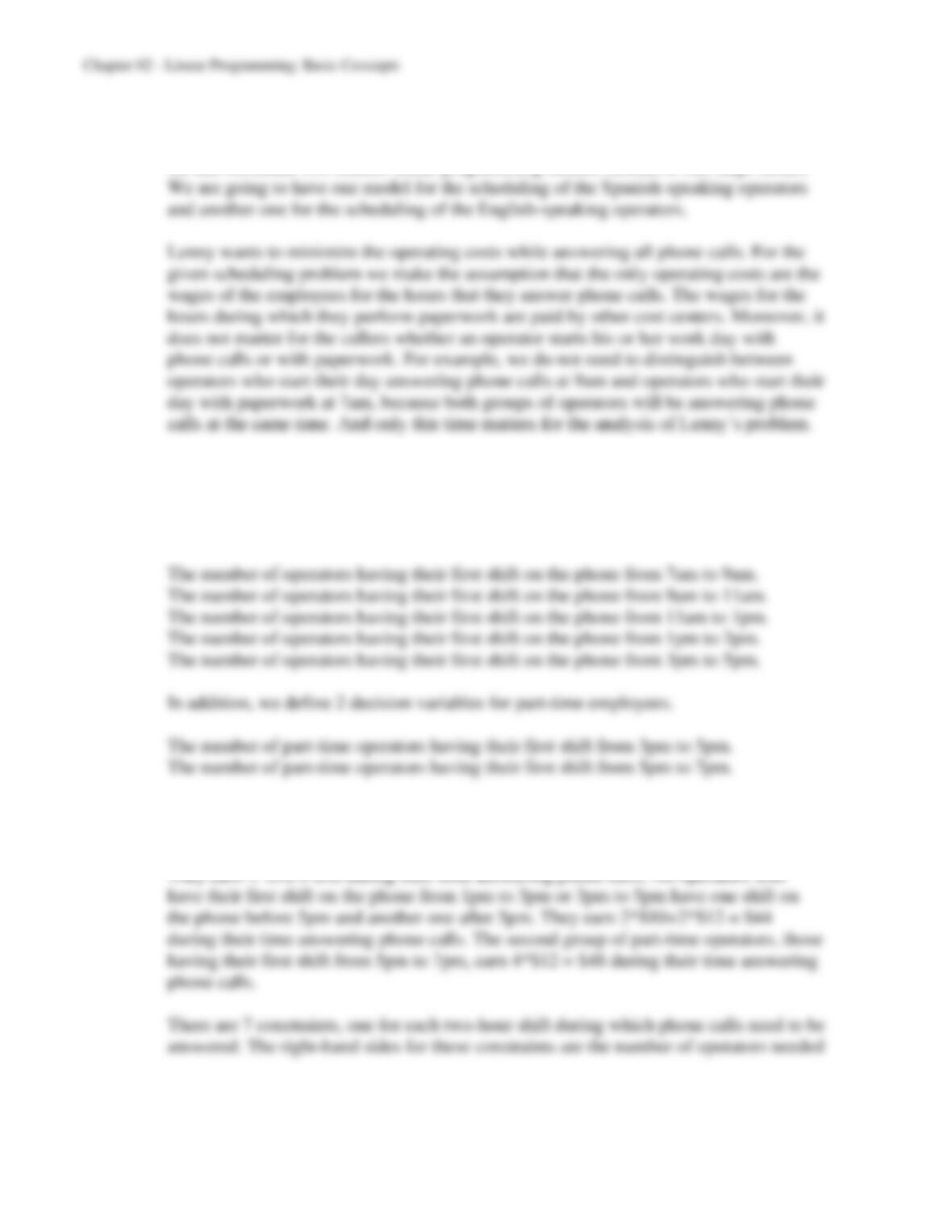
For example, the average number of phone calls per hour during the shift from 7am to
9am equals 40. Since, on average, 80% of all phone calls are from English speakers,
2-40
b) The problems of determining how many Spanish-speaking operators and English-
speaking operators Lenny needs to hire to begin each shift are independent. Therefore
we can formulate two smaller linear programming models instead of one large model.
We define the decision variables according to the time when the employees have their
first shift of answering phone calls. For the scheduling problem of the English-speaking
operators we have 7 decision variables. First, we have 5 decision variables for full-time
employees.
The unit cost coefficients in the objective function are the wages operators earn while
they answer phone calls. All operators who have their first shift on the phone from
7am to 9am, 9am to 11am, or 11am to 1pm finish their work on the phone before 5pm.

2-41
to ensure that all phone calls get answered in a timely manner. On the left-hand side we
determine the number of operators on the phone during any given shift. For example,
The following spreadsheet describes the entire problem formulation for the English-
speaking employees:
1
2
3
4
5
6
7
8
9
10
11
12
13
14
15
16
17
18
19
20
A B C D E F G H I J K
English Full-T ime Full-T ime F ull–Time Full-T ime Full–Time
Speaking on Phone on Phone on Phone on Phone on Phone Part–Time Part–Time
7am-9am 9am-11am 11am-1pm 1pm-3pm 3pm-5pm on Phone on Phone
11am-1pm 1pm-3pm 3pm-5pm 5pm-7pm 7pm-9pm 3pm-7pm 5pm-9pm
Unit Cost $40 $40 $40 $44 $44 $44 $48
Total Agents
Work Shift? Working Needed
7am-9am 1 0 0 0 0 0 0 6 >= 6
9am-11am 0 1 0 0 0 0 0 13 >= 12
11am-1pm 1 0 1 0 0 0 0 10 >= 10
1pm-3pm 0 1 0 1 0 0 0 13 >= 13
3pm-5pm 0 0 1 0 1 1 0 11 >= 11
5pm-7pm 0 0 0 1 0 1 1 5 >= 5
7pm-9pm 0 0 0 0 1 0 1 2 >= 2
Full–Time Full-Time Full-Time Full-T ime Full-Time
on Phone on Phone on Phone on Phone on Phone Part–Time Part-Time
7am-9am 9am-11am 11am-1pm 1pm-3pm 3pm-5pm on Phone on Phone
11am-1pm 1pm-3pm 3pm-5pm 5pm-7pm 7pm-9pm 3pm-7pm 5pm-9pm Total Cost
Number W orking 6 13 4 0 2 5 0 $1,228
6
7
8
9
10
11
12
13
14
I
To tal
Working
=SUMPR ODUCT( B8 :H8,Number Wor king)
=SUMPR ODUCT( B9 :H9,Number Wor king)
=SUMPR ODUCT( B1 0:H10,NumberWo rk in g)
=SUMPR ODUCT( B1 1:H11,NumberWo rk in g)
=SUMPR ODUCT( B1 2:H12,NumberWo rk in g)
=SUMPR ODUCT( B1 3:H13,NumberWo rk in g)
=SUMPR ODUCT( B1 4:H14,NumberWo rk in g)
19
20
K
Total Cost
=SUMPRODUCT(UnitCost,NumberWorking)
Solver Parameters
Set Objective (Target Cell): TotalCost
To: Min
By Changing (Variable) Cells:
NumberWorking
Subject to the Constraints:
TotalWorking >= AgentsNeeded
Solver Options (Excel 2010):
Make Variables Nonnegative
Solving Method: Simplex LP
Solver Options (older Excel):
Assume Nonnegative
Ra nge N ame Ce lls
Ag ents Need ed K8:K14
Nu mberWor king B2 0:H20
TotalCos t K20
TotalWorking I8:I14

2-42
The linear programming model for the Spanish-speaking employees can be developed
in a similar fashion.
1
2
3
4
5
6
7
8
9
10
11
12
13
14
15
16
17
18
19
20
A B C D E F G H I
Spanish Full–Time Full–Time Full-Time Full-T ime Full-T ime
Speaking on Phone on Phone on Phone on Phone on Phone
7am-9am 9am-11am 11am-1pm 1pm-3pm 3pm-5pm
11am–1pm 1pm-3pm 3pm-5pm 5pm-7pm 7pm-9pm
Unit Cost $40 $40 $40 $44 $48
Total Agents
Work Shift? Working Needed
7am-9am 1 0 0 0 0 2 >= 2
9am-11am 0 1 0 0 0 3 >= 3
11am–1pm 1 0 1 0 0 4 >= 3
1pm-3pm 0 1 0 1 0 5 >= 4
3pm-5pm 0 0 1 0 1 3 >= 3
5pm-7pm 0 0 0 1 0 2 >= 2
7pm-9pm 0 0 0 0 1 1 >= 1
Full–Time F ull–Time Full–Time Full-Time Full-T ime
on Phone on Phone on Phone on Phone on Phone
7am-9am 9am-11am 11am-1pm 1pm-3pm 3pm-5pm
11am–1pm 1pm-3pm 3pm-5pm 5pm-7pm 7pm-9pm Total Cost
Number W orking 2 3 2 2 1 $416
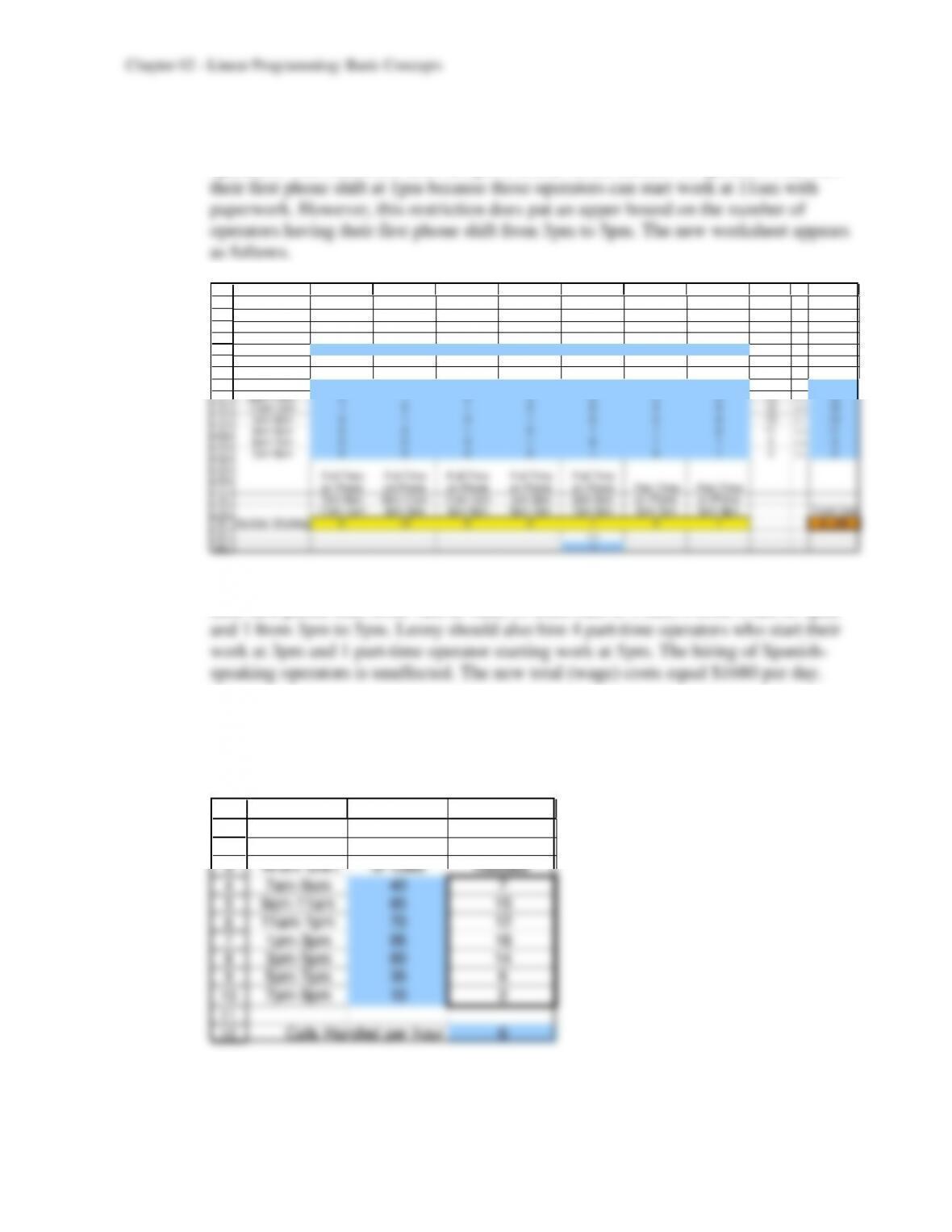
c) Lenny should hire 25 full-time English-speaking operators. Of these operators, 6 have
their first phone shift from 7am to 9am, 13 from 9am to 11am, 4 from 11am to 1pm,
and 2 from 3pm to 5pm. Lenny should also hire 5 part-time operators who start their
2-43
d) The restriction that Lenny can find only one English-speaking operator who wants to
start work at 1pm affects only the linear programming model for English-speaking
operators. This restriction does not put a bound on the number of operators who start
1
2
3
4
5
6
7
8
9
10
11
12
13
14
15
16
17
18
19
20
21
22
A B C D E F G H I J K
English Full-Time F ull-Time F ull–Time F ull-Time Full-Time
Speaking on Phone on Phone on Phone on Phone on Phone Part-Time Part-Time
7am-9am 9am-11am 11am–1pm 1pm-3pm 3pm-5pm on Phone on Phone
11am–1pm 1pm-3pm 3pm-5pm 5pm-7pm 7pm–9pm 3pm-7pm 5pm-9pm
Unit Cost $40 $40 $40 $44 $44 $44 $48
Total Agents
W ork Shift? W orking Needed
7am-9am 1 0 0 0 0 0 0 6 >= 6
9am-11am 0 1 0 0 0 0 0 13 >= 12
11am–1pm 1 0 1 0 0 0 0 12 >= 10
1pm-3pm 0 1 0 1 0 0 0 13 >= 13
3pm-5pm 0 0 1 0 1 1 0 11 >= 11
5pm-7pm 0 0 0 1 0 1 1 5 >= 5
7pm-9pm 0 0 0 0 1 0 1 2 >= 2
Full-T ime Full–Time F ull–Time F ull–Time Full–Time
on Phone on Phone on Phone on Phone on Phone Part-Time Part-Time
7am-9am 9am-11am 11am–1pm 1pm-3pm 3pm-5pm on Phone on Phone
11am–1pm 1pm-3pm 3pm-5pm 5pm-7pm 7pm-9pm 3pm-7pm 5pm-9pm T otal Cost
Number W orking 6 13 6 0 1 4 1 $1,268
<=
1
Lenny should hire 26 full-time English-speaking operators. Of these operators, 6 have
their first phone shift from 7am to 9am, 13 from 9am to 11am, 6 from 11am to 1pm,
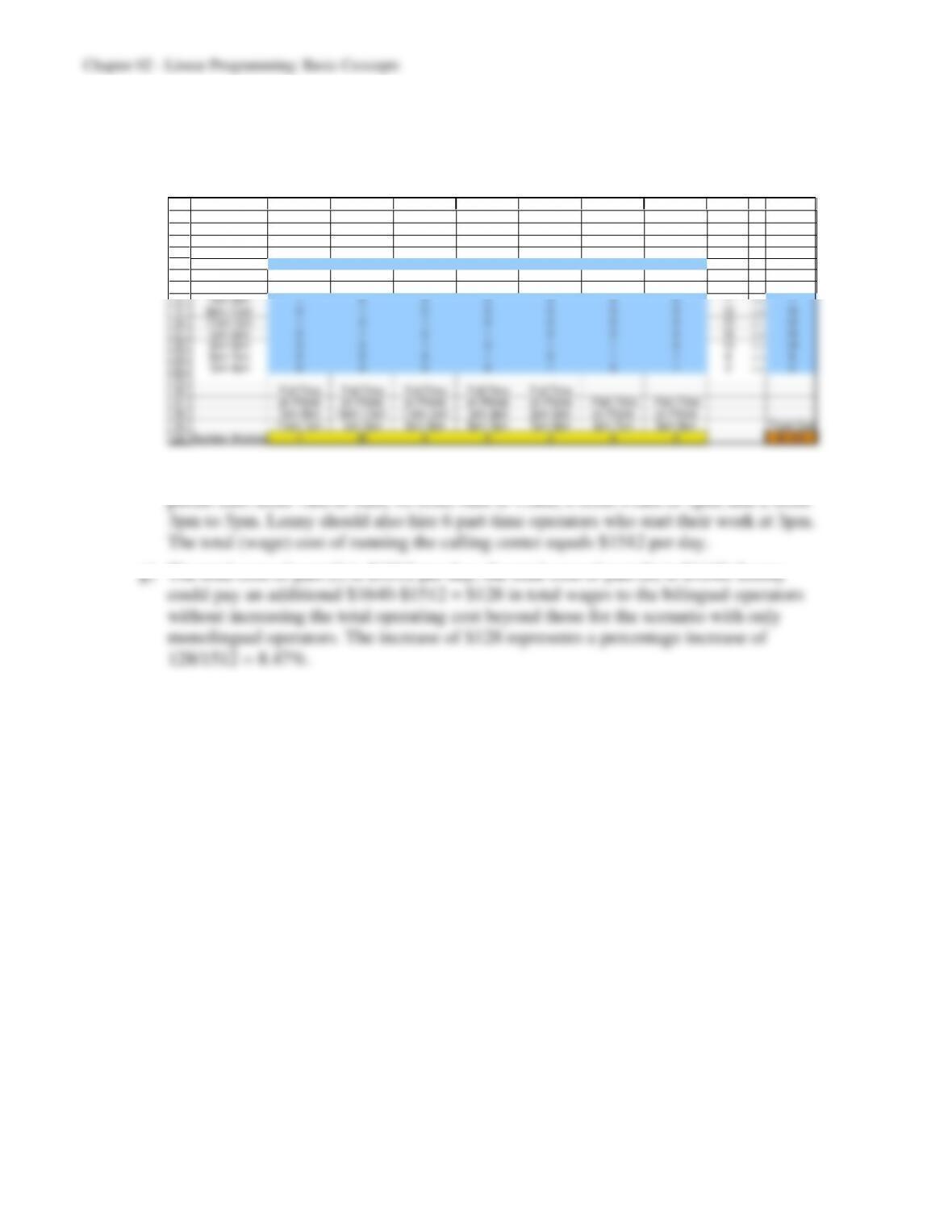
e) For each hour, we need to divide the average number of calls per hour by the average
processing speed, which is 6 calls per hour. The number of bilingual operators that the
hospital needs to staff the call center during each two-hour shift can be found in the
following table:
1
2
3
4
5
6
7
8
9
10
11
12
A B C
Average
Number Agents
Work Shift of Calls Needed
7am–9am 40 7
9am–11am 85 15
11am-1pm 70 12
1pm–3pm 95 16
3pm–5pm 80 14
5pm–7pm 35 6
7pm–9pm 10 2
Calls Handled per hour 6
2-44
f) The linear programming model for Lenny’s scheduling problem can be found in the
same way as before, only that now all operators are bilingual. (The formulas and the
solver dialogue box are identical to those in part (b).)
1
2
3
4
5
6
7
8
9
10
11
12
13
14
15
16
17
18
19
20
A B C D E F G H I J K
Bilin gual Full–Time F ull–Time F ull–Time F ull–Time Full-Time
on Phone on Phone on Phone on Phone on Phone Part–Time Part-Time
7am-9am 9am-11am 11am-1pm 1pm-3pm 3pm-5pm on Phone on Phone
11am-1pm 1pm-3pm 3pm-5pm 5pm-7pm 7pm-9pm 3pm-7pm 5pm-9pm
Unit Cost $40 $40 $40 $44 $44 $44 $48
Total Agents
Work Shift? Working Needed
7am-9am 1 0 0 0 0 0 0 7 >= 7
9am-11am 0 1 0 0 0 0 0 16 >= 15
11am-1pm 1 0 1 0 0 0 0 13 >= 12
1pm-3pm 0 1 0 1 0 0 0 16 >= 16
3pm-5pm 0 0 1 0 1 1 0 14 >= 14
5pm-7pm 0 0 0 1 0 1 1 6 >= 6
7pm-9pm 0 0 0 0 1 0 1 2 >= 2
Full–Time F ull–Time F ull–Time F ull–Time Full-Time
on Phone on Phone on Phone on Phone on Phone Part–Time Part-Time
7am-9am 9am-11am 11am-1pm 1pm-3pm 3pm-5pm on Phone on Phone
11am-1pm 1pm-3pm 3pm-5pm 5pm-7pm 7pm-9pm 3pm-7pm 5pm-9pm Total Cost
Number W orking 7 16 6 0 2 6 0 $1,512
Lenny should hire 31 full-time bilingual operators. Of these operators, 7 have their first

2-45
h) Creative Chaos Consultants has made the assumption that the number of phone calls is
independent of the day of the week. But maybe the number of phone calls is very
different on a Monday than it is on a Friday. So instead of using the same number of
Similarly, Lenny might want to take a closer look at the length of the shifts he has
scheduled. Using shorter shift periods would allow him to “fine tune” his calling
centers and make it more responsive to demand fluctuations.