For use with McGraw-Hill/Irwin
Accounting for Governmental & Nonprofit Entities
17th Edition
By Jacqueline L. Reck and Suzanne L. Lowensohn
Instructions
City of Bingham
Computerized Cumulative Problem

2
Table of Contents
Chapter 1
Introducing City of Bingham
Welcome………………………………………………………. 4
System Requirements ………………………………………………………. 4
Licensing ……………………………………………………………………….. 4
Running or Removing Cities of Smithville and Bingham
Running the Cities of Smithville and Bingham……………………. 5
Removing the Cities of Smithville and Bingham …………………. 5
General Operating Instructions
Opening the Cities of Smithville and Bingham……………………. 5
Creating a new project ……………………………………………………… 6
Opening an existing project ………………………………………………. 6
Saving the current project …………………………………………………. 7
City of Bingham Main Window
Adding and posting journal entries ……………………………………. 8
Editing/deleting/unposting journal entries ………………………….. 8
Working with the ledgers screen ………………………………………..10
Working with the detail journal screen ……………………………….10
Printing Reports ……………………………………………………………………….11
Exporting Trial Balances ………………………………………………………..12
Completing Chapters 2 through 11 of the
City of Bingham Cumulative Problem ……………………………..12
Chapter 2 Opening the Books ………………………………………………..13
Chapter 3 Recording the Annual Budget ……………………………..17
Chapter 4 Recording Operating Transactions Affecting
the General Fund and Governmental Activities at the
Government-wide Level ……………………………………………………….19
Chapter 5 Recording Capital Asset Transactions ……………….26
3
Chapter 6 Recording General Long-term Liabilities and
Debt Service Transactions …………………………..……………………….28
Chapter 7 Recording Enterprise Fund and
Business-type Activities Transactions ………………………………..33
Chapter 8 Recording Fiduciary Fund Transactions —
Tax Agency Fund ………………………………………………………………….39
Chapter 9 Adjusting and Closing Entries for
Governmental Activities, Government-wide Level;
Preparation of Government-wide and Major Fund
Financial Statements ……………………………………………………………..41
Chapter 10 Analysis of Financial Condition ………………………..43
Chapter 11 Preparation of Audit Report ……………………………..43

4
CHAPTER 1
INTRODUCING THE CITY OF BINGHAM
Welcome
Thank you for purchasing the Cities of Smithville and Bingham Governmental
Accounting Software. This software is designed to be used with the McGraw- Hill
textbook Accounting for Governmental and Nonprofit Entities, 17th Edition.
System Requirements
To use the Cities of Smithville and Bingham accounting software application, you
must have the following:
Windows
• 2.33GHz or faster x86-compatible processor, or Intel Atom™ 1.6GHz or
faster processor for netbook class devices
• Microsoft® Windows Server 2008, Windows 7, or Windows 8 Classic
• 512MB of RAM (1GB recommended)
Mac OS
• Intel® Core™ Duo 1.83GHz or faster processor
• Mac OS X v10.7, and above
• 512MB of RAM (1GB recommended)
• Adobe AIR 15 or latest version
• Recommended screen resolution of 1024 x 768 minimum
• Spreadsheet program (in order to easily view the exported CSV files)
• Excel 2003 or later (in order to view the exported Excel files)
• Adobe Reader 9 or later to read saved report files
Licensing
This manual was written for use with the Cities of Smithville and Bingham
software. The manual and the software described in it are copyrighted, with all
rights reserved. This manual and the Cities of Smithville and Bingham software
may not be copied, except as otherwise provided in your software license or as
expressly permitted in writing by McGraw-Hill Higher Education, Inc.
Use of the Cities of Smithville and Bingham governmental accounting software
(the “Software”) and its documentation are governed by the terms set forth in your
license. Such use is at your sole risk. The software and its documentation
(including this manual) are provided “AS–IS” and without warranty of any kind.
5
[Note: Read the following instructions before beginning your first assignment in
Chapter 2. Refer back to this information as needed.]
RUNNING OR REMOVING THE CITIES OF SMITHVILLE AND
BINGHAM
Running the Cities of Smithville and Bingham
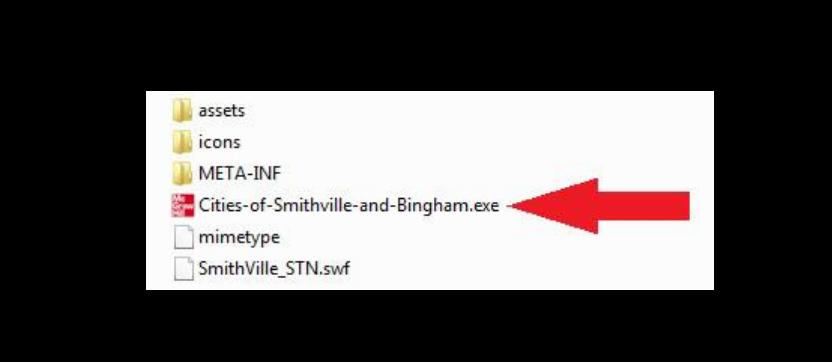
The software application can be run by clicking on the “Cities of Smithville and
Bingham” icon/program as indicated in the “Opening the Cities of Smithville and
Bingham” instructions below. Click “Install” and follow the installation prompts.
It is recommended to save this file in your Programs/Applications or Desktop.
You may exit the program by clicking the “X” button at the top right corner on a PC
or top left corner on a MAC.
Removing the Cities of Smithville and Bingham
You can remove the software application by uninstalling the “Cities of Smithville
and Bingham” program.
GENERAL OPERATING INSTRUCTIONS
Opening the Cities of Smithville and Bingham
You can open the Cities of Smithville and Bingham at any time by clicking on the
“Cities of Smithville and Bingham” icon/program.
6
Creating a New Project
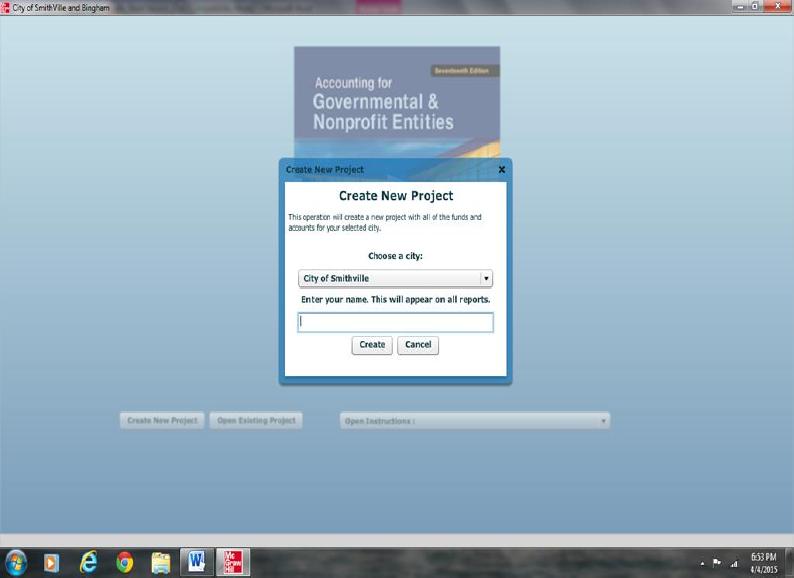
To access the instructions for the Bingham project click on Open Instructions in
the opening window and select and print the Bingham project instructions file. To
create a new project, click on “Create New Project.” The Create New Project
window will appear, as shown below.
Enter your first and last name, then select City of Bingham as your project and click
[Create]. The main project window will pop-up once the project is created and you
will be ready to begin entering journal entry data for your first assignment. This
step creates the accounts and funds that you will need to complete the “City of
Bingham” project. After you have completed the journal entries for each
assignment, you should save your project data file in a folder that you have created
on your computer. For your own protection against hard-drive failure or file
corruption, we recommend that you create a dated backup file on a removable
device (e.g., flash drive) or cloud storage at the end of each session. This will
permit you to reopen your project to the current stage of completion should you
make serious errors on the next session.
Opening an Existing Project
After your initial data entry session, click on “Open Existing Project,” and then
select and open the data file you saved at the end of your first session.
7
Saving the Current Project
During, or at the end of each assignment, click on <File> and <Save/Save As>. If
a filename has already been specified, the current filename should be displayed in
the Save dialog but may be changed if desired.
City Of Bingham Main Window
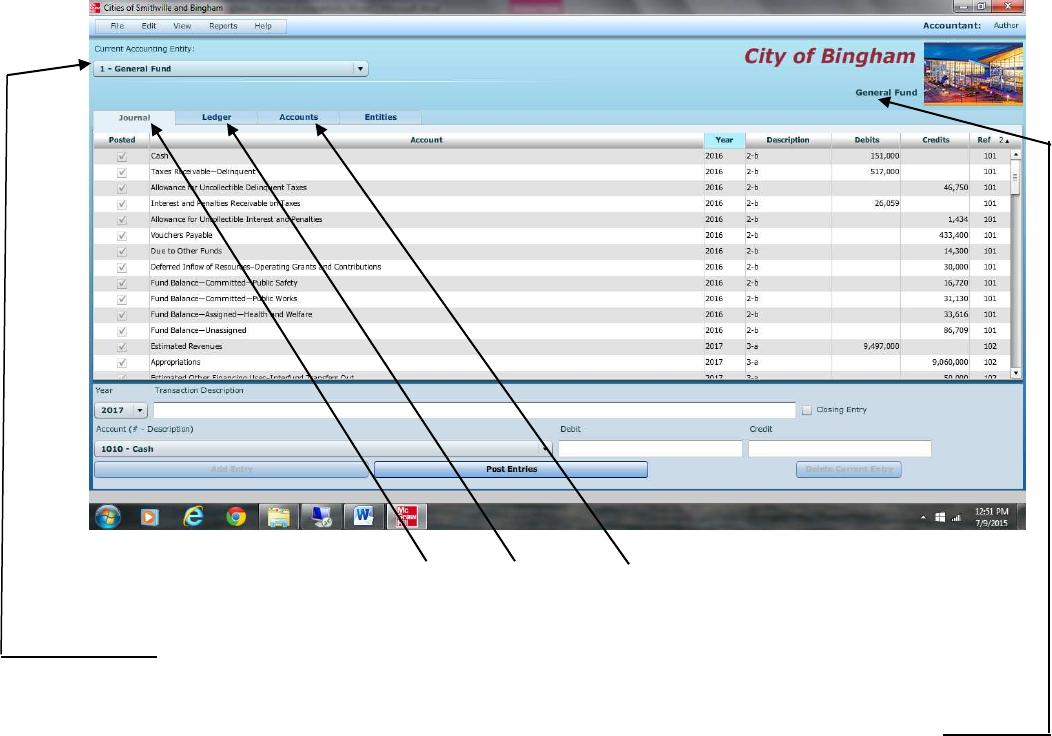
If you have opened a project file, the main project window should appear as
follows:
To navigate between the Journal, Ledger, and Account screens, simply click on the
[TAB] for that particular screen.
To switch between different funds and governmental activities, government-wide,
choose the desired entity from the drop-down menu.
You can verify which entity you are working on by the caption on the upper right
corner of the window. It will show the title of your project, and the current fund
you are in.
The main window has the same standard window controls as most other
applications. To close down your project, simply click on the [X] box. If you click
on the [X] box you will be asked whether you want to close the program without
saving changes. Remember the folder location where you save your file so it
will be easier to retrieve it when you want to reopen the file.
8
Adding and Posting Journal Entries
You need to be in the Journal view before you can add any journal entries. Once
you are in the Journal view, you will see the journal entry panel on the lower
portion of the window.
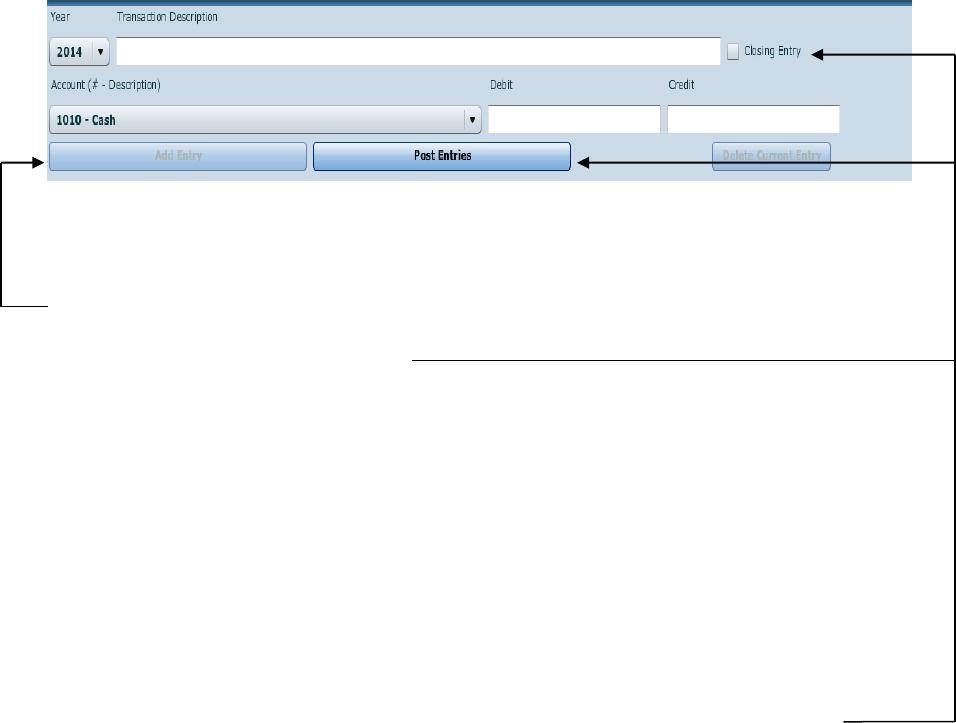
Before ANY entry can be added to the Journal, a transaction description, account #
– description, and debit or credit amount must be specified.
Once you have filled in the necessary fields, simply click on [Add Entry] to add
the entry to the journal. If the entry being made is a closing entry, you must click on
the check mark for [Closing Entry].
If one of the fields is missing a value or contains an illegal character, the [Add
Entry] button will remain disabled.
If the account selected from the drop-down [Account (# – Account Description)]
menu is a control account, the detail journal will automatically open for entering
the transaction detail. When entering data in the detail journal, you must first select
an item from the drop-down [Transaction Description] or type your own
description in the box before selecting the account. When you have completed your
entries the detail total for the transaction will be entered into the control account.
Once you have entered a batch of entries into the general journal, you can post them
to the general ledger at any time by clicking the [Post Entries] button. In the case
of the General Fund, posting transactions also posts entries from the detail journal
to the Revenue ledger and Appropriations, Encumbrances, Expenditures ledgers.
The [Post Entries] button only posts entries for the fund/entity that is currently
open.
Editing/Deleting/Unposting Journal Entries
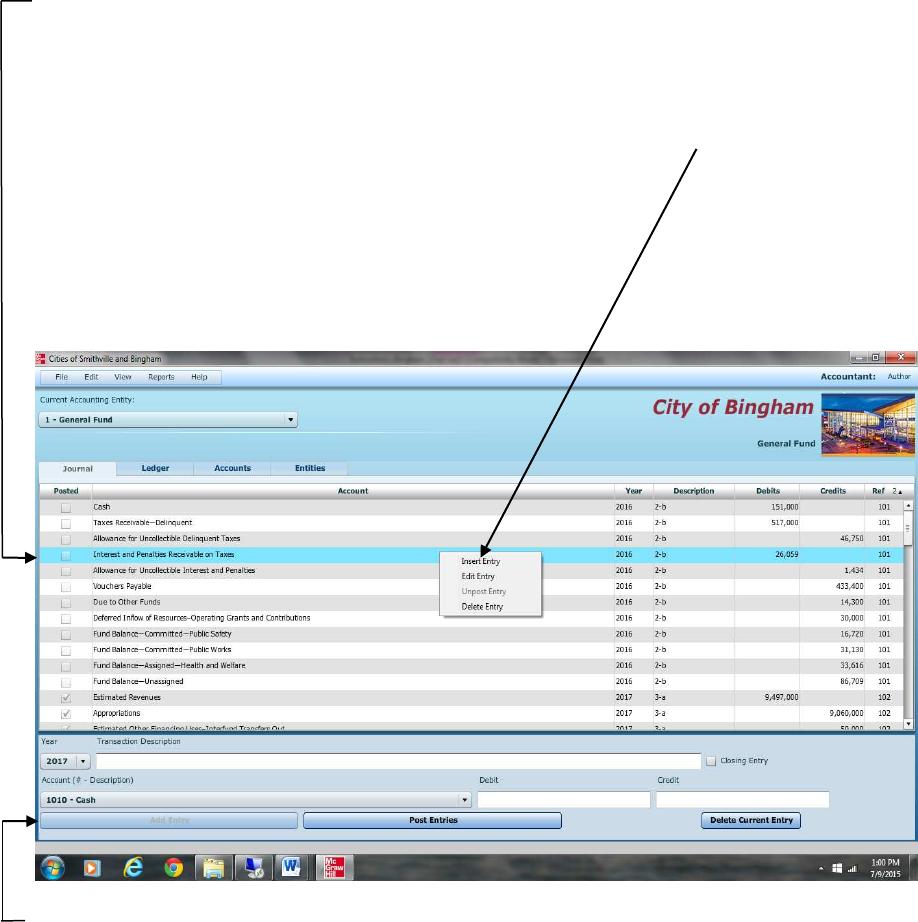
To edit entries that have already been entered, double click or right click on the
entry, and select edit. You will know you are in edit mode when the entry form
turns red and the boxes fill in with the data from the journal. If you wish to delete an
entry, right click on the item and select [Delete] or choose [Edit]–[Delete].
9
As in real-world systems, the software usually does not allow you to edit entries
that have already been posted. So, it is recommended that you verify the accuracy
of entries before clicking [Post Entries]. However, for your convenience we have
added the capability to “unpost” individual batches of posted transactions. To
unpost simply highlight any entry within the batch you want to unpost and either
right click and select [Unpost] or select [Unpost] from the Edit menu. Make all
necessary editing changes to the appropriate accounts then click [Post Entries] and
your corrections will be made to the appropriate accounts. If you need to add a
missing entry to a previously posted journal entry, then unpost as described above,
highlight the line below which a new entry is to be added, and right click and select
“Insert New Entry.” Note that the “Insert Entry” function will work if you are
inserting an entry prior to a balance sheet account. However, it will not work when
inserting an entry prior to any account that has an associated subsidiary ledger (e.g.,
estimated revenues, expenditures).
Screen shot of “right clicking” on a journal entry.
Enter the data for the new entry and click “Add Entry” to insert the new entry. A
provision also allows you to clear all of the transactions from the current fund or
entity. Under [File]-[Student Assistance] you will find the option [Wipe out data
for current fund or governmental activities]. The wipe out function should be
used as a last resort since making changes by editing is quite easy. Once you select
this option, there is no going back. It will remove ALL of the transactions for the
current fund or entity.
10
Working with the Ledger Screen
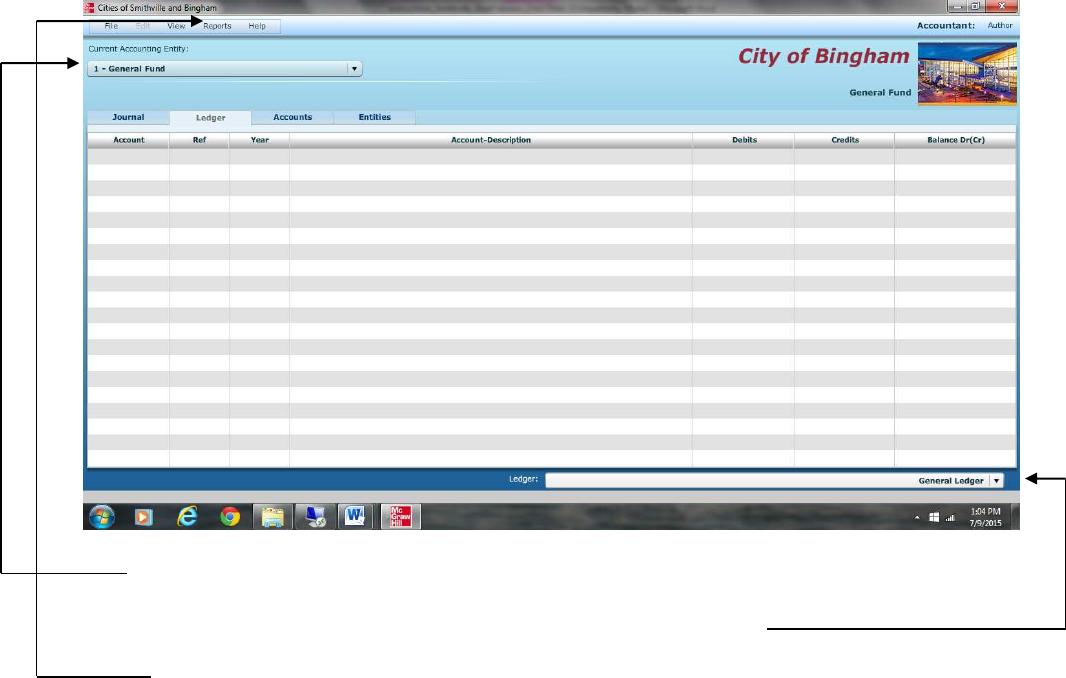
Switch to the Ledgers screen by clicking on the Ledger tab.
Switch entities at any time by changing the selection. Depending on the fund or
entity on which you are working, there may be different ledgers for you to view.
Choose the ledger you want to view from the drop-down list.
If you want to print out a ledger, you should open the [Reports] menu, and select
the report to print.
Working with the Detail Journal Screen
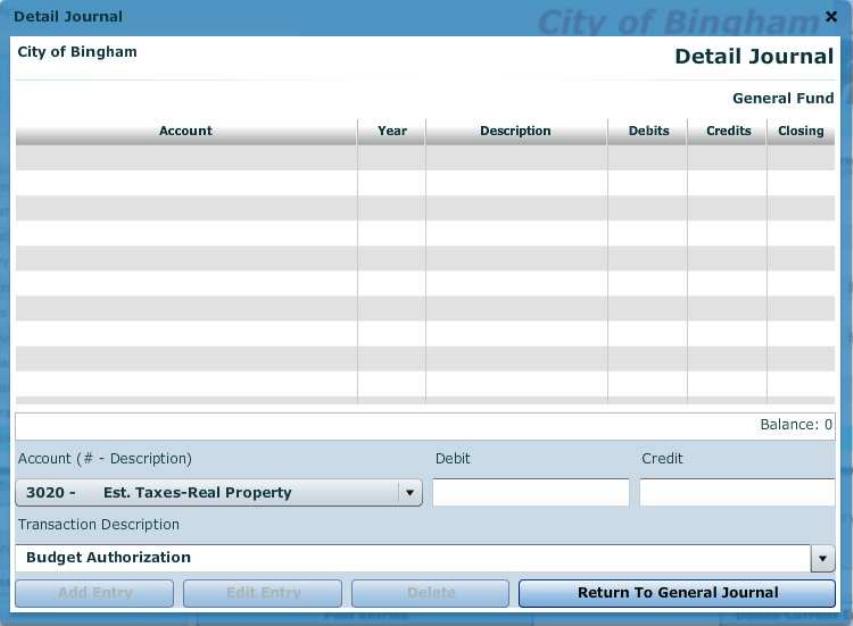
The General Fund of the City of Bingham uses a Detail Journal to avoid recording
operating or budget detail in the general journal/ledgers.
If you choose a control account that has subsidiary detail associated with it, you
will be taken directly to the Detail Journal. If you attempt to edit a journal entry
that has associated subsidiary detail, you will automatically be prompted to also
open the Detail Journal for editing, if desired.
The Detail Journal screen for the General Fund appears as shown on the following
page.
11
The Detail Journal operates very similar to the entry screen on the General Journal.
Fill in the boxes or, in the case of the [Transaction Description] box, select a
description from the drop-down menu, and click [Add Entry]. The balance of the
entries for this transaction is automatically updated. When you exit the Detail
Journal the balance will be copied into a single control account amount in the
General Journal. Please note that the year and reference numbers of these
transactions are based on the originating entry (the line in the General Journal).
Printing Reports
All of the reports for the City of Bingham are available through the Reports menu.
Simply go to the menu and click on the report you want. To print, click on the
“Print” icon and print in the normal manner. If you need to create a “Save as
Printable PDF File,” accept the default file name and save location, or change the
name and/or location if you prefer.
12
Exporting Trial Balances
To make it easier to prepare financial statements/schedules, spreadsheet files for
all trial balances for each entity and each year of transactions, as well as detail
subsidiary account balances (General Fund only), can be exported to either Excel
or CVS for non-Microsoft applications. To export an item, select it from the [File]
[Export] menu, accept the default file name and folder location, and save it. You
can change the file name and/or location if you prefer.
Completing Chapters 2 through 11 of the City of Bingham
This version of a cumulative problem written for the computer presents a series of
transactions, covering activities of the City of Bingham, assuming the city utilizes the
dual-track accounting approach to the GASB governmental reporting model described in
Reck and Lowensohn, Accounting for Governmental and Nonprofit Entities, 17th Edition.
The transactions presented relate to the city’s General, capital projects, debt service,
enterprise, and fiduciary funds, as well as to an additional accounting entity, Governmental
Activities at the government-wide level. The transactions and instructions in this series are
designated Chapter 2, Chapter 3, etc., corresponding to the chapters of Reck and
Lowensohn, Accounting for Governmental and Nonprofit Entities, 17th Edition.
You should begin the project with Chapter 2 of the instructions as you complete Chapter 2
of the textbook. Some problems require you to print trial balances or other documents.
Other problems require the preparation of financial statements or other documents. The
specified documents can either be turned in chapter by chapter or retained in a cumulative
folder until the end of the project, depending on your instructor’s preference and
instructions. Some instructors may prefer that you electronically submit your project data
file and either Excel or PDF files containing your trial balances, financial statements, and
other, rather than submitting printed copies.
To minimize errors, you should read and follow all instructions carefully. Students find
that this computerized cumulative problem significantly enhances their learning if they
complete each City of Bingham chapter as the corresponding chapter of the textbook is
covered. Conversely, students who procrastinate often find that the project takes much
more time than they expected and that it is harder to recall how to make the journal entries
covered in the earlier chapters. Thus, delaying until the deadline for your project is nearly
due may increase the total time it takes you to do the project and leave you little time for
anything else that week. So, our advice is to stay current with the project.
13
Chapter 2 Opening the Books
The City of Bingham has installed a new computerized accounting system, which provides
files for general journal entries and posting to appropriate general ledger/subsidiary ledger
accounts. Budgetary, operating statement, and balance sheet accounts are provided for the
General Fund and the other governmental fund types. Operating statement accounts and
balance sheet accounts are also provided for governmental activities at the
government-wide level and the proprietary and fiduciary funds used by the City of
Bingham that you will use in Chapters 5-9 of the problem. To begin this case, you must
enter the city’s initial accounting information as of December 31, 2016, so that all
transactions can be recorded for the next fiscal year beginning January 1, 2017.
Required
Open the City of Bingham software by double clicking on the Cities of Smithville and
Bingham program. If creating a new project, click [Create New Project], when the
[Create New Project] window appears choose City of Bingham from the [Choose a City]
drop down menu. In addition, in the [Enter your name] box please type in your first and
last name so that your name will appear on all printable reports and click [Create]. This
will create the project and provide access to all of the funds and accounts that you will need
to complete the “City of Bingham” cumulative problem.
To protect yourself from possible hard drive failure or corruption of your project data file,
we recommended that you save your file to a removable device (e.g., flash drive or the
cloud), creating a dated backup file for your project at the end of each session.
To open an existing project, click on [Open Existing Project] in the opening window.
a. If it is not already displayed, select [General Fund] in the [Current Accounting
Entity] window and the [Accounts] tab. Clicking on the [Accounts] tab allows you
to see the chart of accounts that will be used for the [General Fund]. A different chart
of accounts is provided for each of the accounting entities. Next, select the [Journal]
tab and click the drop down menu for [Account (# – Description)]. You should see
the same general ledger accounts that were listed when you clicked on the [Accounts]
tab. (Note: For purposes of this exercise, date suffixes are omitted from the
Expenditures and Encumbrances accounts as expenditures from more than one year’s
appropriations do not occur in this problem.)
b. The post-closing trial balance for the General Fund of the City of Bingham as of
December 31, 2016, is shown on the following page. Select the [Journal] view and
create a journal entry to enter the balance sheet accounts and amounts shown in the
trial balance (review software operating procedures in Chapter 1 of these instructions
if necessary). Be sure to enter 2016 from the drop-down [Year] menu and enter the
paragraph number from these instructions in the [Transaction Description] box of
the [Journal] view. For this entry you should enter 2-b. Select the appropriate
accounts individually and insert the appropriate amounts. (Note: Enter all dollar

14
amounts without dollar signs, without commas, and without decimal points. All
amounts in this project should be rounded to the nearest whole dollar. For all
entries, it is vitally important that the correct year be selected.) You must enter
each account and amount one line at a time by clicking [Add Entry].
The year and transaction description need only be entered for the first line of the journal
entry; it should remain in the boxes for the rest of the accounts. When you have
completed entering all account data and amounts, verify the accuracy of all your entries,
including date and paragraph numbers. When you are sure that your entries are correct,
click [Post Entries] to post the items to the General Ledger of the General Fund.
Unpost capability. As discussed in Chapter 1 of these instructions, the City of
Bingham software program permits students to “unpost” a particular batch of posted
transactions. Unposted entries then can be edited or missing entries can be inserted
before re-posting entries. Prior to unposting a batch all batches must be posted.
Select [Reports, Trial Balances, Post-Closing Trial Balance] and print or save as a
PDF file the post-closing trial balance for year 2016. If printed, retain the printed trial
balance in your personal cumulative folder until the due date assigned by your
instructor for the project. The PDF file can be submitted as directed by your instructor.
CITY OF BINGHAM
General Fund
Post-closing Trial Balance
As of December 31, 2016
Account Title Debits Credits
Cash $ 151,000
Taxes Receivable—Delinquent 517,000
Allowance for Uncollectible Delinquent Taxes $ 46,750
Interest and Penalties Receivable on Taxes 26,059
Allowance for Uncollectible Interest and Penalties 1,434
Vouchers Payable 433,400
Due to Other Funds 14,300
Deferred Inflow of Resources—Operating
Grants and Contributions 30,000
Fund Balance—Committed—Public Safety 16,720
Fund Balance—Committed—Public Works 31,130
Fund Balance—Assigned—Health and Welfare 33,616
Fund Balance—Unassigned 86,709
Totals $ 694,059 $ 694,059
c. Select [Governmental Activities—Government-Wide] in the [Current
Accounting Entity] drop-down menu and the [Accounts] view tab. You will see all
of the accounts included in the trial balance below, plus many other accounts that will
be used in the various chapters of the City of Bingham project.

15
d. Select the [Journal] view and create a journal entry to enter the statement of net
position (i.e., balance sheet) accounts and amounts shown in the following trial
balance. It is necessary to enter these items in the accounts of the governmental
activities category at the government-wide level as the general journal and general
ledger for governmental activities comprise a separate “set of books” from those for
the General Fund. Be sure to enter 2016 from the drop-down [Year] menu and enter
2-d in the Transaction Description box. Select each account individually and insert
the appropriate debit or credit amount for each account. When you have completed
entering the initial data, verify the accuracy of all entries and click [Post Entries] to
post the entries to the governmental activities, government-wide general ledger.
CITY OF BINGHAM
Governmental Activities, Government-wide Level
Post-closing Trial Balance
As of December 31, 2016
Account Title Debits Credits
Cash $ 1,101,000
Taxes Receivable—Delinquent 602,000
Allowance for Uncollectible Delinquent Taxes $ 100,750
Interest and Penalties Receivable on Taxes 35,659
Allowance for Uncollectible Interest and Penalties 2,394
Land 1,210,000
Improvements Other than Buildings 9,900,000
Accumulated Depreciation—Improvements
Other Than Buildings 2,310,000
Infrastructure 32,109,000
Accumulated Depreciation—Infrastructure 12,408,000
Buildings 10,230,000
Accumulated Depreciation—Buildings 2,310,000
Equipment 8,360,000
Accumulated Depreciation—Equipment 4,030,400
Vouchers Payable 433,400
Accrued Interest Payable on Long-term Debt 50,000
Internal Payables to Business-type Activities 14,300
Current Portion of Long-term Debt 500,000
Serial Bonds Payable—2% 9,500,000
Deferred Inflow of Resources—Operating Grants
and Contributions 30,000
Net Position—Net Investment in Capital Assets 30,750,600
Net Position—Restricted for Debt Service 939,640
Net Position—Unrestricted 168,175
Totals $63,547,659 $63,547,659