
11) All parts of a container in BorderLayout must be used.
12) A JPanel can itself contain JPanels.
13) If a GUI container is resized by the user, all components of the GUI are automatically
increased or decreased by the same fraction to fit in the newly sized container.
14) The size and shape of a GUI container is based on the layout manager selected and the type
and number of items added to the container.
15) A border can be put around any Swing component with the exception of a JButton and
JScrollPane component.
16) The term “test case” is used to express a set of inputs (or user actions) and the expected
outputs to be used in testing out software.

17) In black-box testing, the tester should already know something about how the program is
implemented so that he/she can more carefully identify what portion(s) of the software are
leading to errors.
7.3 Free-Form Questions
1) Provide a reason why an instance data would be declared static.
2) Provide a reason why a method would be declared static.
3) Write a static method that is passed two ChessPieces and determines if the two pieces are
owned by the same player. It should return true or false.
}
4) Explain the difference between implementing an interface and a derived class.
5) Define an interface class that contains two int constants, X = 5 and Y = 10 and one int method
called useXY which receives no parameters. Call your interface class XYClass
}
6) Assume a class Foo implements Comparable. Without knowing anything else about the Foo
class, write an equal method that returns true if the Foo parameter passed to this Foo is equal to
this Foo as determined by using the implementation of Comparable.

7) To implement Comparable for the ChessPiece class, the current ChessPiece’s type is
compared to a ChessPiece passed as a parameter. The method should return 0 if the types are
equal, -1 if this piece’s type is a lesser piece than the parameter’s type, and 1 if this piece’s type is
a greater piece than the parameter’s type. Pieces are ordered as follows: “Pawn” is a lesser piece
to a “Knight” and a “Bishop”, “Knight” and “Bishop” are equivalent for this example, both are
lesser pieces to a “Rook” which is a lesser piece to a “Queen” which is a lesser piece to a “King.”
Write the proper method to implement Comparable for this class.
}
8) Why was the Y2K problem a problem of software maintenance and not a problem of software
testing?

9) In what way is black-box testing better than glass-box testing? In what way is glass-box
testing better than black-box testing?
10) Write a set of code that will allow a user to select an input image and then place this image in
a JLabel lab1 and add lab1 to a JPanel as the northern component in a JFrame using
BorderLayout. The JFrame has already been instantiated as jf and the BorderLayout already
established. Hint: a JFileChooser returns a File and JLabel requires the String name of a file as
an argument. A File can return its name using File class’ method getAbsolutePath( )

11) Write code to create a JPanel with 4 JCheckBox GUI components and two JLabels for
output, one that says “Current cost is” and the other that outputs the computed cost based on
which of the food items has been selected.
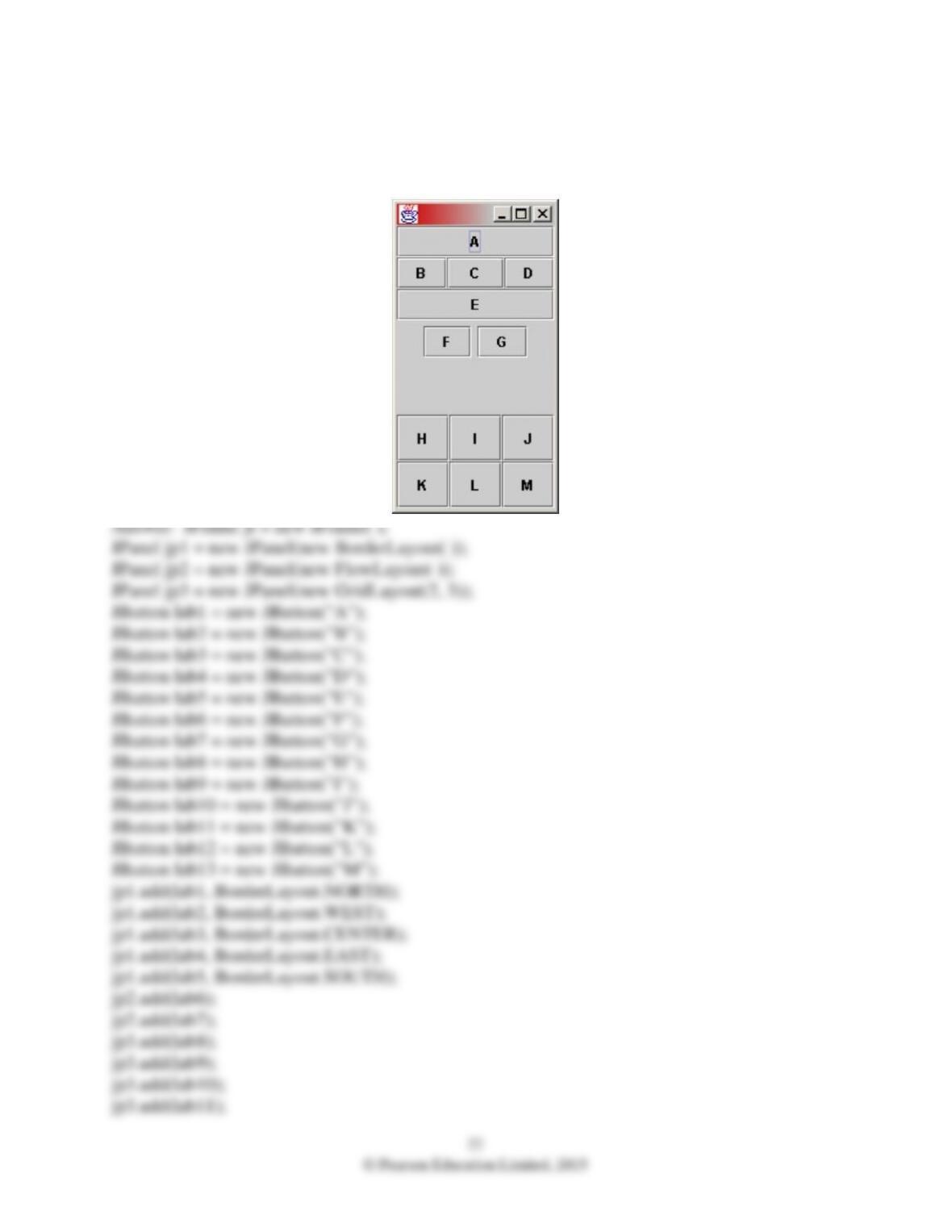
12) Provide code to generate the following JFrame. Each lettered item is a JButton. Hint:
Create several JPanels, each one having two or more JButtons and taken up a portion of the
JFrame.

23
© Pearson Education Limited, 2015
jp3.add(lab12);
jp3.add(lab13);
JPanel jp4 = new JPanel(new GridLayout(3, 1));
jp4.add(jp1);
jp4.add(jp2);
jp4.add(jp3);
jf.getContentPane( ).add(jp4);
jf.pack( );
jf.setVisible(true);
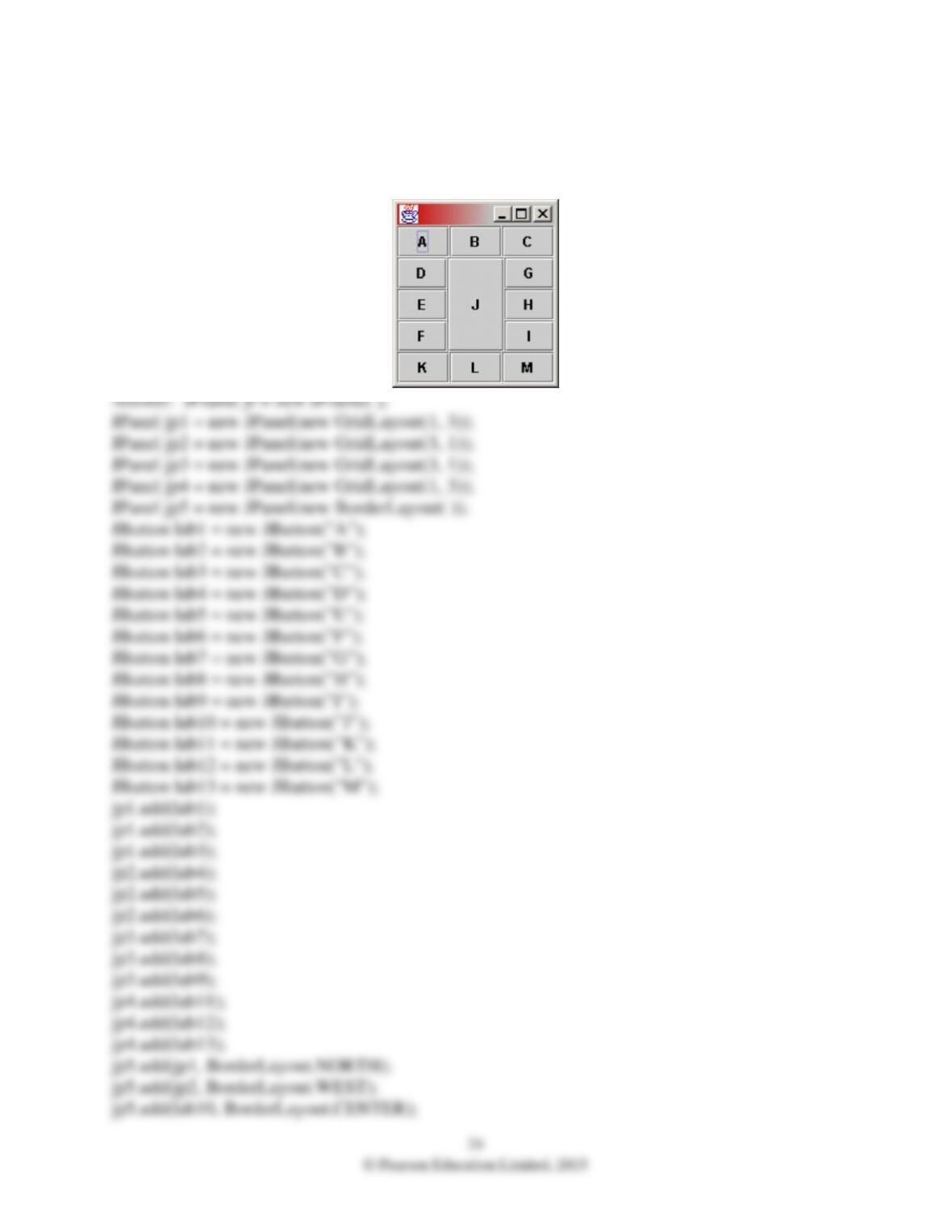
13) Provide code to generate the following JFrame. Each lettered item is a JButton. Hint:
Create several JPanels, each one having two or more JButtons and taken up a portion of the
JFrame.
25
© Pearson Education Limited, 2015
jp5.add(jp3, BorderLayout.EAST);
jp5.add(jp4, BorderLayout.SOUTH);
jf.getContentPane( ).add(jp5);
jf.pack( );
jf.setVisible(true);
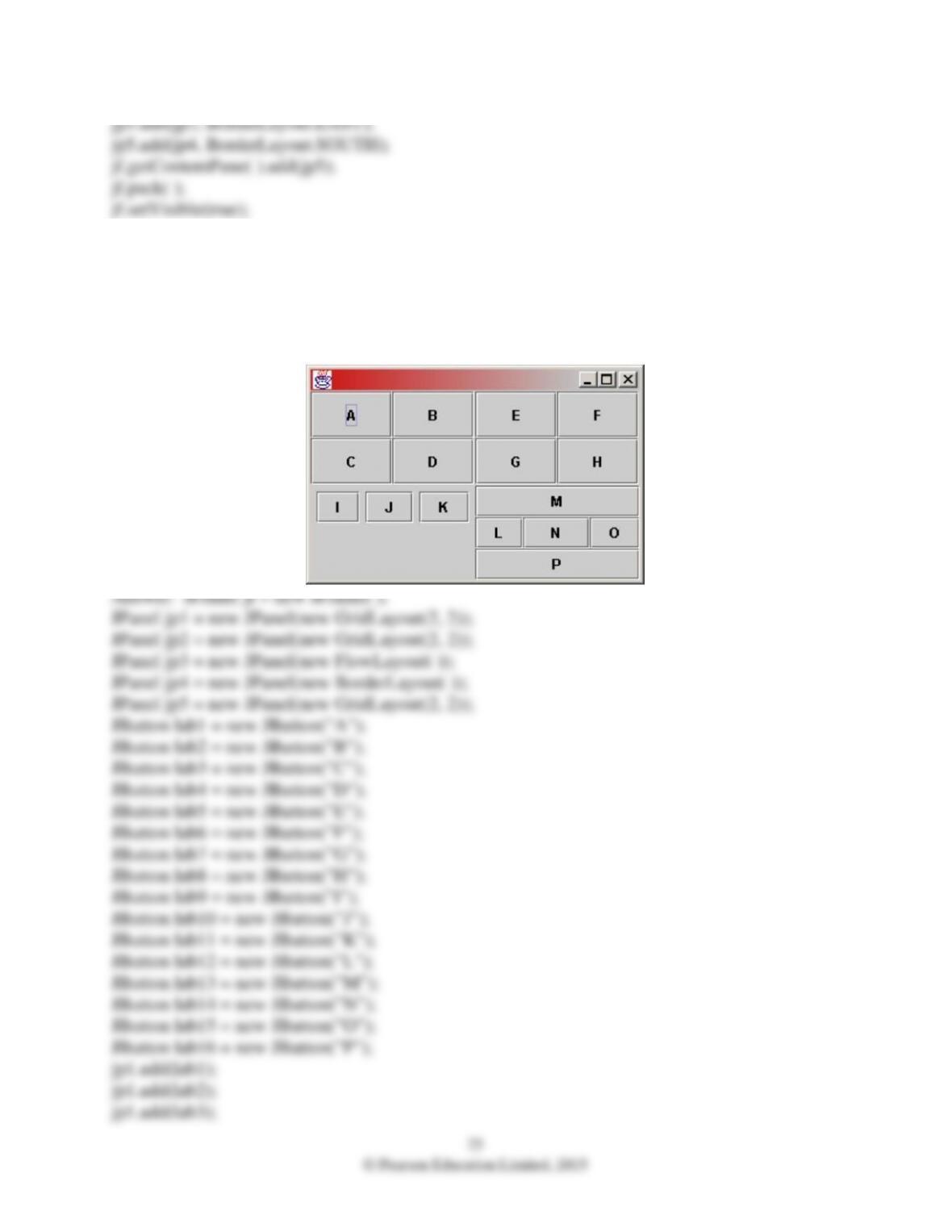
14) Provide code to generate the following JFrame. Each lettered item is a JButton. Hint:
Create several JPanels, each one having two or more JButtons and taken up a portion of the
JFrame.

26
© Pearson Education Limited, 2015
jp1.add(lab4);
jp2.add(lab5);
jp2.add(lab6);
jp2.add(lab7);
jp2.add(lab8);
jp3.add(lab9);
jp3.add(lab10);
jp3.add(lab11);
jp4.add(lab12, BorderLayout.WEST);
jp4.add(lab13, BorderLayout.NORTH);
jp4.add(lab14, BorderLayout.CENTER);
jp4.add(lab15, BorderLayout.EAST);
jp4.add(lab16, BorderLayout.SOUTH);
jp5.add(jp1);
jp5.add(jp2);
jp5.add(jp3);
jp5.add(jp4);
jf.getContentPane( ).add(jp5);
jf.pack( );
jf.setVisible(true);

27
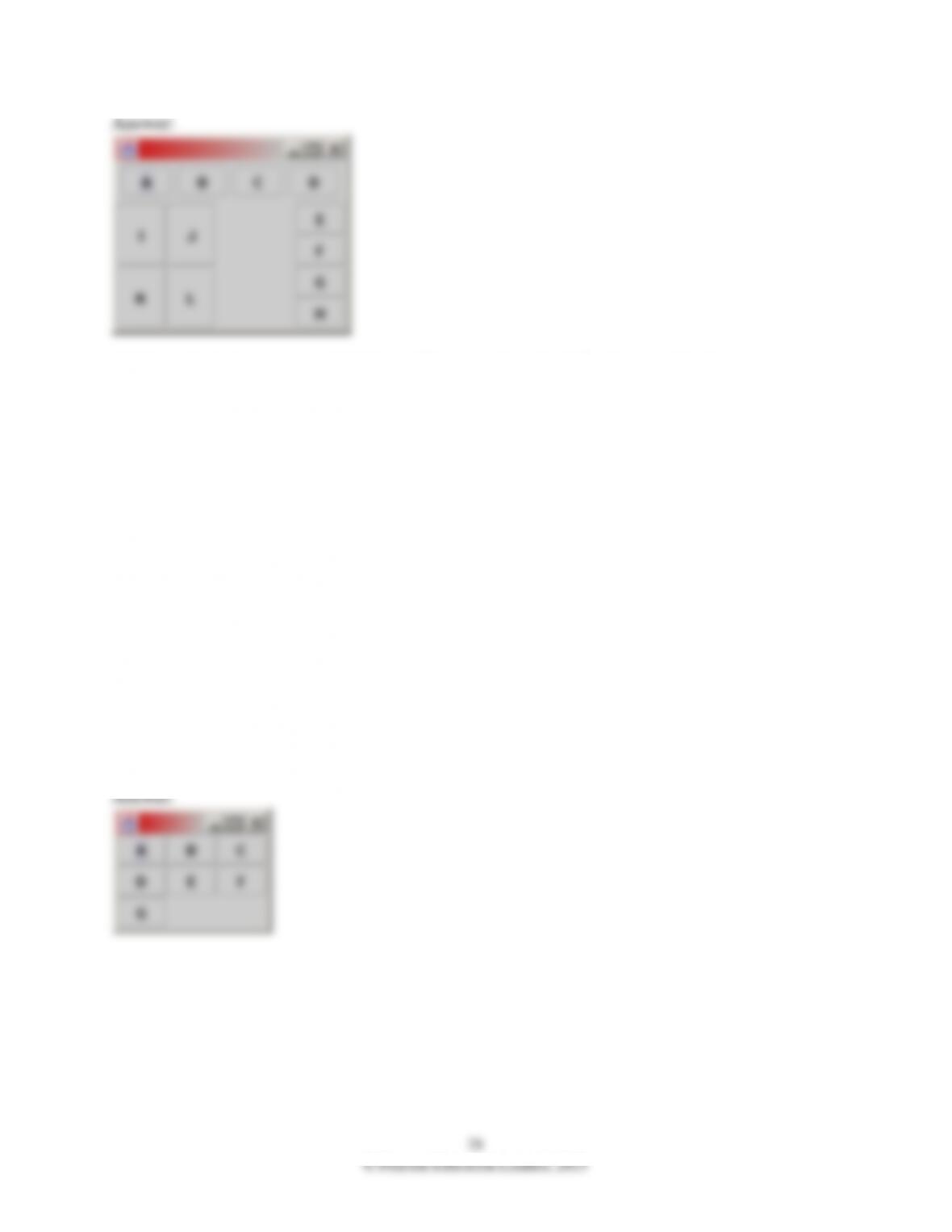
15) Draw the JFrame as you think it would appear given the following set of code:
JButton jb1 = new JButton(“A”);
JButton jb2 = new JButton(“B”);
JButton jb3 = new JButton(“C”);
JButton jb4 = new JButton(“D”);
JButton jb5 = new JButton(“E”);
JButton jb6 = new JButton(“F”);
JButton jb7 = new JButton(“G”);
JButton jb8 = new JButton(“H”);
JButton jb9 = new JButton(“I”);
JButton jb10 = new JButton(“J”);
JButton jb11 = new JButton(“K”);
JButton jb12 = new JButton(“L”);
JPanel jp1 = new JPanel( );
jp1.add(jb1);
jp1.add(jb2);
jp1.add(jb3);
jp1.add(jb4);
JPanel jp2 = new JPanel(new GridLayout(4, 1));
jp2.add(jb5);
jp2.add(jb6);
jp2.add(jb7);
jp2.add(jb8);
JPanel jp3 = new JPanel(new GridLayout(2, 2));
jp3.add(jb9);
jp3.add(jb10);
jp3.add(jb11);
jp3.add(jb12);
JPanel jp4 = new JPanel(new BorderLayout( ));
jp4.add(jp1, BorderLayout.NORTH);
jp4.add(jp2, BorderLayout.EAST);
jp4.add(jp3, BorderLayout.WEST);
JFrame jf = new JFrame( );
jf.getContentPane( ).add(jp4);
jf.pack( );
jf.setVisible(true);
28
© Pearson Education Limited, 2015
Answer:
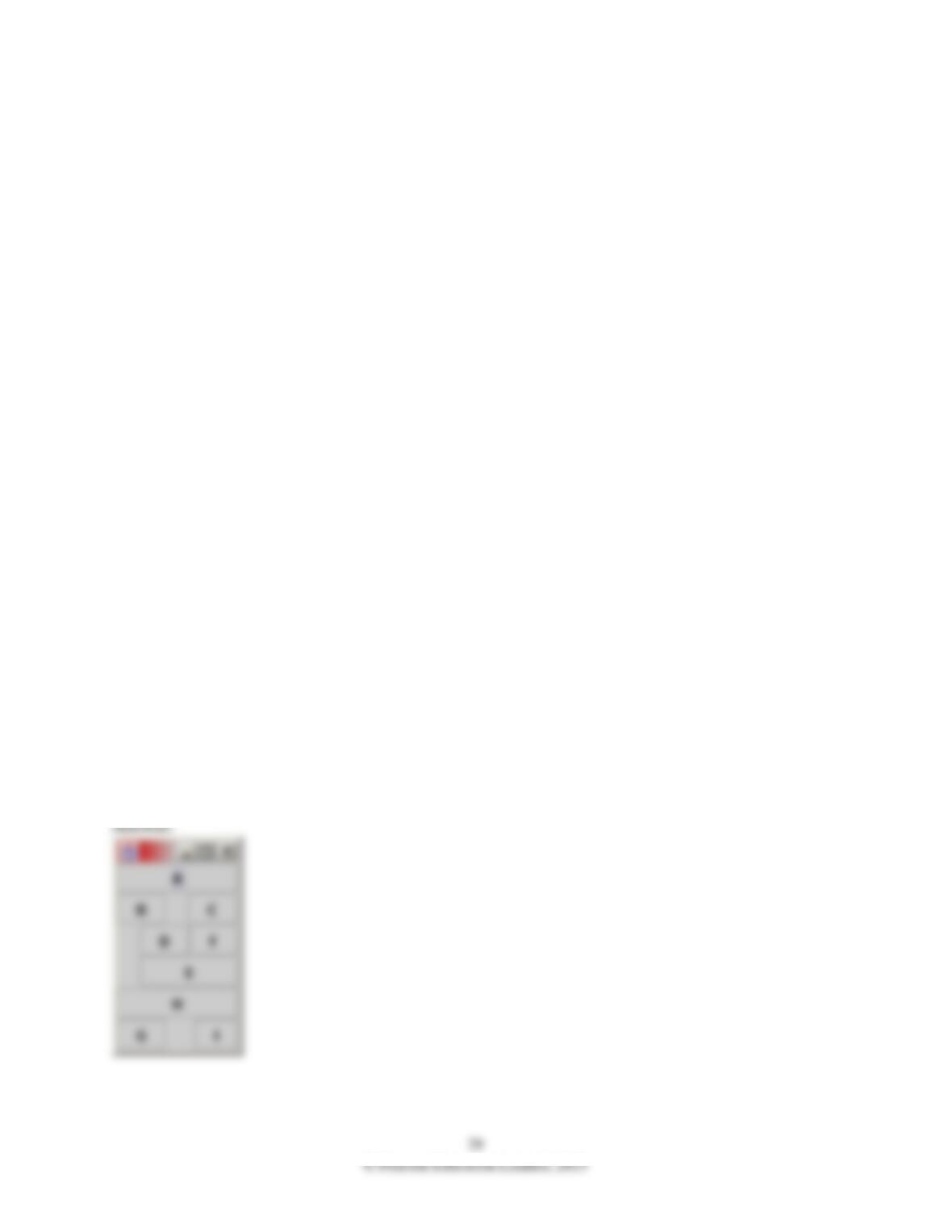
16) Draw the JFrame as you think it would appear given the following set of code:
JButton jb1 = new JButton(“A”);
JButton jb2 = new JButton(“B”);
JButton jb3 = new JButton(“C”);
JButton jb4 = new JButton(“D”);
JButton jb5 = new JButton(“E”);
JButton jb6 = new JButton(“F”);
JButton jb7 = new JButton(“G”);
JPanel jp1 = new JPanel(new GridLayout(3, 3));
jp1.add(jb1);
jp1.add(jb2);
jp1.add(jb3);
jp1.add(jb4);
jp1.add(jb5);
jp1.add(jb6);
jp1.add(jb7);
JFrame jf = new JFrame( );
jf.getContentPane( ).add(jp1);
jf.pack( );
jf.setVisible(true);
17) Draw the JFrame as you think it would appear given the following set of code:
JButton jb1 = new JButton(“A”);
JButton jb2 = new JButton(“B”);
JButton jb3 = new JButton(“C”);
JButton jb4 = new JButton(“D”);
JButton jb5 = new JButton(“E”);
JButton jb6 = new JButton(“F”);
JButton jb7 = new JButton(“G”);
JButton jb8 = new JButton(“H”);
JButton jb9 = new JButton(“I”);
JPanel jp1 = new JPanel(new BorderLayout( ));
jp1.add(jb1, BorderLayout.NORTH);
jp1.add(jb2, BorderLayout.WEST);
jp1.add(jb3, BorderLayout.EAST);
JPanel jp2 = new JPanel(new BorderLayout( ));
jp2.add(jb4, BorderLayout.WEST);
jp2.add(jb5, BorderLayout.SOUTH);
jp2.add(jb6, BorderLayout.EAST);
JPanel jp3 = new JPanel(new BorderLayout( ));
jp3.add(jb7, BorderLayout.WEST);
jp3.add(jb8, BorderLayout.NORTH);
jp3.add(jb9, BorderLayout.EAST);
JPanel jp4 = new JPanel(new BorderLayout( ));
jp4.add(jp1, BorderLayout.NORTH);
jp4.add(jp2, BorderLayout.EAST);
jp4.add(jp3, BorderLayout.SOUTH);
JFrame jf = new JFrame( );
jf.getContentPane( ).add(jp4);
jf.pack( );
jf.setVisible(true );

18) Why should the add( ), subtract( ), multiply( ), divide( ) methods in the RationalNumber
class in the textbook be declared to be public, while the gcd( ) method is declared to be private?