File: Chapter 04 Employees
True/False
[QUESTION]
1. When working with Bellwether Garden Supply in Chapter 4, the first step in setting up payroll is to go
to the Employees & Payroll Navigation Center > select Employees > Set Up Employee Defaults.
2. To make sure you are starting in the appropriate place in the data for Chapter 4, restore the Exercise
3-2.ptb file.
3. The accounts affected by paychecks are expense accounts specifically set up to handle payroll.
4. In Sage 50, voluntary payroll deductions are called allowances and can include gas, union dues and
savings bonds.
5. Sage 50 2019 includes example payroll tax tables for the sample company, Bellwether Garden Supply.
6. On the Payroll Entry window, you define payroll fields and tax information for individual employees.
7. Bellwether’s employee Brandee M. Nunnley is an hourly employee and is paid bi-weekly.
8. Bellwether’s employee Drake V. Carter is a salaried employee paid bi-weekly.
9. Bellwether Garden Supply, credits Account No. 10300, Payroll Checking Account, for the net paycheck
amount.
10. The employee wages expense account is debited for the gross amount of the paycheck and any
deductions used are credited.
11. Before you begin Chapter 4, you could restore which of the following backups:
a. Exercise 3-2.ptb
b. Exercise 3-1.ptb
c. Chapter 3.ptb
d. Exercise 2-2.ptb
e. Bgs.ptb
12. On the Navigation Bar, make the following selections to set up payroll default information:
a. Employees & Payroll Navigation Center > Pay Employees >Enter Payroll for Multiple Employees
b. Employees & Payroll Navigation Center > Pay Employees > Set Up Payroll Service
c. Employees & Payroll Navigation Center > Employees > Set Up Employee Defaults
d. Tasks > Payroll Entry
e. Maintain > Employees/Sales Rep
13. To set up specific guidelines for individual employees, make these selections:
a. Employee tasks > click Employees > Employee Maintenance > make appropriate selection
b. Tasks> select for Payment > select employee
c. Maintain > Default Information > Employees
d. Employees & Payroll Navigation Center > click Employees > View and Edit Employees
e. Tasks > Payroll for one employee
14. On the Navigation Bar, make the following selections to enter paychecks for an employee:
a. Employees & Payroll Navigation Center > Pay Employees > Payroll Set Up Service
b. Employees & Payroll Navigation Center > Pay Employees >Enter Payroll for One Employee
c. Maintain > Default Information
d. Employees & Payroll Navigation Center > Employees > View and Edit Employees
e. Tasks > Payroll & Employees > View and Edit Employees
15. To look at an employee’s record, display this window:
a. Payroll Entry window
b. Tasks > Employees
c. Maintain Employees & Sales Reps
d. System > General Journal entry
e. Employees & Tasks Navigation Center > click Employees
16. Processing payroll is automatic once _____________________ are set up correctly.
a. Defaults
b. Tasks
c. Employees/Sales rep tasks
d. Payroll tables
e. Manually recorded payroll deductions
[QUESTION]
17. To back up your work in Chapter 4, before completing the end-of-chapter exercises, the following
file name is suggested:
a. Chapter 4
b. Chapters 3 and 4
c. Chapters 1 through 4
d. Exercise 3-1
e. Chapter number and page number
18. The employee deductions display as negative amounts on the Payroll Entry window because:
a. They are added to the paycheck amount
b. They are not used to compute the paycheck
c. They are deducted from the employee’s gross pay
d. The employer always pays deductions from the paycheck
e. Employee deductions display as positive amounts
19. On the Employee Defaults window, the Employee Fields tab is for:
a. Liability accounts that are related to employee deductions
b. Assets accounts that are related to employee deductions
c. Expense accounts that are related to employee deductions
d. Liability accounts that are related to employer deductions
e. Expense accounts are deducted from liabilities
20. On the Employee Defaults window, the Company Fields tab is for:
a. Liability accounts that are related to employee deductions
b. Assets accounts that are related to employee deductions
c. Expense and liability accounts that are related to employee deductions
d. Liability and expense accounts related to employer deductions
e. Employer expenses related to cash withdrawals
CHAPTER 4, ANSWERS TO SHORT-ANSWER QUESTIONS, QA TEMPLATES (Answers
may vary.)
1. Draw the diagram that shows how payroll accounting is done.
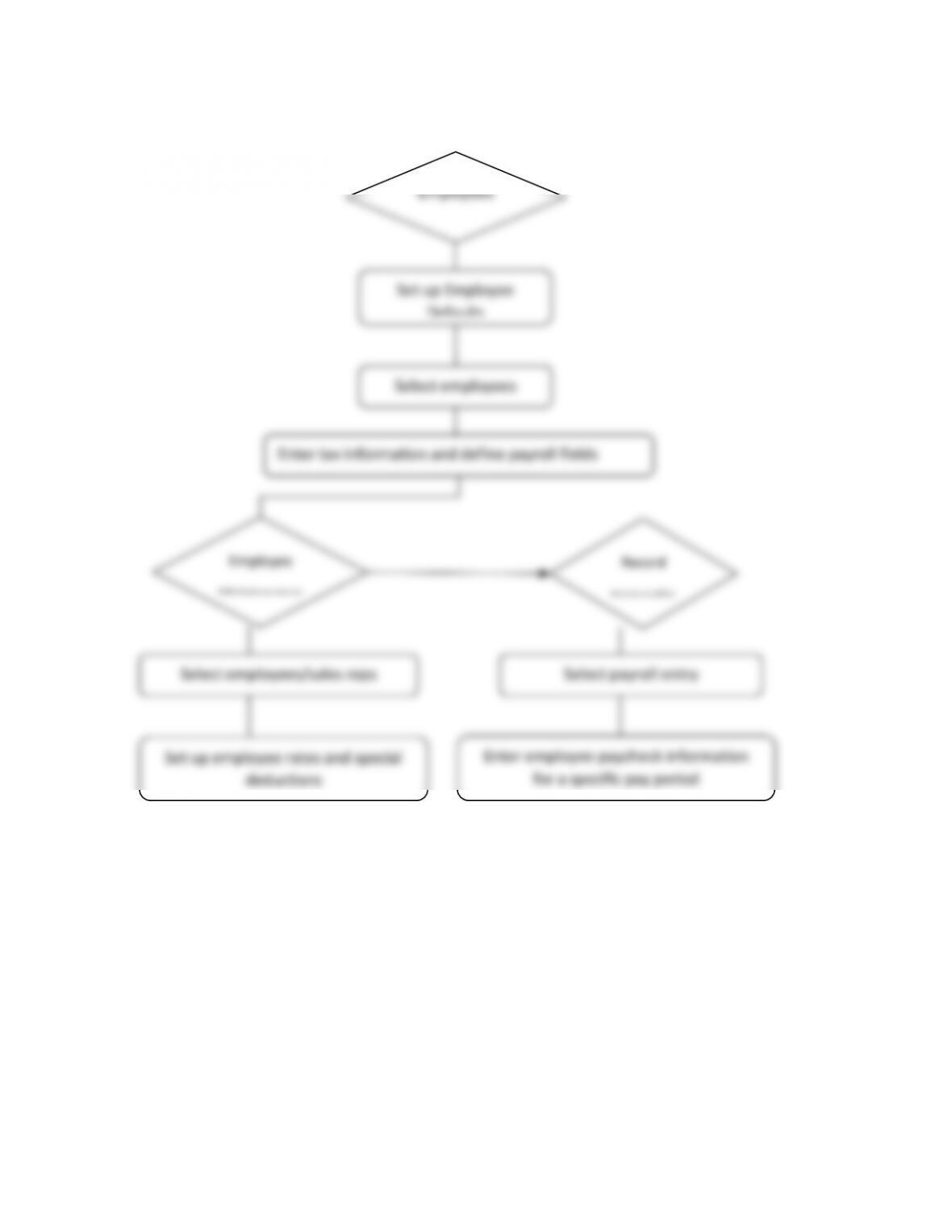
Set up Employee
Defaults
Select employees
Enter tax information and define payroll fields
Employees
Employee
Maintenance
Record
transactio
Select employees/sales reps
Select payroll entry
Set up employee rates and special
deductions
Enter employee paycheck information
for a specific pay period
2. When setting up payroll defaults, what is the first step?
3. Identify the five tabs on the Employee Defaults window.
4. What is the Maintain Employees/Sales Reps window used for?
5. What do the check marks in the Calc column of the employee defaults indicate?
Explain.
6. What is the difference in the appearance of the Payroll Entry window for an hourly
employee and a salaried employee? Explain.
7. Why do the employee deductions display as negative amounts on the Payroll Entry
window?
8. What are the gross pay amounts for Brandee M. Nunnley and for Drake V. Carter?
Include Mr. Carter’s overtime pay.
9. What is the net pay for Brandee M. Nunnley and for Drake V. Carter? Include Mr.
Carter’s overtime pay.
10. What happens when payroll entries are posted?
ANALYSIS QUESTIONS:
1. What pay methods does Bellwether Garden Supply use to pay employees? Briefly
explain how you determine Bellwether’s pay method.
2. Are all employees paid the same way; for example, bi-weekly? Explain how to
determine the frequency with which an employee is paid.