Lab 5
BDAN 330
616578.docx 1 | P a g e D r . K i r k A t k i n s o n
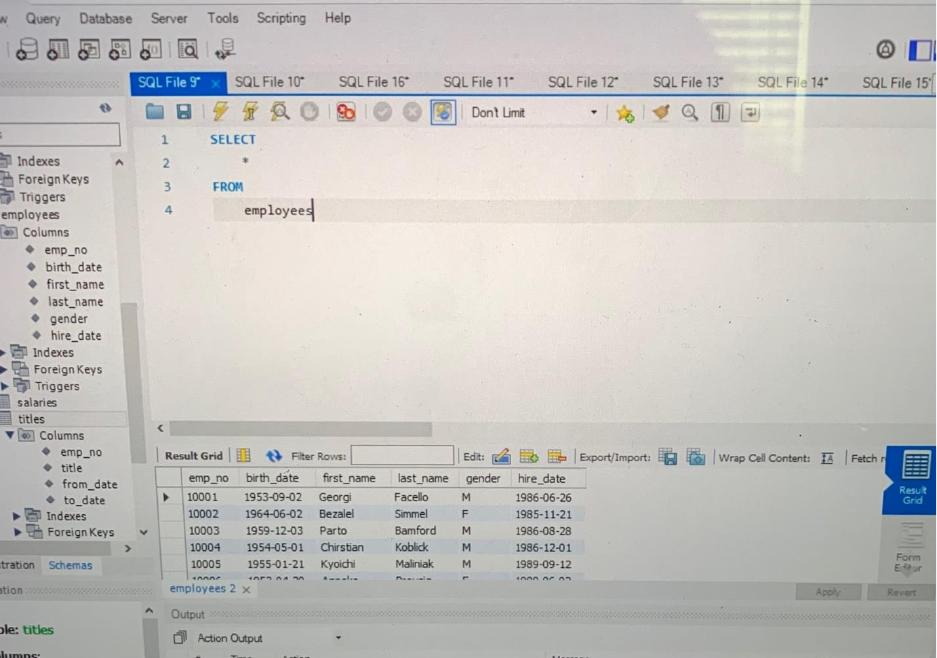
1. Create a list of all fields from the employees table.
2. Retrieve a list with all female employees whose first name is Kellie.
3. Retrieve a list with all employees whose first name is either Kellie or
Aruna.
4. Create a list of all fields from employees table that are female and the first
name is either Kellie OR Aruna. (be wary of order of precedence!)
5. Use the IN operator to select all individuals from the “employees” table,
whose first name is either “Denis”, or “Elvis”.
6. Extract all records from the ‘employees’ table, aside from those with
employees named John, Mark, or Jacob.
7. Select all the information from the “salaries” table regarding contracts
from 66,000 to 70,000 dollars per year.
8. Retrieve a list with all individuals whose employee number is not between
‘10004’ and ‘10012’.
9. Using the views provided in the employees database,
a. List all from the first view
b. List all from the next view.
10. Create a view named new_view, it should consist of:
a. first name (employee table)
b. last name “ “
c. gender “ “
d. hire date “ “
e. Title (from title table)
11. Retrieve all rows using the View new_view.
At this point, please download the sqlscript files provided located on Bb
a) department_dup_create and
b) dept_manager_dup
Once saved on your PC/Mac, go to Workbench and run them (File – Run
SQL Script) one at a time and IN ORDER! Refresh your schemas in
Workbench, you should have two new tables. Use these new tables
through the balance of the lab where applicable.

Lab 5
BDAN 330
616578.docx 2 | P a g e D r . K i r k A t k i n s o n
12.
a. Using the new tables (the ones with _dup at the end) extract a list
containing information about all managers’ employee number, first
and last name, department number, and hire date.
b) Join the ’employees’ and the ‘dept_manager_dup’ tables to return a
subset of all the employees whose last name is Markovitch. See if
the output contains a manager with that name.
Hint: Create an output containing information corresponding to the
following fields: ‘emp_no’, ‘first_name’, ‘last_name’, ‘dept_no’,
‘from_date’. Order by ‘dept_no‘ descending, and then by ’emp_no’.
13. Select all managers’ first and last name, hire date, job title, start date,
and department name. This requires joining more than two tables!
Lab 5
BDAN 330
616578.docx 3 | P a g e D r . K i r k A t k i n s o n
Lab 5