PIM Solution Design Document – All Banners
Page 1 of 244
Informatica PIM
All Banners Implementation
Solution Design Document
December, 2015
PIM Solution Design Document – Saks 7.1 Upgrade
Page 2 of 244
Document Properties
File Name
All_Banners_Solution_Design_Document..docx
Document Owner
Megan Cooper
Creation Date
December 8, 2015
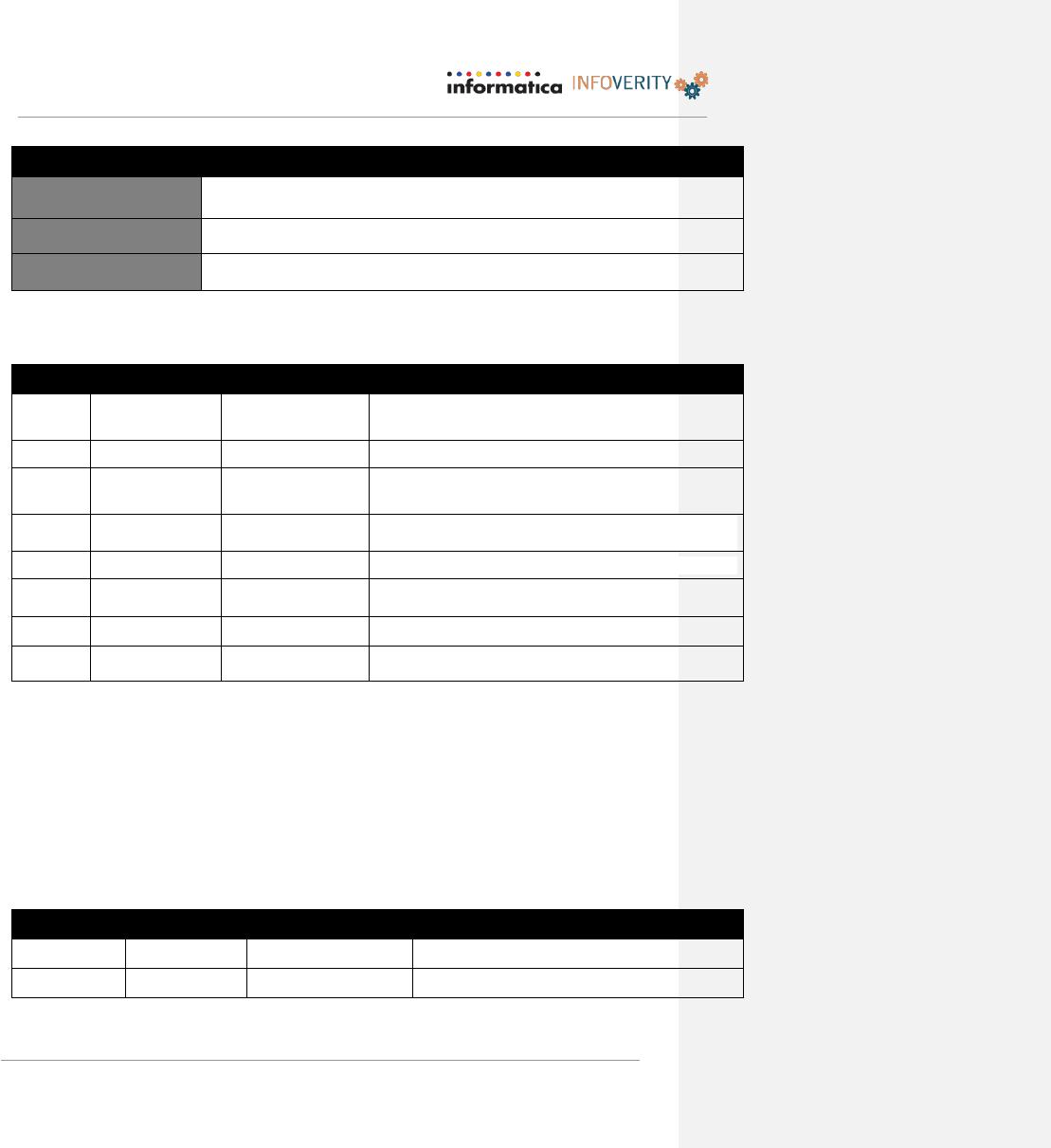
Revision History
Version
Revision Date
Author(s)
Revision Notes
1.0
12/23/2015
Megan Cooper
Initial Document Creation – Background, Repository,
Hierarchy and Imports completed.
2.0
1/14/2016
Megan Cooper
Exports and Appendicies updated
2.1
1/18/2016
Megan Cooper
Update exports will additional explanation and
screenshots
2.2
1/29/2016
Megan Cooper
Updated export sections and appendicies; updated
import appendicies
2.3
2/16/2016
Megan Cooper
Updated export sections and appendicies – Collections
6.0
7/28/2016
Megan Cooper
Updated with all changes from QA and UAT testing
enhancements
Document Sign-Off / Evidence of Review
With this acknowledgement, the undersigned hereby agree to the form, content and overall
integrity of the accompanying document.
Each section of this document has been thoroughly reviewed by technical, business leads and
subject matter expert groups that have communicated their support for the document content to
each of the signatories listed below. Signatories, in turn, are those individuals that speak on
behalf of their respective subject matter experts, technical and business leads.
Version
Date
Approved By:
Notes
1.1

PIM Solution Design Document – All Banners
Page 3 of 244
Contents
Revision History 2
Document Sign-Off / Evidence of Review 2
Preface 6
1 Project Background 7
2 Process Overview 9
2.1 To-Be Processes 9
3 HBC Data Model 10
4 Key Design Decisions & Assumptions 12
5 PIM Functional Requirements and Design 14
5.0 Data Repository Format 14
5.0.1 Customer Field Requirements 14
5.0.2 Repository Configuration & Design 14
5.1 General Functional Requirements 16
5.2 Hierarchy 27
5.2.1 MAH Hierarchy 28
5.3 Import 53
5.4 Export 70
5.5 Web Client Requirements 99
5.6 Roles and Security 108
5.7 Workflow Requirements 112
5.8 PIM Workflow Requirements 114
5.9 Scene 7 Requirements 124
5.10 DQ Cleansing & Standardization 126
5.10.1 Data Quality 127

PIM Solution Design Document – Saks 7.1 Upgrade
Page 4 of 244
5.11 Conversion Error! Bookmark not defined.
6 Architecture 162
7 Database Migration Strategy 162
8 Cutover 163
9 APPENDIX A 165
10 APPENDIX B – SDW (RFS) – Item (Product) Import Feed 168
11 APPENDIX C – SDW (RFS) – SKU (Item) Import Feed 170
12 APPENDIX D – AMS (Pricing) Import Feed – Product 172
13 APPENDIX E – CMS Item Import Feed 173
14 APPENDIX F – CMS Product Import Feed 174
15 APPENDIX G – Inventory Import Feed – Item 174
16 APPENDIX H – Inventory Import Feed – Product 175
17 APPENDIX I – Translation Copy Import 176
18 APPENDIX J – Meta-Product Import 177
19 APPENDIX K – Meta Product Bulk Transfer Creation 179
20 APPENDIX L – Meta Product Bulk Creation 181
21 APPENDIX M – Attribute Transfer 184
22 APPENDIX N – Apparel Copy Sheet 192
23 APPENDIX O – Bags/Luggage Copysheet 195
24 APPENDIX P – Beauty Copysheet 197
25 APPENDIX Q – Bed/Bath Décor Copysheet 199
26 APPENDIX R – Electronics/Strollers/Toys Copysheet 202
27 APPENDIX S – Gourmet Copysheet 204
28 APPENDIX T – Jewelry Copysheet 205
29 APPENDIX U – Shoes Copysheet 208
30 APPENDIX V – Sunglasses/Accessories Copysheet 210

PIM Solution Design Document – Saks 7.1 Upgrade
Page 5 of 244
31 APPENDIX W – Watches Copysheet 213
32 APPENDIX X – Mass Feature Inheritance Import 215
33 APPENDIX Y – PIM to SDW Item Export 217
34 Appendix Z – PIM to SDW Product Export 218
35 Appendix AA – PIM to SDW Web Hierarchy Export 223
36 Appendix BB – Blue Martini Attribute & Preset Value Export 224
37 Appendix CC – PIM to SDW Collection Export 226
38 Appendix DD – Turn-In Sheet Export 228
39 Appendix EE – Meta-Product Transfer Export 230
40 Appendix FF – Attribute Transfer 232
41 Appendix GG – Mass Feature Inheritance 239
42 Appendix HH – Translation Export 240
43 Appendix II – Fields to Trigger Export 241
PIM Solution Design Document – Saks 7.1 Upgrade
Page 6 of 244
Preface
AUDIENCE
Hudson Bay Company (HBC), Saks Fifth Avenue, Business and Technical stakeholders.
PURPOSE
To convey the interpretation of the HBC All Banner PIM implementation business and
system requirements and detail out the solution path forward.
AUTHORS
The following individuals have contributed to the content of this document. Please
direct questions to these individuals for any clarification of detailed technical designs.
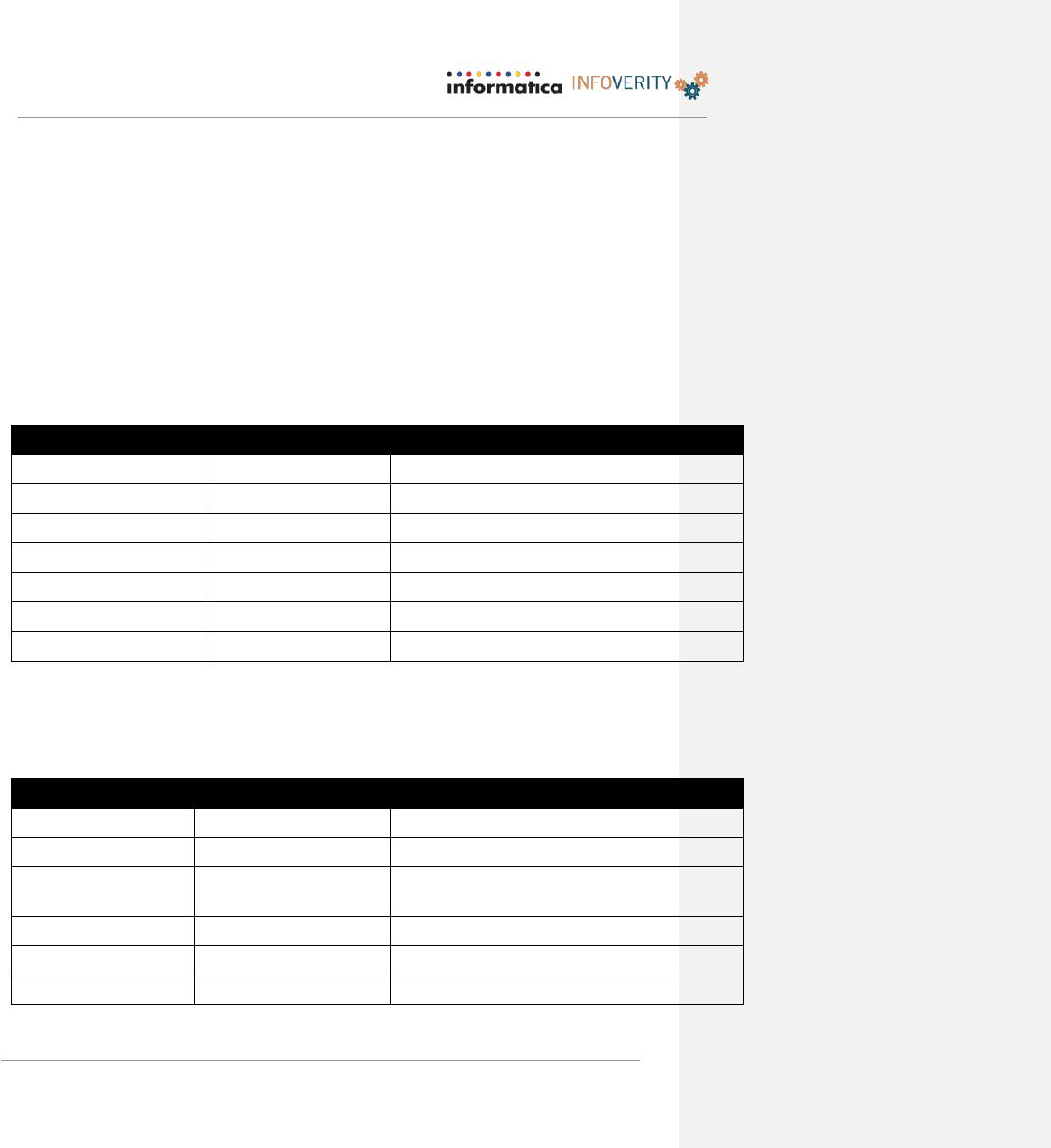
Name
Role
Area of Responsibility
Megan Cooper
Solution Architect
Overall Document Owner and Contributor
Nic Prellwitz
Delivery Manager
Document Contributor / Reviewer
Dave Gibson
Sr. Technical Consultant
Document Contributor / Reviewer
Sriram Bobba
Workflow Designer
Document Contributor / Reviewer
Sean Flaherty
Technical Consultant
Document Contributor
Srinivas Eaty
Informatica Architect
Document Reviewer
Milan Simpraga
Informatica Architect
Document Reviewer
DESIGN TEAM
The following individuals contributed to, reviewed, or attended design sessions during
the creation of this document as subject matter experts.
Name
Role on Design Team
Area of Responsibility
Stephanie Doiron
Product Manager
Project Manager – Shared Services
Jess Hindin
Project Manager
Project Manager – PIM
Heather Vander Zwaag
Business Owner
Senior Director – Site Operations &
Improvements
Naveed Iqbal
Business Owner
Senior Manageer – Site Operations
Nadia Hassanein
Business Owner
Vera Polyachek
Business Analyst
PIM Solution Design Document – Saks 7.1 Upgrade
Page 7 of 244
Name
Role on Design Team
Area of Responsibility
Rajesh Mathew
Manager, Data Management
Larry Richard
Director, Data Management
RELATED DOCUMENTS
Document Name
Description
Location
User Stories
User Stories
Version One – All Banners
Project Plan
Detailed Project Plan
PIM Field Configuration
List
List of all fields to be configured in PIM
New & Existing Product
Conceptual Workflow
High level workflow diagram for new,
existing (new color), and rollup Products
Workflow DQ Rules
List of all DQ rules; Task Names and
logic for assignments to user groups;
Workflow User Group
Assignments
Contains the list of User Groups for
workflow and the Direct Merch IDs to be
used to assign tasks to each of the User
Groups
Sizing & Architecture
Diagram
Server topology diagram for PIM
1 Project Background
HBC is seeking to implement an “All Banners”, omni-channel PIM solution for their
company banners which consists of four brands: The Bay, Lord & Taylor, Saks 5th
Avenue and Saks Off 5th. HBC seeks to standardize the process and PIM platform
across all four banners for consistency in the overall product lifecycle, product data
maintenance and enrichment, and syndication to various consumer and partner channels.
The All Banners project will accomplish this by onboarding product data and users from
The Bay, Lord & Taylor and Saks Off 5th banners into the exisiting Saks 5th Ave PIM
7.1 platform. The HBC goals and business objectives for this project are as follows:

PIM Solution Design Document – Saks 7.1 Upgrade
Page 8 of 244
• Increase full-price selling time, reduce costs, and increase efficiencies through the
item lifecycle
• Scalable solution not requiring the addition of staff in item setup, including
expansion of available items online and drop-ship
• Increase in product data accuracy leading to less return rates and higher
conversions
• Less customer inquiry with richer product data
• Reduce the amount of Not Live product through visibility of products in Item
Lifecycle and ability to prioritize products needing quicker resolution
• High value product data enabling more informed decisions to impact investments in
product and marketing
The HBC All Banners PIM 7.1 implementation will include reloading of Saks’s data to
reconfigured existing fields, and the migration of Saks Off 5th, Lord & Taylor, and The
Bay data from RFS extension tables and WCS. The HBC All Banners PIM 7.1
implementation will also incorporate the reconfiguration of existing imports templates
for daily feeds from SDW (RFS) systems (in CSV format) to account for additional
fields from the new banners, as well as a feeds from pricing origination system, AMS,
PO system, CMS, and Inventory systems, OMS.
Product and item level data will be loaded directly into the master catalog and workflow
will also run and execute data quality rules to check data consistency and assign tasks
for completion. Products will automatically be assigned to the MAH hierarchy utilizing
data quality rules based on the product’s department ID and class ID in RFS. Assorting
to each of the banner’s web hierarchy will be done manually by users. Any assignments
that cannot be made by data quality will be manually assigned. This will allow users to
work with the data in a more organized manner. The data will be modeled in 2 tiers –
Product (Product ID), and Item (UPC). The tiered data structure allows for attribute
“inheritance” for the lower to the item level so users do not need to maintain the same
data at each individual item (attribution at higher level will not be displayed on lower
level items within the UI, but will be available to export as an item level attribute).
Exports for DSG, Saks and Off 5th will be filtered to only export “Product Type” of
“Product”. Exports for DSG Products will have the additional filter as part of
scheduling to only send “Active” Products and Items.
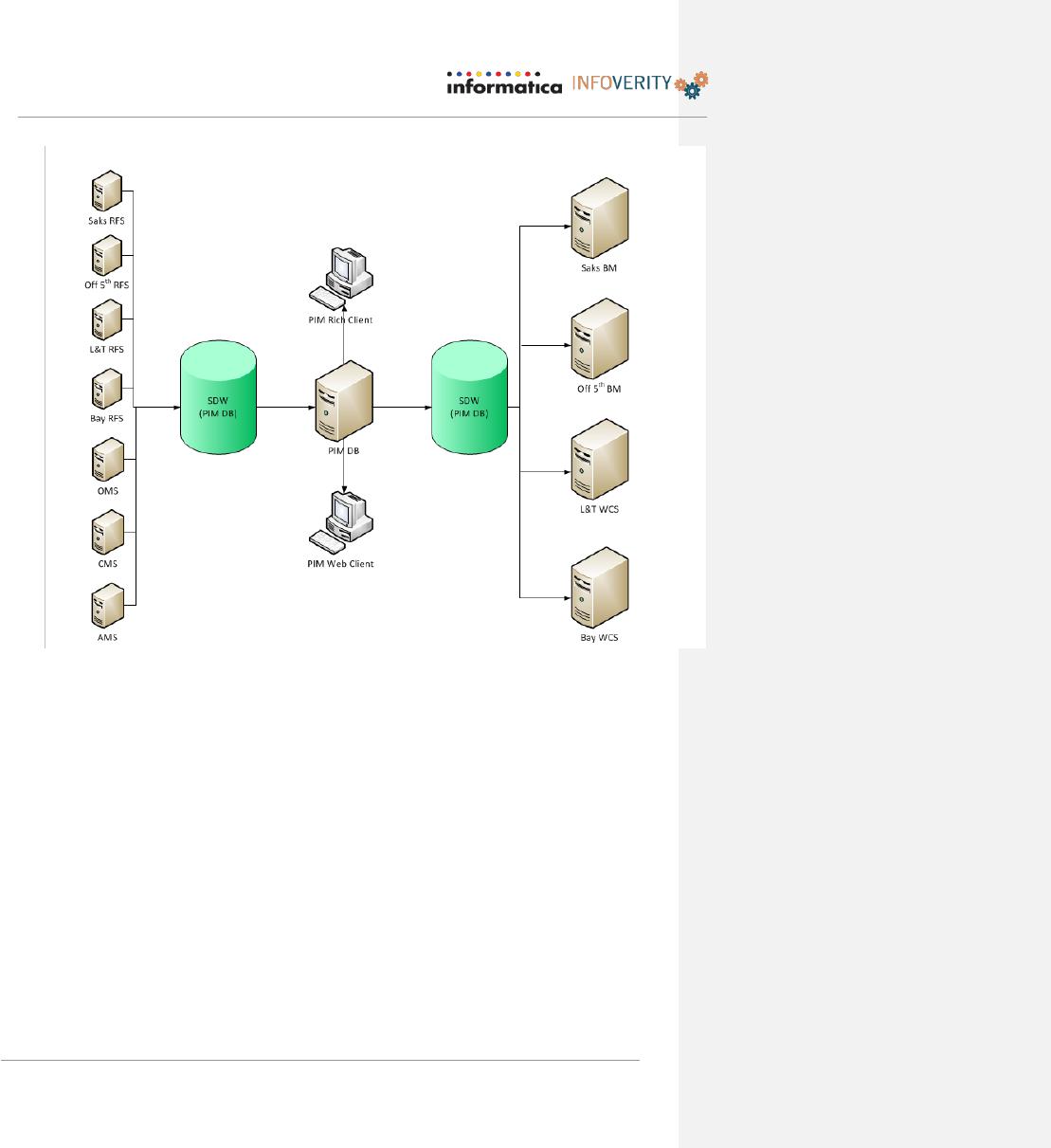
CONCEPTUAL ARCHITECTURE
The diagrams below depict the conceptual architecture and data flow for the future state,
PIM 7.1 All Banners.
PIM Solution Design Document – Saks 7.1 Upgrade
Page 9 of 244
2 Process Overview
2.1 To-Be Processes
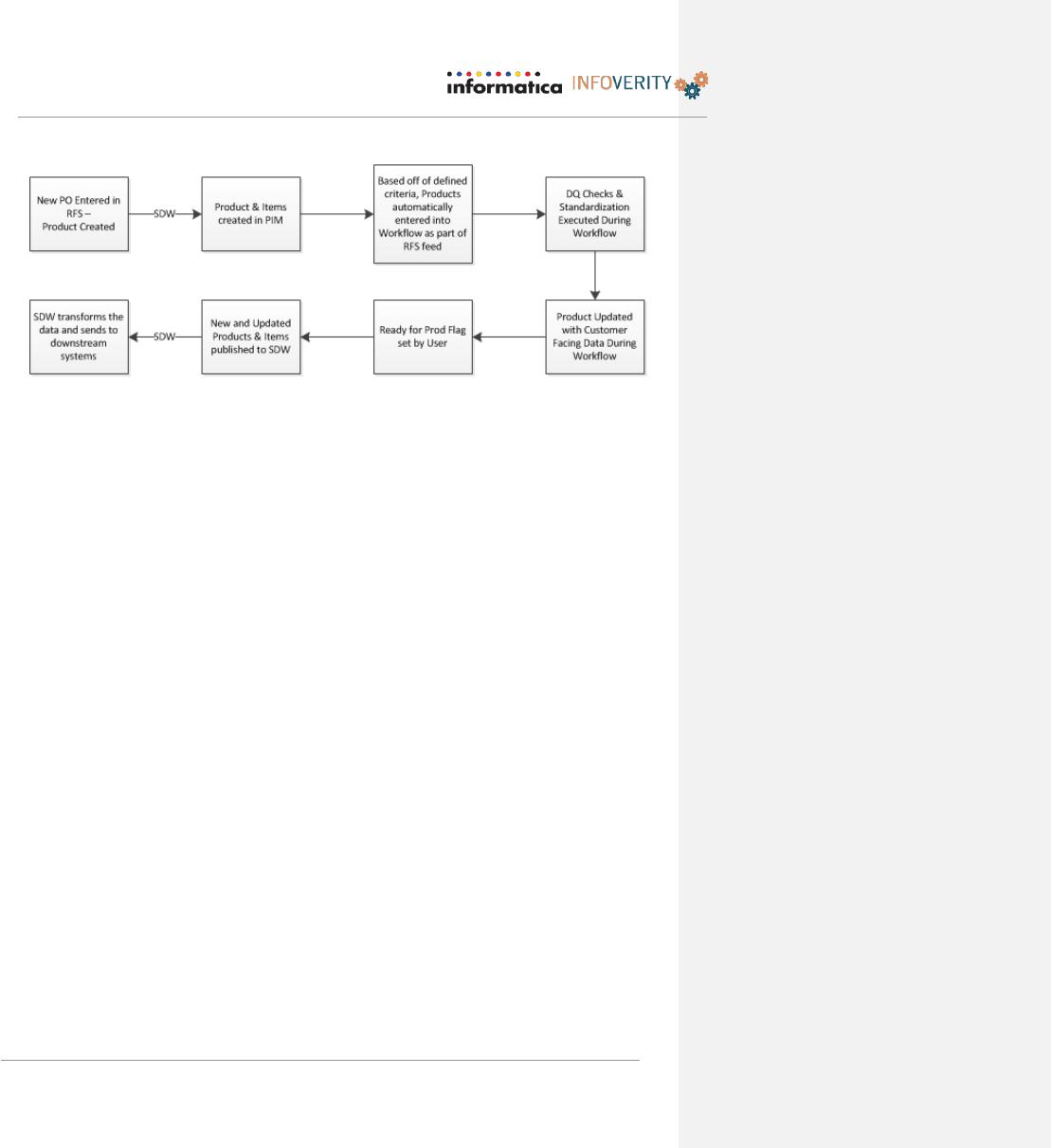
All HBC banners will be migrating to a standardized process combing best practices
from each banner. The general flow of a new Product in PIM is outlined below:
PIM Solution Design Document – Saks 7.1 Upgrade
Page 10 of 244
This document serves to cover the Solution Design for the functionality to be provided by the
HBC All Banner implementation. As the implementation is completed, the detailed functional
design documents will be created for the functional requirements where low level design
specifications are warranted for workflow or extensions. From those detailed functional
design documents, the manner in which PIM is installed will be outlined and then HBC’s Field
Repository, any identified product customizations and Taxonomy structure will be created
during the Implementation portion of the project.
3 HBC Data Model
Item No.
Item No. is a field that will be populated from the SDW (RFS) feed from the UPC
field. If this field is not populated, the import will fail.
Product No.
Product No. is a field that will be populated from the SDW (RFS) feed from the
Product No field. If this field is not populated, the import will fail.
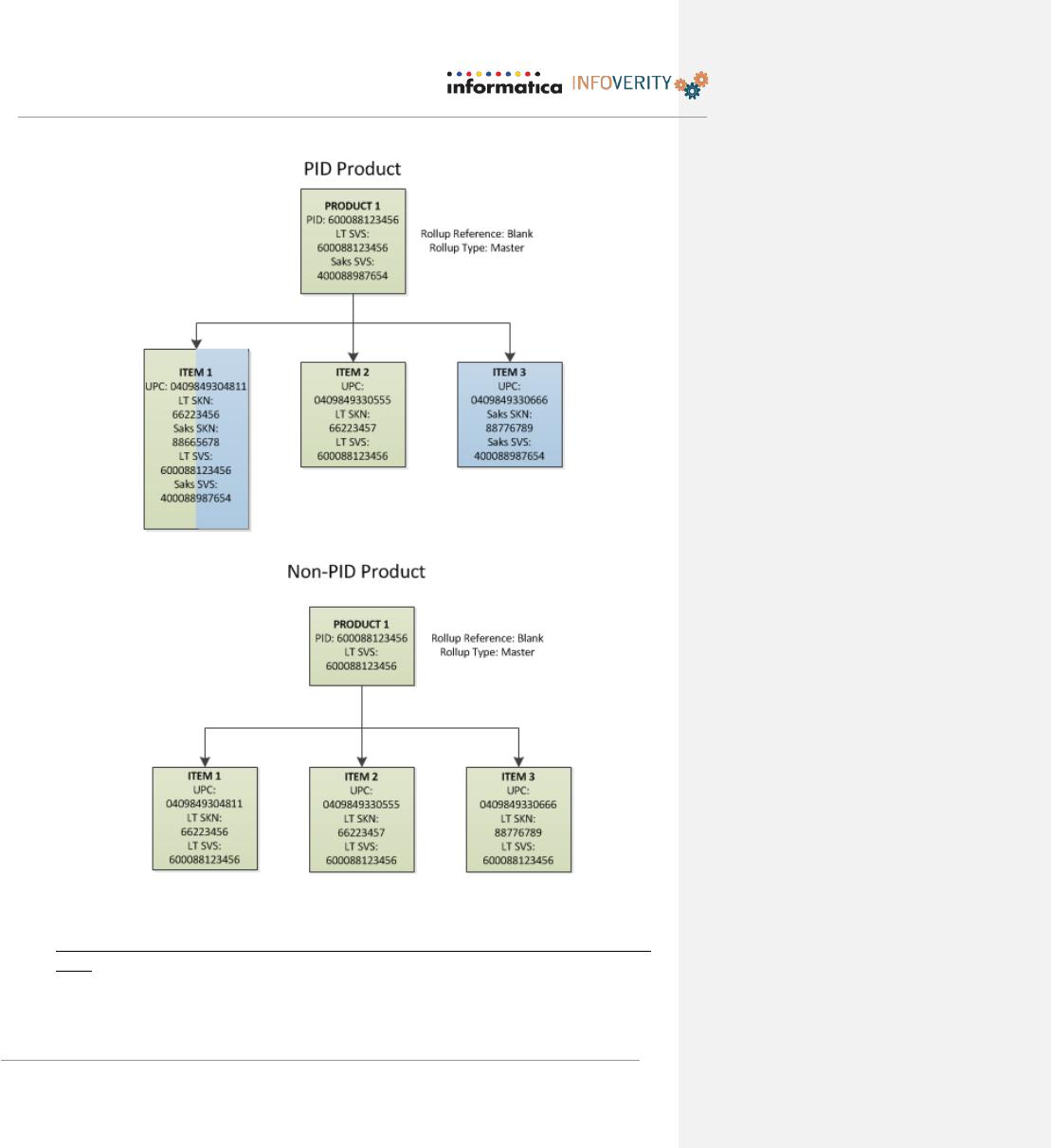
Product No. will be populated in SDW before being imported into PIM, using the
following logic:
• For new Products, SVS will be utilized as the Product ID
• For Products that have exact matching UPCs will share the same Product ID.
• SVS will be stored as a banner qualified field at the Item level
PIM Solution Design Document – Saks 7.1 Upgrade
Page 11 of 244
Some general information on the key core concepts & benefits of Product Families in
PIM:
Product Families can have a single child item or multiple items, both are common.

PIM Solution Design Document – Saks 7.1 Upgrade
Most customers have a combination of the two kinds of product families within their
PIM, some with multiple children & others with only a single item.
Infoverity recommends customers utilize the concept of product families to reduce the
overlapping of item attribute information & assist in ensuring data consistency by
maintaining certain fields at a single data level where possible. In this case at the
parent product level. If a customer is utilizing the ability to store parent product
information they should ensure that every item is assigned to a corresponding parent
product even if that means creating the parent product for the item, i.e. 1–to-1 Product
to Item.
When items are exported from PIM information (fields and attributes), from the parent
product level may also be exported along with the child items.
Assigning a product family to a category automatically assigns all its child items /
SKUs to the corresponding category which is generally the standard behavior that is
desired per the majority of customers.
4 Key Design Decisions & Assumptions
1
All Products & UPCs will originate in each respective banner’s source
system (RFS) and flow to PIM through SDW. However, PIM users will