!Page!1!of!21!
PROJECT(2(
LARGE(COMPANY(DATABASE(
ISE(382(
TEAM(04:(ERIC(LOEB,(NATHAN(CURTIS,(DAVID(
TANAKA(
ADVANCED!SQL!QUERIES!
60!points!
PROJECT(OBJECTIVES(
Use JOINs, subqueries, and SQL functions to answer complex questions
TEAM(WORK(
Each team member must collaborate and contribute to the project. Only one submission of the
completed project (per team) is required.
CASE(SCENARIO((REFER(TO(PAGE(291(OF(YOUR(TEXTBOOK)(
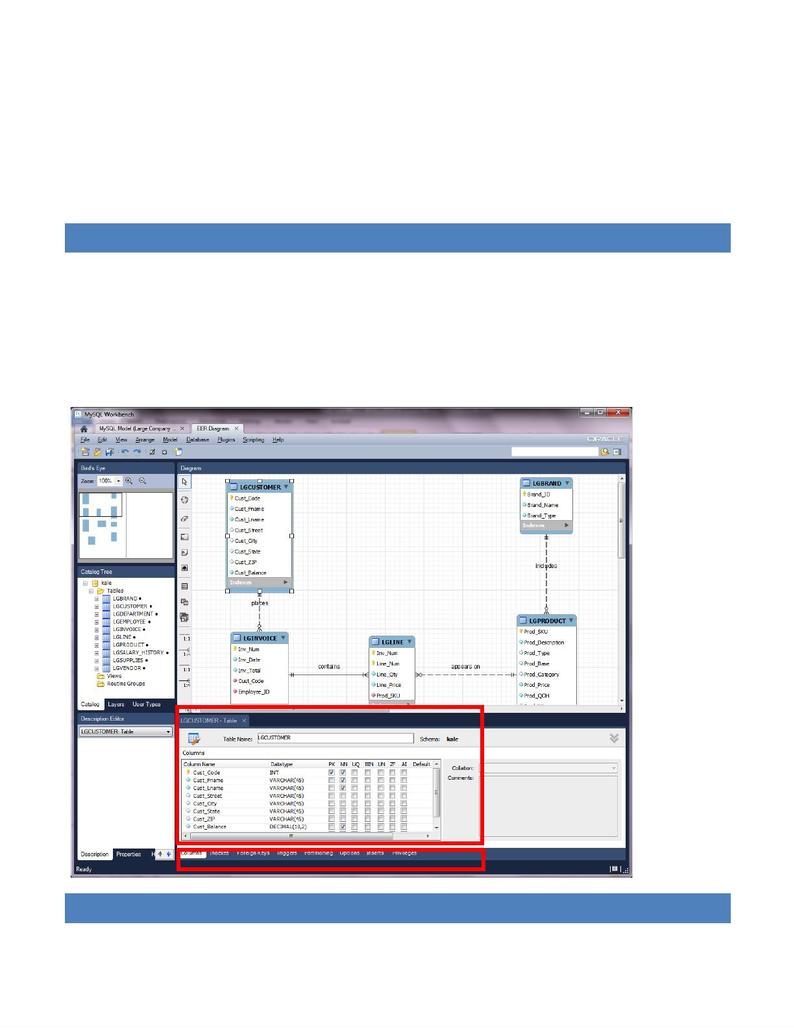
Large Company database stores data for a company that sells paints. The company tracks the
sale of products to customers. The database keeps data on customers [LGCUSTOMER], sales
[LGINVOICE], products [LGPRODUCT), which products are on which invoices [LGLINE],
employees [LGEMPLOYEE], the salary history of each employee [LGSALARY_HISTORY],
!Page!2!of!21!
departments [LGDEPARTMENT], product brands [LGBRAND], vendors [LGVENDOR], and
which vendors supply each product [LGSUPPLIES] as shown in the ER diagram below.
Historical data for this company in stored in a Microsoft Access database. Some of the tables
contain only a few rows of data, while other tables are quite large; e.g. there are only eight
departments, but more than 3,300 invoices containing over 11,000 invoice lines.
REVIEW(YOUR(LARGE(COMPANY(ER(MODEL(
Download the Large Company Data Model file from Blackboard and import it to the Data
Modeling panel by choosing Open Existing EER Model. Open the model and review the tables,
attributes, keys, relationships and data types.
After reviewing the model, close the model.
!
INSTRUCTIONS(
!Page!3!of!21!
1. Although you built and populated your own Large Company database in Project 1, you
have been given access to a LargeCo database in MYSQL. Use this database to do this
project.
2. You may want to save each query definition in a local text file (.sql). Share those with
your team members.
3. For turning in your Project, create a Word file.
4. In the Word document, use the following format to answer the queries. Insert the SQL
statement and a screen shot of the results.
Query 1:
SELECT *
FROM user01.LGDEPARTMENT;
Result:
QUERIES(
!
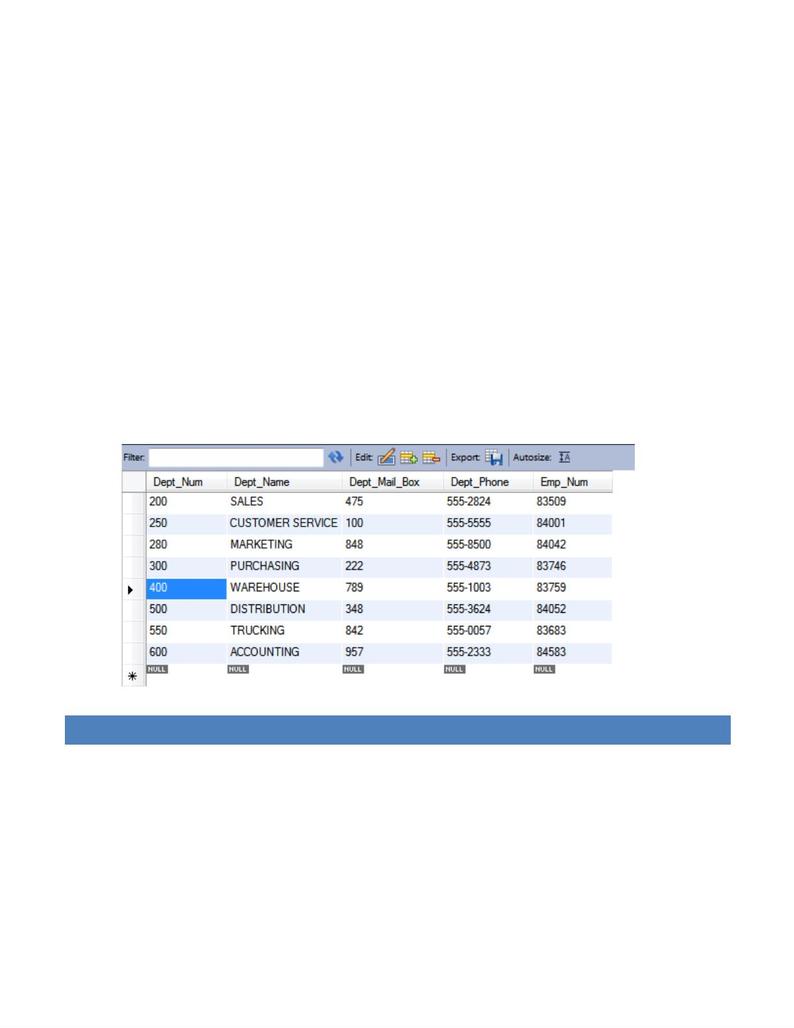
1. Write!a!query!to!display!the!eight!departments!in!the!LGDEPARTMENT!table.!
use!largeco;!
select!*!
from!lgdepartment;!
!Page!4!of!21!
!
!
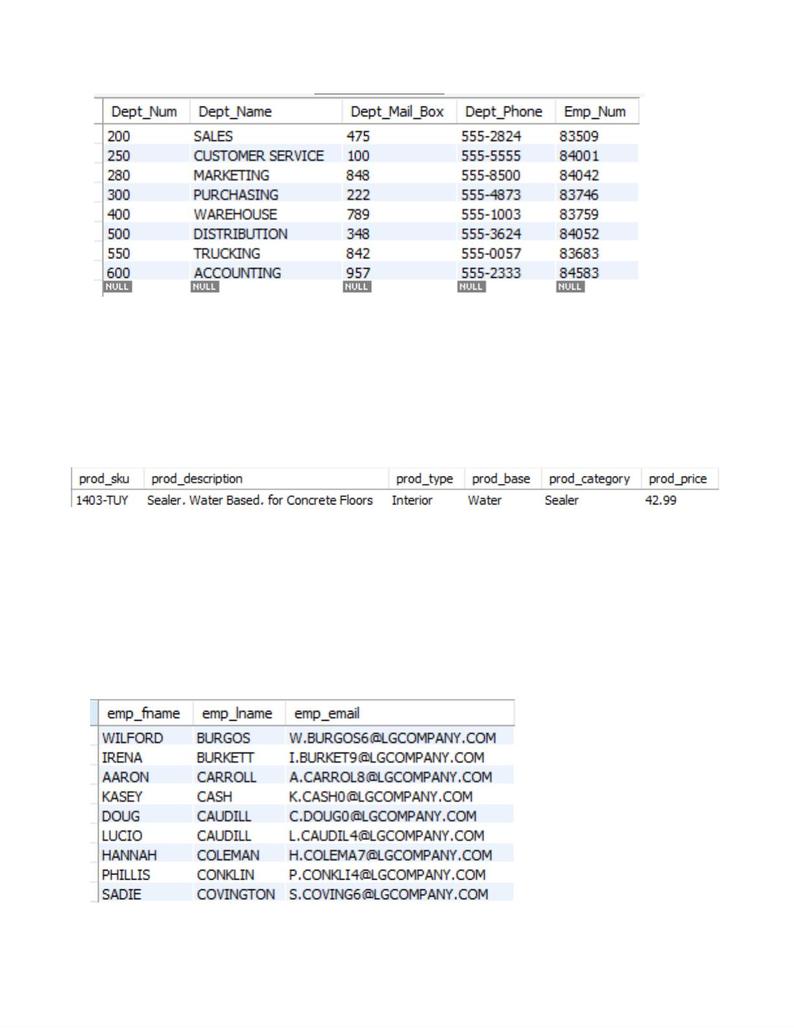
2. Write! a! query! to! display! the! SKU! (stock! keeping! unit),!description,! type,! base,! category,! and!price! for! all!
products!that!have!a!PROD_BASE!of!water!and!a!PROD_CATEGORY!of!sealer.!
!
use!largeco;!
select!p.prod_sku,!p.prod_description,!p.prod_type,!p.prod_base,!p.prod_category,!p.prod_price!
from!lgproduct!p!where!p.prod_base=”water”!and!p.prod_category=”sealer”;!
!
!
!
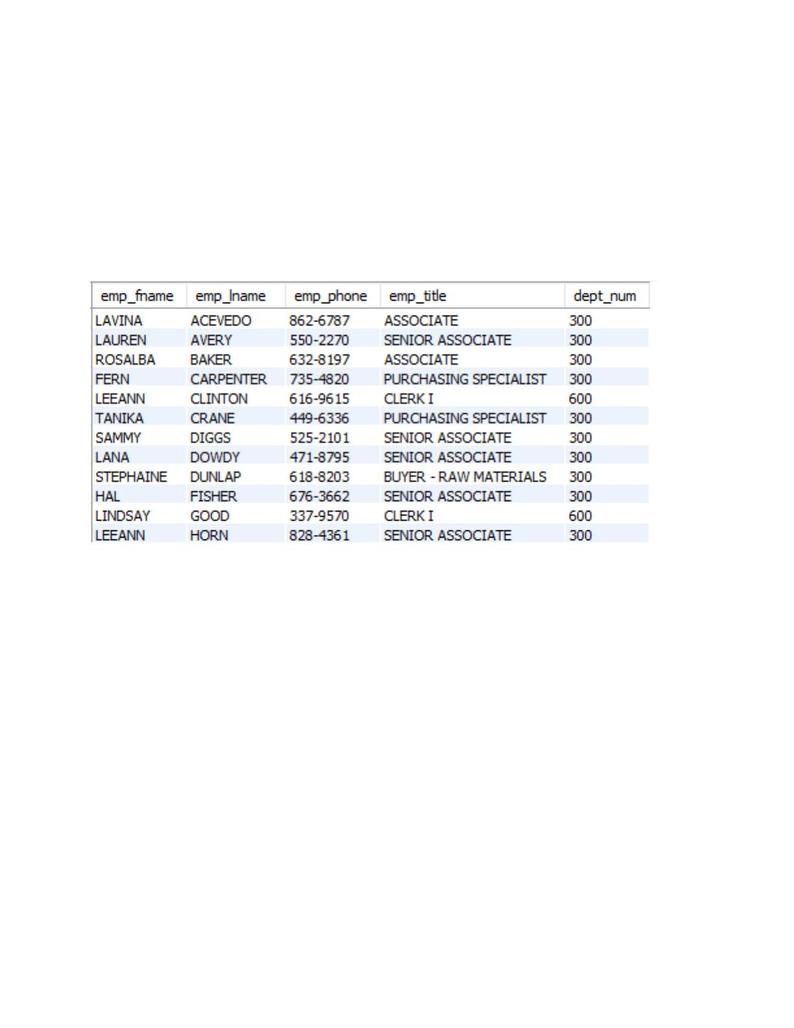
3. Write!a!query!to!display!the!first!name,!last!name,!and!e–mail!address!of!employees!hired!from! January!1,!
2003,!to!December!31,!2012.!Sort!the!output!by!last!name!and!then!by!first!name.!
!
use!largeco;!
select!emp_fname,!emp_lname,!emp_email!
from!lgemployee!
where!Emp_Hiredate!>!’2003–01–1′!
and!Emp_Hiredate!<!‘2012–12–31′!
order!by!emp_lname,!emp_fname;!
!
!Page!5!of!21!
4. Write! a! query! to! display! the! first! name,! last! name,! phone! number,! title,! and! department! number! of!
employees!who!work!in!department!300!or!have!the!title!“CLERK!I.”!Sort!the!output!by!last!name!and!then!
by!first!name.!
!
use!largeco;!
Select!emp_fname,!emp_lname,!emp_phone,!emp_title,!dept_num!
from!lgemployee!
where!dept_num!=!300!or!emp_title!=!’CLERK!I‘!
order!by!emp_lname,!emp_fname;!
!
!
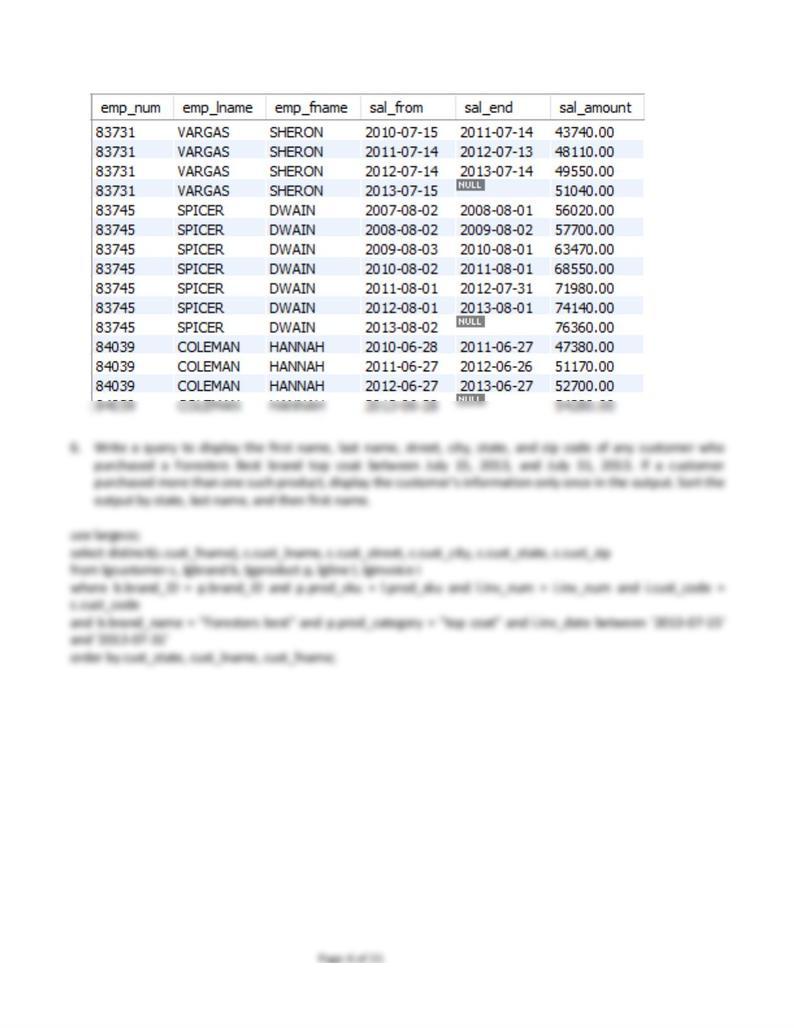
5. Write!a!query!to!display!the!employee!number,!last!name,!first!name,!salary!“from”!date,!salary!end!date,!
and!salary!amount!for!employees!83731,!83745,!and!84039.!Sort!the!output!by!employee!number!and!salary!
“from”!date.!
!
use!largeco;!
select!e.emp_num,!e.emp_lname,!e.emp_fname,!s.sal_from,!s.sal_end,!s.sal_amount!
from!lgemployee!e,!lgsalary_history!s!
where!s.emp_num!=!e.emp_num!and!
!(e.emp_num!=!83731!or!e.emp_num!=!83745!or!e.emp_num!=!84039);!
!