MS5106
DATA SCIENCE & BIG DATA ANALYTICS
Mid-Term Assignment 1
Student Name: Mahesh Ghanti
Student ID : 20231287
Assignment: 1
Date of Submission: 12/04/2021

Eurostar
Eurostar is an international company with multiple branches worldwide. Through its
website, Eurostar offers most of the products and services online. This report considers the
analysis of Apache web-logs using Hive to determine the pattern and possible business
insight.
Amazon web services provide a platform called AWS EMR that integrates with Hive, an
open-source application to provide a scalable and efficient architecture for analyzing large–
scale data.
The log files are collected between 5th July and 5th August 2014, and the files are stored in
Amazon S3 at the below-mentioned path.
Path: s3://us-east-1.elasticmapreduce.samples
Region: us-east-1 —> North Virginia region
There are 4996 entries, and each entry provides details of every user in the log files in the
below-mentioned format:
Each entry provides various attributes like date, time, internet protocol, resource location,
type of browser, and type of device. Overall, it gives the user’s requests to access
resources/website and the software devices installed on devices as a medium to access the
website.
Hive Script Overview:
Hive uses SerDe (serializer/deserialiser) to translate various data formats into readable
format like database tables. In this case, SerDe with the regular expressions to parse log
file data into a defined log file table.
The script also uses HiveQL, similar to SQL like a scripting language, for further analysis
and data warehousing.
Script Execution:
1) Preparation of S3 Bucket: In AWS S3, a bucket is created to place the sript.
2) Creating a Cluster: A cluster is created to execute the script while enabling Hive and
Hadoop configurations. After the configuration, the script is executed and output files
are available on the provided path.
I. Comment on the script, providing a brief explanation of what it does.
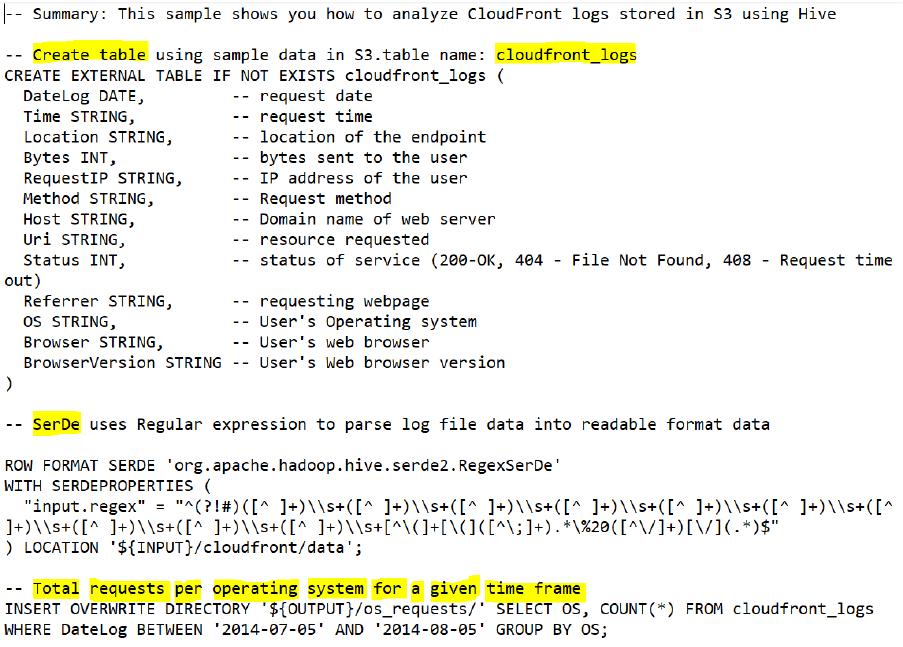
The below-mentioned script is classified into 4 major blocks of code
1. Table & Columns
2. Filter & Location
3. Output Query
Fig 1.1 Hive Script
1. Table & columns
The first section of the script is Creating Table or using the Existing Table to parse the log
data file into the table. As Hive does not manage the external table’s data, creating

EXTERNAL table for external use as when we want to use the data outside the Hive with
the table name as ‘cloudfront_logs’.
In the Fig 1.1, it is seen that there are 13 attributes in total present in each entry in the logfile
and all the attributes are identified and justified by commenting against each column and
briefly explained in the below Table 1.1
Attribute/Column
Type
Logged Entry
Description
Datelog
date
2014–07–05
Date of the request logged for accessing the
Eurostar Website.
Time
string
20:00:00
Time of the request logged in HH:MM:SS
Location
string
LHR3
Location of the endpoint webserver serving the
request: LHR3-London Heathrow Three
Bytes
string
4260
4260 bytes sent to requestor
RequestIP
string
10.0.0.15
IP address of the requestor
Method
string
GET
Get request type method which is used to acquire a
file by the user
Host
string
eabcd123456
78.cloudfront
Domain name of the hosting web server
identify the resource on computer network. Here, it
out, 304- not modified
string
Operating system of requestor
Browser
string
Web browser of requestor which is used for web
surfing
BrowserVersion
string
Version of the web browser